🎃 HALLOWEEN SALE: 50% OFF best-selling Windows, Office, Autodesk & Server keys — use code GHOST50 Shop the sale →


Windows 10 ESU Extended to October 2027: What Changed, Who Qualifies, and Should You Still Upgrade?

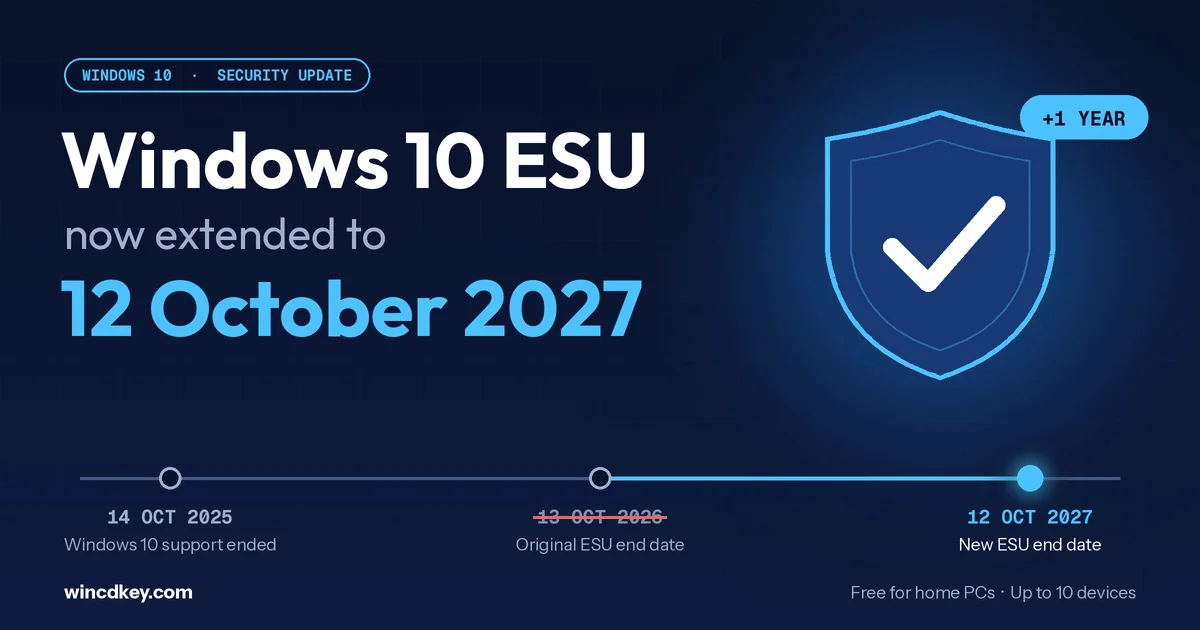
The original deadline is still circulating in older articles, so many Windows 10 users think their protection ends next month. It doesn’t. But 13 October 2026 still matters: it is the last update day for Windows 11 version 24H2 Home and Pro, and the end of support for Office 2021. This guide separates what actually changes, what doesn’t, and which move makes sense for your PC.
What changed with Windows 10 ESU?
In late June 2026, Microsoft extended its consumer Extended Security Updates programme for Windows 10 by a full year. Coverage for personal devices now runs to 12 October 2027 instead of 13 October 2026. Devices already enrolled were moved to the new date automatically, and new enrolments remain open until the programme closes.
Microsoft made the change quietly, through an edit to its ESU documentation and an editor’s note on the Windows Experience Blog, rather than a formal announcement. That is why so many people missed it. Microsoft’s own Windows 10 ESU page now lists 12 October 2027 as the end date.
It’s worth being clear about what ESU is. It delivers only critical and important security updates for Windows 10 version 22H2. It adds no new features, fixes no non-security bugs, and includes no technical support. It keeps an older PC safe while you plan your move. It doesn’t make Windows 10 a supported product again.
What still ends on 13 October 2026?
Three Microsoft deadlines still fall on or around 13 October 2026, even though Windows 10 ESU no longer does. Windows 11 version 24H2 Home and Pro stop receiving updates, Office 2021 and Office LTSC 2021 reach end of support with no extension, and Office 2021’s supported connection to Microsoft 365 services ends.
| Product | Key date | What happens | What to do |
|---|---|---|---|
| Windows 10 (no ESU) | Ended 14 Oct 2025 | No security updates since this date | Enrol in ESU or upgrade |
| Windows 10 consumer ESU | 12 Oct 2027 (was 13 Oct 2026) | Security patches continue for enrolled personal PCs | Enrol if you haven’t; nothing to do if you have |
| Windows 11 24H2 Home & Pro | 13 Oct 2026 | No further monthly updates for this version | Install 25H2 or 26H2 through Windows Update |
| Office 2021 / Office LTSC 2021 | 13 Oct 2026 | No more security fixes, and Microsoft offers no ESU | Plan a move to Office 2024 or Microsoft 365 |
| Windows 10 commercial ESU | Up to Oct 2028 | Paid, per device, for organisations | Budget per device or migrate |
If you run Windows 11 24H2, you’re one update away from staying supported. Version 26H2 reached the Release Preview channel in late August and installs as a small enablement package on 24H2 and 25H2 PCs. Our Windows 11 26H2 features guide covers what it changes. Office 2021 users have a harder deadline, which we cover in detail in our Office 2021 end of support guide.
Is Windows 10 ESU free, and who qualifies?
Yes, Windows 10 ESU is free for most home users. You can enrol at no cost by syncing your PC settings to a Microsoft account with Windows Backup, or by redeeming 1,000 Microsoft Rewards points. A one-time purchase of about $30 is the third option. One enrolment covers up to 10 devices on the same Microsoft account.
Your PC qualifies for the consumer programme if it meets all four conditions:
- It runs Windows 10 version 22H2. Check under Settings > System > About.
- It is a personal device, not a work machine.
- It is not joined to an Active Directory domain or Microsoft Entra ID, and not managed by MDM. Entra-registered devices are eligible.
- You can sign in with a Microsoft account during enrolment.
One practical check before you start: open Settings > Update & Security > Activation and confirm Windows is activated. A frequent support question we see comes from people whose PC lost its activation after a motherboard repair or a clean reinstall, then couldn’t finish other setup steps. Fix activation first. Our installation and activation help page walks through the common fixes.
How do you enrol in Windows 10 ESU?
You enrol from Windows Update in about ten minutes. Update the PC to Windows 10 version 22H2, open Settings > Update & Security > Windows Update, select Enroll now, sign in with a Microsoft account, and choose the free Windows Backup option, Rewards points, or the one-time purchase.
- Install all pending updates. Go to Settings > Update & Security > Windows Update, and restart until no more updates appear. ESU only applies to version 22H2.
- Sign in as an administrator. You’ll be asked for a Microsoft account during the wizard. A local account will work only after you link one.
- Select “Enroll now”. The link appears on the Windows Update page under the end-of-support message.
- Choose your enrolment option. The free Windows Backup route syncs your settings to OneDrive. The Rewards route uses 1,000 points. The paid route is a one-time charge.
- Finish and keep Windows Update on. Security updates then arrive as normal monthly patches through 12 October 2027.
Watch out for scam emails. Microsoft emailed some enrolled users about the extension, and fake “renew your Windows 10 support” messages are now circulating. Never enrol or pay through a link in an email. Always go through Settings > Windows Update on the PC itself.
Should you stay on ESU or upgrade to Windows 11?
Upgrade now if your PC meets the Windows 11 requirements, because the upgrade is free and gives you years of feature and security support. Use ESU if your PC can’t run Windows 11, or if you rely on software that doesn’t work on it yet. ESU buys time, not a long-term home.
The deciding factor is almost always hardware. Windows 11 requires TPM 2.0, UEFI Secure Boot, a supported 64-bit processor, 4 GB of RAM and 64 GB of storage. Microsoft’s Windows 11 specifications page lists the details, and the free PC Health Check app tests your machine in a minute. Match your situation below:
| Your situation | Best move | Why |
|---|---|---|
| PC passes PC Health Check; Windows 10 is activated | Upgrade to Windows 11 now (free) | Your Home or Pro licence carries over, and you get full support instead of patches only |
| PC passes, but you’re on Home and need BitLocker, Remote Desktop hosting or Hyper-V | Upgrade, then move from Home to Pro | Pro features are unlocked with a key; no reinstall needed |
| PC fails the TPM, Secure Boot or CPU check | Enrol in free ESU and plan a replacement before Oct 2027 | Keeps the PC patched without forcing an early purchase |
| Building a new PC or replacing a drive | Install Windows 11 with a new licence | No reason to start a new build on an OS that is only on life support |
| Work PC joined to a domain or managed by IT | Commercial ESU or migration plan | The free consumer programme doesn’t apply |
A mistake we see regularly: people upgrade a Windows 10 Home PC, then expect Windows 11 Pro features. The upgrade keeps your edition, so Home stays Home. If you need Pro tools, a Windows 11 Home to Pro upgrade key switches the edition in place, without reinstalling or losing files.
Building a new PC or replacing an old licence?A Windows 11 Pro licence is delivered by email with install and activation instructions. For basic home use, Windows 11 Home costs less. Every order is covered by our refund and replacement policy, and you can check what other buyers say on Trustpilot.
If a PC can’t run Windows 11 and its Windows 10 activation has been lost, reactivating it with a Windows 10 Pro key lets you enrol in ESU and keep the machine patched until October 2027. Treat this as a bridge, not a long-term setup.
How to upgrade from Windows 10 to Windows 11
Back up your files, confirm the PC passes PC Health Check, then open Settings > Update & Security > Windows Update and select Download and install under the Windows 11 offer. The upgrade keeps your apps, files and licence, and usually takes 30 to 90 minutes, depending on the PC.
- Back up first. Copy important files to OneDrive or an external drive. Upgrades rarely lose data, but a backup costs nothing.
- Run PC Health Check. If it fails only on TPM or Secure Boot, check your UEFI/BIOS settings. Both are often available but switched off.
- Start the upgrade. Use the Windows Update offer, or Microsoft’s Installation Assistant if the offer hasn’t appeared yet.
- Check activation afterwards. Go to Settings > System > Activation. It should say Windows is activated with a digital licence.
- Update to the latest version. Install 25H2 or 26H2 when offered, so you don’t land on 24H2 just as its Home and Pro updates end.
For a full walkthrough with screenshots, including a clean install from USB, see our Windows 11 Pro download and upgrade guide. If activation fails after the upgrade with error 0xC004F050, our 0xC004F050 fix guide covers the usual causes.
What about business PCs?
Business PCs don’t qualify for the free consumer ESU extension if they are domain-joined, Entra-joined or MDM-managed. Organisations must buy commercial ESU per device through volume licensing. It lasts up to three years to October 2028, and the price doubles each year, which makes migrating the cheaper option for most small businesses.
For a small office, the maths usually favours moving now. Year-one commercial ESU costs more per device than many businesses expect, and it rises every year. A Windows 11 Pro 5-PC pack covers a typical small team in one purchase. The Office 2024 Pro Plus and Windows 11 Pro bundle handles the Office 2021 deadline at the same time. For larger fleets, request a B2B volume quote.
Frequently asked questions
Is Windows 10 ESU still free?
Yes, for personal devices. You can enrol at no cost by syncing your PC settings to a Microsoft account with Windows Backup, or by redeeming 1,000 Microsoft Rewards points. A one-time paid option of about $30 (or local equivalent) is also available. One enrolment covers up to 10 devices on the same Microsoft account.
Does Windows 10 ESU end on 13 October 2026?
No. That was the original date. In June 2026 Microsoft extended the consumer ESU programme by one year, so enrolled personal devices now receive critical and important security updates until 12 October 2027. Devices already enrolled were extended automatically.
What happens if I keep using Windows 10 without ESU?
Windows 10 keeps working, but it has received no security fixes since support ended on 14 October 2025. Every newly discovered vulnerability stays unpatched, which raises the risk from malware and phishing attacks, especially for PCs used for banking, email or work.
Can I still upgrade from Windows 10 to Windows 11 for free?
If your PC meets the Windows 11 hardware requirements and runs a genuine, activated copy of Windows 10, the upgrade is offered at no cost through Windows Update, and your Home or Pro edition carries over. PCs that fail the TPM 2.0, Secure Boot or processor checks are not offered the upgrade.
Is the ESU extension available for businesses?
The free consumer programme excludes devices joined to a domain or Microsoft Entra ID, or managed by MDM. Organisations use the commercial ESU programme instead, which is sold per device through volume licensing, rises in price each year, and runs for up to three years to October 2028.
Will Microsoft extend Windows 10 ESU again?
Microsoft has announced nothing beyond 12 October 2027. It has now extended consumer coverage once, but you should plan around the published date rather than expect another reprieve. Use the extra year to test Windows 11 or budget for a replacement PC.
Still unsure which route fits your PC? Browse the Windows 11 licence range, or ask our team through the Help & Support Centre. We’ll tell you honestly if ESU is the better choice for your machine.


