

Microsoft 365 Family vs Personal: Which One Is Right for You in 2026

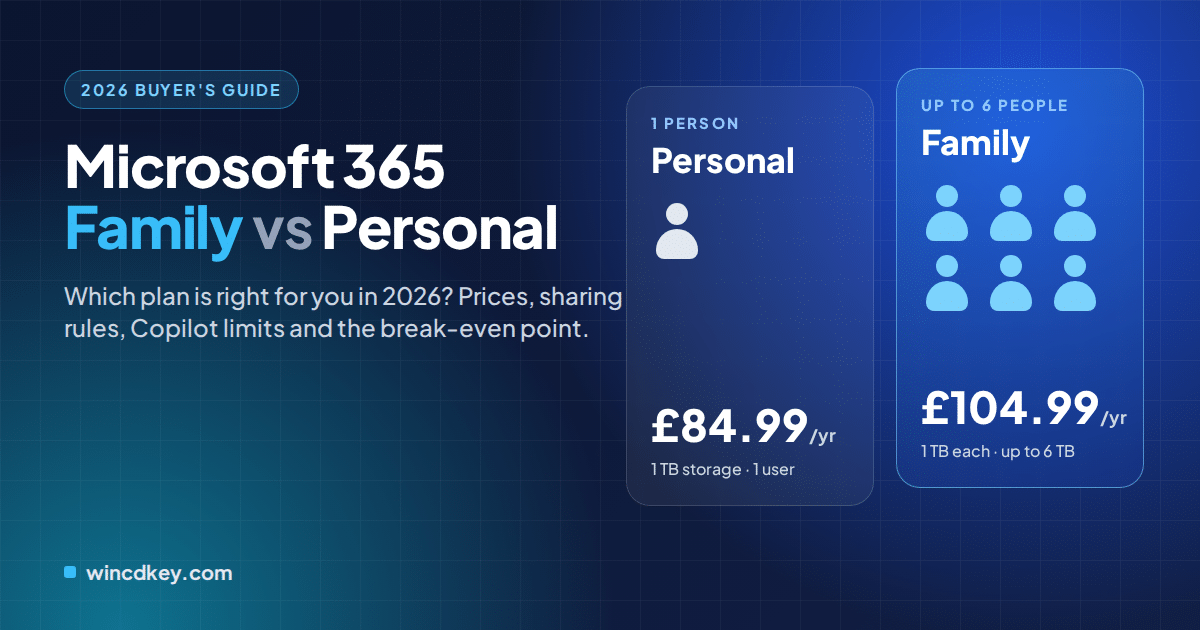
Quick answer: Choose Microsoft 365 Personal if you are the only user. Choose Microsoft 365 Family if two to six people in one household need Office, because it costs just £20 a year more than Personal and gives every member their own 1 TB of storage. The catch for 2026: on Family, only the plan owner gets Copilot.
Both plans install the same Word, Excel, PowerPoint and Outlook apps, so the decision is really about three things: how many people will use it, how much each person pays, and who needs the AI features Microsoft added in 2025. This guide walks through each one with current UK pricing, then shows you the cheapest way to buy whichever plan fits.
Microsoft 365 Family vs Personal at a glance
The two plans differ in exactly three rows of this table. Everything else, from the desktop apps to Microsoft Defender, is identical.
| Feature | Microsoft 365 Personal | Microsoft 365 Family |
|---|---|---|
| UK list price (annual) | £84.99 | £104.99 |
| Number of people | 1 | Up to 6 (owner + 5) |
| OneDrive cloud storage | 1 TB | 1 TB per person, up to 6 TB in total |
| Desktop apps (Windows and Mac) | Word, Excel, PowerPoint, Outlook, OneNote | Same apps for every member |
| Simultaneous sign-ins | 5 devices | 5 devices per person |
| Copilot in Word, Excel, PowerPoint, Outlook | Yes, monthly AI credit allowance | Owner only; members cannot use it |
| Microsoft Defender, Teams, Clipchamp, Designer | Included | Included |
| Cost per person (6 users) | £84.99 | £17.50 |
| Licence type | Subscription (term-based); renews unless cancelled | |
Prices from Microsoft’s UK plan comparison. Regional prices vary.
Which is better, Microsoft 365 Family or Personal?
Family is the better plan for any household with two or more users, and Personal is better for someone who will never share. Family’s £20 premium is recovered the moment a second person joins, but if you are a single user it simply buys storage and seats you will not use.
There is one situation where the usual advice flips. If two adults both rely on Copilot for drafting emails or summarising spreadsheets, a single Family plan leaves one of them without it. We cover that trade-off in the Copilot section below, because it is the detail most comparison guides skip.
How much do Microsoft 365 Family and Personal cost in 2026?
In the UK, Microsoft 365 Personal costs £84.99 a year and Microsoft 365 Family costs £104.99 a year at Microsoft’s list price. In the US the equivalent prices are $99.99 and $129.99, and both plans can also be billed monthly at a higher effective annual cost.
These prices date from Microsoft’s January 2025 increase, when Copilot and Designer were added to both plans. Since then, the gap between the two plans has stayed at exactly £20 a year, which is what makes the break-even maths so simple.
Where is the break-even point?
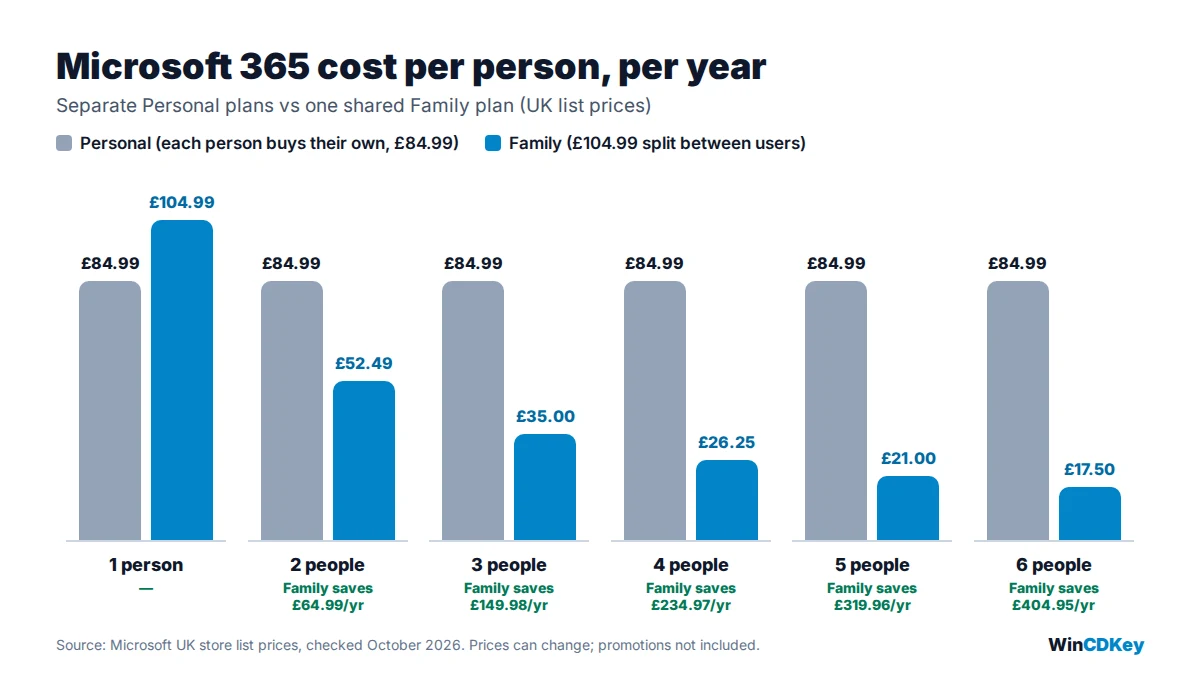
The break-even point is two people. Two Personal plans cost £169.98 a year, while one Family plan costs £104.99, saving roughly £65. Every additional member after that lowers the per-person cost further, down to £17.50 each for a full household of six.
If you are buying a product key rather than paying Microsoft directly, the same logic applies. You can compare current pricing in our Microsoft 365 and Office 365 range, where keys are redeemed against your own Microsoft account just like a store purchase.
Does Copilot work for everyone on a Family plan?
No. On Microsoft 365 Family, Copilot and the other AI features in Word, Excel, PowerPoint, Outlook and Designer work only for the subscription owner. The five people you share with get the full apps and their own storage, but they cannot use the owner’s AI allowance, according to Microsoft’s sharing rules.
Microsoft meters AI use with monthly AI credits. Personal subscribers and the Family owner receive 60 credits a month, while shared Family members receive the same basic allowance as a free Microsoft account. You can read how credits are counted on Microsoft’s AI credits page.
Why does this matter? Because Microsoft justified the 2025 price rise largely through AI features, a Family plan effectively charges the household for Copilot that only one person can use. If you already use the new Copilot keyboard shortcuts in Microsoft 365 daily, factor that in before you consolidate everyone onto one plan.
Practical fix for two AI users
Make the heaviest AI user the Family owner. If a second person genuinely needs Copilot, Microsoft’s own suggestion is to give that person a separate Personal plan. A common setup we see is one Family plan for the household plus one Personal plan for the second working adult.
How many devices and how much storage do you get?
Each person can install Microsoft 365 on all their devices and be signed in on up to five at once, and each person gets 1 TB of OneDrive storage. On Family, that means six separate 1 TB allowances, not one shared 6 TB pool.
This separation is a privacy feature as much as a storage one. Family members sign in with their own Microsoft accounts, so nobody can see another person’s documents, inbox or photos unless they share them. It also means one teenager filling their OneDrive with video cannot eat into a parent’s backup space.
The apps run on Windows, macOS, iPhone, iPad and Android. Mac users get the same Word, Excel, PowerPoint, Outlook and OneNote apps, which is one reason subscriptions suit mixed-device homes better than a single Office 2024 for Mac licence tied to one machine.
Who should choose Personal, and who should choose Family?
Choose Personal if you are one person with your own devices; choose Family if you are organising Office and storage for a household. Real-life cases make the line clearer.
Microsoft 365 Personal suits
- Solo students and freelancers who need the desktop apps, 1 TB for coursework or client files, and Copilot for drafting.
- Anyone who wants Copilot for themselves while family members are covered elsewhere, such as through a school or employer account.
- Users who prefer simple billing with no family group to manage.
Microsoft 365 Family suits
- Couples and parents with children, where only one adult relies on Copilot.
- Households replacing several paid cloud storage plans, since each member gets 1 TB of private OneDrive space.
- Mixed Windows and Mac homes that want the same apps on every laptop, tablet and phone.
If you run a small business, neither consumer plan is designed for staff accounts. Microsoft points teams towards its business plans, and for perpetual licences across several machines you can request pricing through our B2B and wholesale team.
What about Microsoft 365 Premium and the Classic plans?
Microsoft 365 Premium costs £189.99 a year in the UK and adds much higher Copilot limits on top of everything in Family. It is aimed at people who use AI heavily, not at households that simply need more seats, because Family and Premium share the same six-person limit.
Premium does not remove the owner-only rule either. Microsoft’s Copilot plans for individuals page notes that AI features on shared Family and Premium plans remain with the subscription owner.
The Classic Personal and Classic Family plans are the opposite trade: the same apps and storage at the pre-2025 price, without Copilot. They are not sold to new customers. Existing subscribers have typically been offered them only when starting to cancel, and Microsoft has signalled they are temporary.
Is Microsoft 365 better than a one-time Office 2024 licence?
Microsoft 365 is better if you want cloud storage, Copilot and constant feature updates; a one-time Office 2024 licence is better if you just want the core apps on one computer without a yearly bill. Over five years, Personal costs about £425 at list price, whereas a perpetual licence is paid once.
| Option | Payment | Cloud storage | Copilot | Best for |
|---|---|---|---|---|
| Microsoft 365 Personal | £84.99 / year | 1 TB | Yes | One user, many devices |
| Microsoft 365 Family | £104.99 / year | 1 TB × 6 | Owner only | Households of 2–6 |
| Office Home 2024 (perpetual) | One-time | None included | No | One PC or Mac, offline use |
| Office Home & Business 2024 (perpetual) | One-time | None included | No | Adds Outlook and commercial-use rights |
Perpetual Office does not include Copilot or other cloud AI features, which stay exclusive to Microsoft 365. If that suits you, Office 2024 Home for Windows covers Word, Excel, PowerPoint and OneNote, while Office 2024 Home & Business for PC or Mac adds Outlook. Our guide to what’s new in Office 2024 explains the feature set in more detail.
One timing note: if you still run Office 2021, Microsoft ends its support on 13 October 2026. Our Office 2021 end-of-support guide covers what changes and how to move either to Microsoft 365 or to Office 2024.
How to share Microsoft 365 Family
You share Microsoft 365 Family from your Microsoft account by inviting up to five people, who must accept and join your Microsoft family group. The whole process takes a few minutes.
- Activate the plan. Redeem your Family product key at setup.office.com while signed in to the account that will own the subscription. Our installation and activation guide walks through this step.
- Open sharing settings. Sign in at account.microsoft.com, go to Subscriptions and choose the sharing option for Microsoft 365 Family.
- Invite members. Send each person an email invitation or link. They must accept it and join your family group before the plan activates for them.
- Members install the apps. Each member signs in with their own Microsoft account, installs the apps and gets their own 1 TB of OneDrive.
Remember the dependency this creates. If the owner cancels, lets the plan lapse or leaves the family group, every member loses access, so the most organised adult in the house should hold the subscription.
If a member’s computer still has an older Office version installed, removing it first prevents licence conflicts. Our walkthrough on how to completely uninstall Office covers the clean-up.
Buying a Microsoft 365 key: what to check
A Microsoft 365 product key gives you a fixed subscription term that you redeem on your own Microsoft account. It is not a lifetime licence, so check the term length, the plan type and the region before you buy.
- Term length. Keys are sold for a set period, such as six or twelve months. Redeeming a key on an account with the same active plan extends your end date rather than starting a second subscription.
- Plan type. A Family key and a Personal key are different products. Buy the plan you intend to keep, because switching plans can shorten the converted term.
- Region. Some keys are tied to a region. Our listings state when a key is global.
- Seller accountability. Look for clear refund terms, real support and verifiable reviews before you pay.
Ready to choose?
For a household, the Microsoft 365 Family 6-month key (Global) covers up to six people. For one user, see the Microsoft 365 Personal key for PC, Mac, iOS and Android. Keys are delivered by email, and you can follow your order on the order tracking page.
WinCDKey has served more than 600,000 orders and holds over 2,500 verified reviews on Trustpilot. You can check our Microsoft AppSource partner listing, read our refund and returns policy, and see how EU resale rules apply on our EU law and authentication page. If anything goes wrong during activation, the Help & Support Centre is the fastest route to a fix.
Final verdict: Family or Personal?
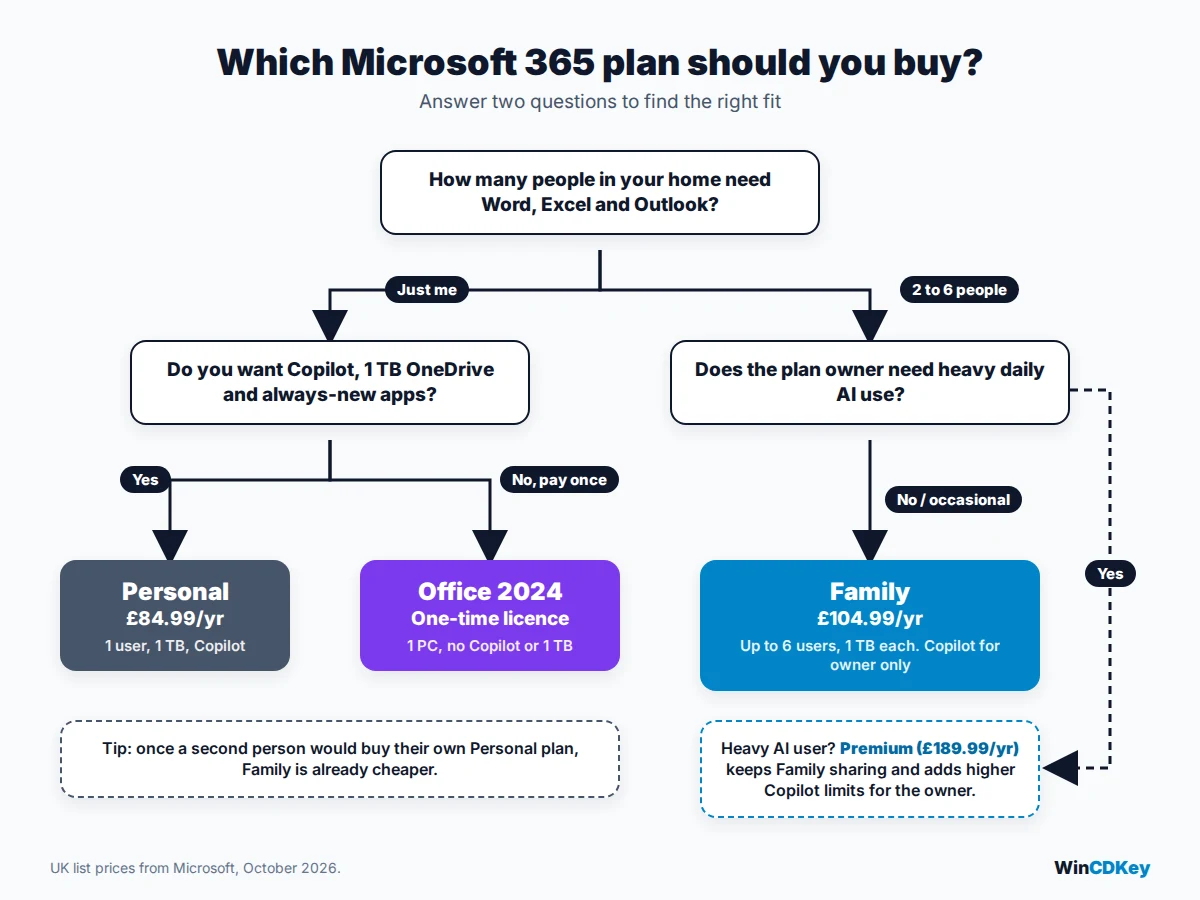
Pick Family for two or more users who are happy for one person to own Copilot, Personal for a single user, and two Personal plans for two adults who both need AI every day. If you do not need cloud storage or Copilot at all, a one-time Office 2024 licence will cost less over time.
Microsoft 365 Family vs Personal: FAQs
Is Microsoft 365 Family worth it for two people?
Yes, on price alone. At UK list prices, Family costs £104.99 a year against £169.98 for two Personal plans, a saving of about £65. The exception is when both people need Copilot inside Word, Excel or Outlook, because Family’s AI features only work for the subscription owner.
Can Microsoft 365 Family members see each other’s files?
No. Each person on a Family plan signs in with their own Microsoft account and gets a separate 1 TB of OneDrive storage. Files, email and documents stay private unless someone deliberately shares them.
Do family members get Copilot on Microsoft 365 Family?
No. Microsoft states that AI features such as Copilot in Word, Excel, PowerPoint, Outlook and Designer are available only to the Family subscription owner and cannot be shared. Members get the full desktop apps and storage, but not the owner’s AI allowance.
How many devices can I use Microsoft 365 on?
You can install the apps on all your devices, and each person can be signed in on up to five devices at the same time. That limit applies per person, so on Family each of the six members has their own five simultaneous sign-ins.
Can I upgrade from Microsoft 365 Personal to Family later?
Yes. You can switch from Personal to Family from your Microsoft account, or redeem a Family product key on the same account. Microsoft typically adjusts the remaining time on your current subscription when you change plans, so check the converted end date before you confirm.
What happens if the Microsoft 365 Family owner cancels or leaves?
Everyone loses access. Members’ benefits depend on the owner’s subscription and family group, so if the owner cancels, lets it lapse or leaves the family group, all members lose the apps and their extra storage. Members should keep important files backed up.
Is Microsoft 365 a one-time purchase?
No. Microsoft 365 Personal and Family are subscriptions that run for a set term, usually one year or one month. If you want to pay once and keep the apps, a perpetual licence such as Office 2024 Home is the alternative, without cloud storage or Copilot.
Can I share Microsoft 365 Family with friends outside my home?
Microsoft designs Family for a household and requires every member to join the owner’s Microsoft family group. The plan can be shared with up to five other people. For colleagues or a business team, Microsoft recommends its business plans instead.
Can I use a product key to extend my current Microsoft 365 subscription?
Yes. Redeeming a Microsoft 365 key on an account that already has the same plan adds the new term to your existing end date rather than starting a second subscription. Microsoft caps how much prepaid time can be stacked on one account.
What apps are included in Microsoft 365 Family and Personal?
Both plans include the same apps: Word, Excel, PowerPoint, Outlook and OneNote on Windows and Mac, plus OneDrive storage, Microsoft Defender, Microsoft Teams, Clipchamp and Designer. The only differences are the number of people and who can use the AI features.
Still deciding? Browse the WinCDKey FAQs, compare editions in our Office 2024 Home & Business vs Pro Plus LTSC guide, or read more on the WinCDKey blog.


