🎃 HALLOWEEN SALE: 50% OFF best-selling Windows, Office, Autodesk & Server keys — use code GHOST50 Shop the sale →


Is There an Office 365 Lifetime License? What to Buy Instead in 2026

No. Microsoft does not sell an Office 365 lifetime license. Office 365 for home users is now called Microsoft 365, and every Personal, Family and Premium plan is a subscription that you renew monthly or yearly. If you want to pay once and keep your apps, the product you are looking for is a perpetual licence such as Office 2024.
That distinction matters because “lifetime Microsoft 365” listings are everywhere, often with 5 TB of storage and a price lower than a month of the real thing. This guide explains what those offers usually are, why they tend to stop working, and what you can actually buy instead.
Key takeaways
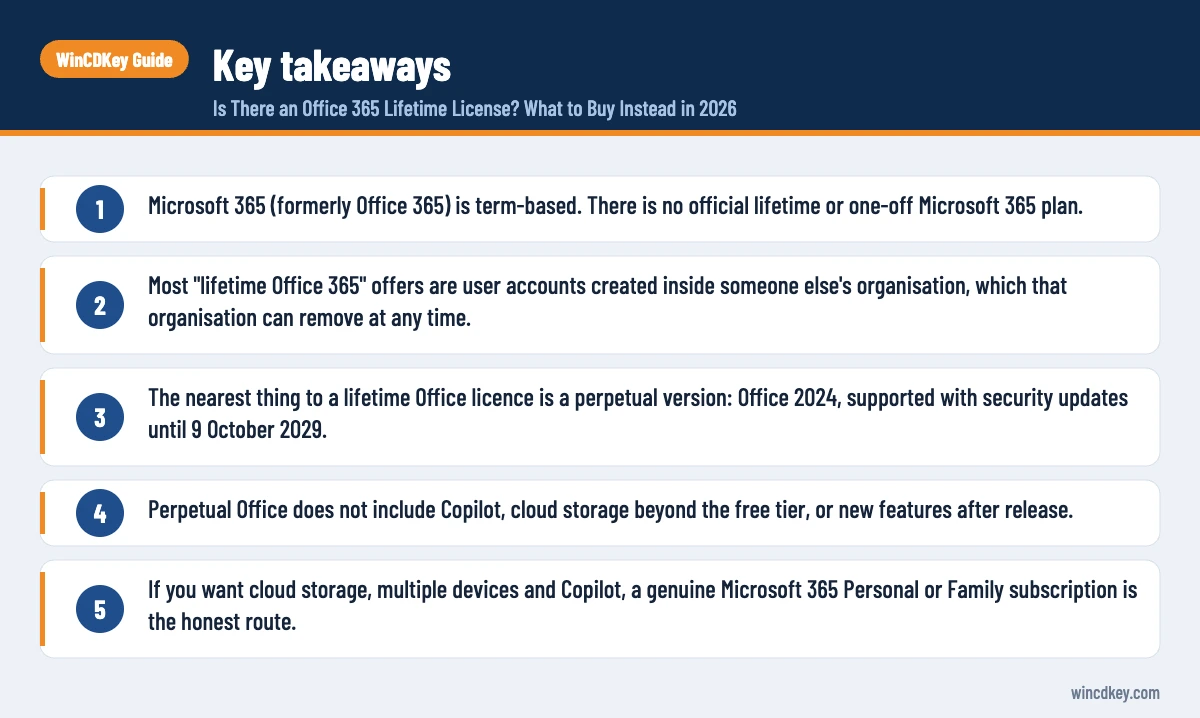
- Microsoft 365 (formerly Office 365) is term-based. There is no official lifetime or one-off Microsoft 365 plan.
- Most “lifetime Office 365” offers are user accounts created inside someone else’s organisation, which that organisation can remove at any time.
- The nearest thing to a lifetime Office licence is a perpetual version: Office 2024, supported with security updates until 9 October 2029.
- Perpetual Office does not include Copilot, cloud storage beyond the free tier, or new features after release.
- If you want cloud storage, multiple devices and Copilot, a genuine Microsoft 365 Personal or Family subscription is the honest route.
In this guide
- Is there an Office 365 lifetime license?
- What are “lifetime Office 365” offers really selling?
- What can go wrong with a lifetime Microsoft 365 account?
- How to tell a lifetime account offer from a genuine licence
- What is the closest thing to a lifetime Office licence?
- When is a Microsoft 365 subscription the better choice?
- Frequently asked questions
- The bottom line
- Useful links
Is there an Office 365 lifetime license?
There is no Office 365 lifetime license from Microsoft. Office 365 consumer plans were renamed Microsoft 365 in 2020, and Personal, Family and Premium are all sold as recurring subscriptions. When the subscription ends, the apps drop into a read-only state until you renew. “Lifetime” only applies to perpetual versions such as Office 2024.
The confusion is understandable. People use “Office 365” as shorthand for Word, Excel and PowerPoint in general, so a search for a lifetime Office 365 key often really means “I want Office without paying every year”. That need is legitimate, and it has a legitimate answer. It just is not a Microsoft 365 subscription.
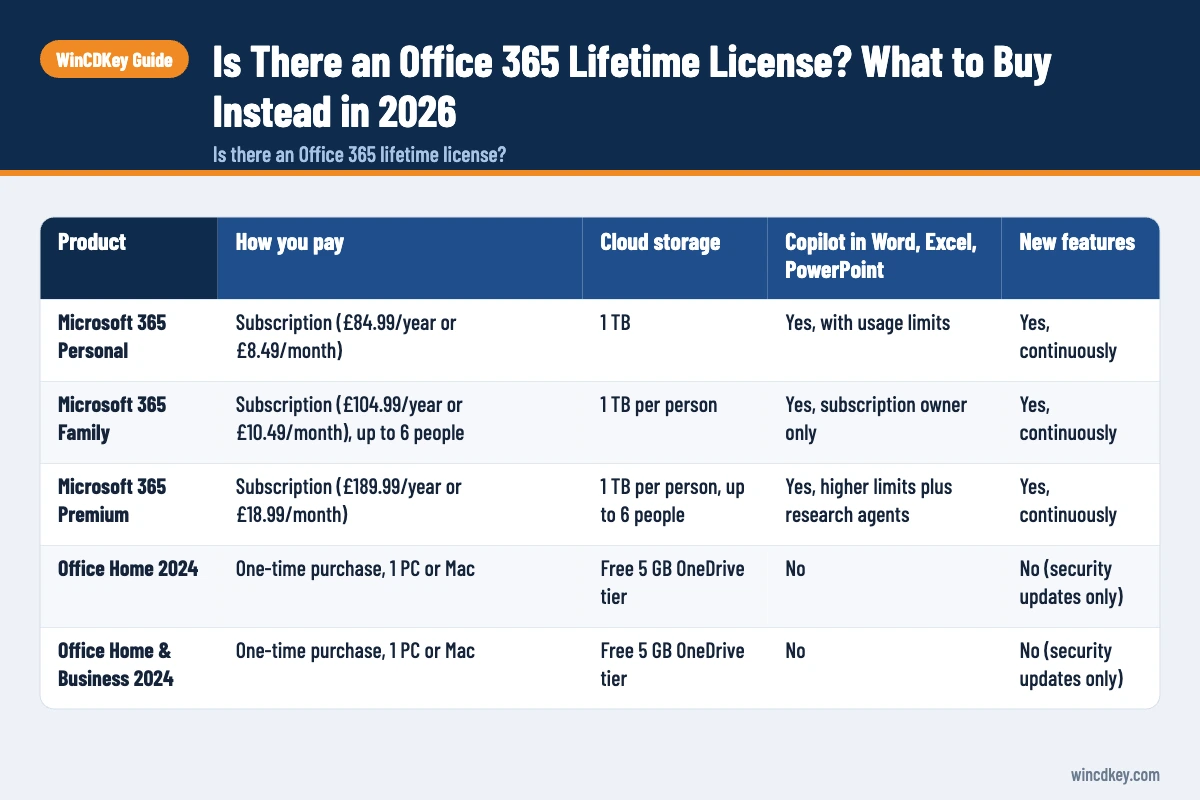
Here is what Microsoft actually offers to home users and small businesses, based on Microsoft’s UK plan comparison at the time of writing:
| Product | How you pay | Cloud storage | Copilot in Word, Excel, PowerPoint | New features |
|---|---|---|---|---|
| Microsoft 365 Personal | Subscription (£84.99/year or £8.49/month) | 1 TB | Yes, with usage limits | Yes, continuously |
| Microsoft 365 Family | Subscription (£104.99/year or £10.49/month), up to 6 people | 1 TB per person | Yes, subscription owner only | Yes, continuously |
| Microsoft 365 Premium | Subscription (£189.99/year or £18.99/month) | 1 TB per person, up to 6 people | Yes, higher limits plus research agents | Yes, continuously |
| Office Home 2024 | One-time purchase, 1 PC or Mac | Free 5 GB OneDrive tier | No | No (security updates only) |
| Office Home & Business 2024 | One-time purchase, 1 PC or Mac | Free 5 GB OneDrive tier | No | No (security updates only) |
Prices are Microsoft’s UK list prices and change from time to time. Retailers, including us, often sell the same products for less.
What are “lifetime Office 365” offers really selling?
Most lifetime Microsoft 365 offers sell a username and password, not a product key. The account usually sits inside a business, school or developer organisation (a “tenant”) that the seller controls. You get working apps for as long as that organisation keeps paying for, and keeps assigning, the licence attached to your account.
In practice the listings tend to fall into three groups:
- Accounts in someone else’s tenant. You receive an address ending in an unfamiliar domain, often something like
@companyname.onmicrosoft.com. The licence belongs to that organisation, not to you. - Shared or resold credentials. One paid subscription is split between strangers, which Microsoft’s consumer terms do not permit outside the Family sharing feature.
- Mislabelled perpetual keys. Some listings call an Office 2019, 2021 or 2024 key “lifetime Office 365”. The key itself may be fine, but you are buying a perpetual version without cloud features, so the title is misleading.
The common thread is control. With a genuine subscription, the account and its renewal date are yours. With a tenant account, an administrator you have never met can reset the password, remove the licence or delete the account, and Microsoft will treat that as the organisation’s decision.
What can go wrong with a lifetime Microsoft 365 account?
The main risks are losing access without warning, losing the files you saved to that account’s OneDrive, and having no one to appeal to. Because the account belongs to another organisation, Microsoft support cannot restore it for you, and a seller who has disappeared cannot either.
A common support ticket we see starts with “Office suddenly says my account is disabled”. When we look, the customer bought a cheap lifetime account elsewhere months earlier. The pattern is usually one of these:
- The tenant is closed or stops paying. Licences are removed in bulk and the apps fall back to reduced functionality, meaning you can view and print but not edit. Microsoft describes this state in its Microsoft 365 Apps licensing and activation overview.
- Your files are not really yours. Documents stored in that account’s OneDrive live in the organisation’s storage, and the administrator can usually access or delete them.
- Privacy exposure. Email, contacts and files in a tenant account are visible to whoever runs it. That is a poor place for invoices, CVs or family photos.
- No meaningful refund. Marketplace protection periods are often shorter than the time it takes for the account to stop working.
None of this means every seller is acting in bad faith. It does mean the word “lifetime” is a promise the seller cannot keep, because the underlying licence is still a subscription paid by someone else.
How to tell a lifetime account offer from a genuine licence
A genuine Microsoft 365 purchase gives you a product key, or a redemption link, that you activate on your own personal Microsoft account. A lifetime account offer gives you login details for an account someone else created. Checking which one you are buying takes about two minutes.
- Read what is delivered. If the listing promises “account and password” rather than a product key, it is an account in someone else’s organisation.
- Check the storage claim. Consumer Microsoft 365 plans offer 1 TB per person. Offers of 5 TB for one user usually point to business or education tenants.
- Look at the term. Genuine subscription keys are sold for a fixed period, such as 6 or 12 months. “Lifetime”, “permanent” or “forever” next to Microsoft 365 is a red flag.
- After activation, check your account page. At account.microsoft.com, under Services & subscriptions, a genuine plan shows Microsoft 365 Personal, Family or Premium with a renewal or expiry date.
- Compare the price with the term. A full year of Microsoft 365 Family for less than the price of a coffee should prompt questions.
What is the closest thing to a lifetime Office licence?
The closest thing to a lifetime Office licence is a perpetual version such as Office 2024. You pay once, activate it on one device, and can keep using that version indefinitely. Microsoft provides security updates for Office 2024 until 9 October 2029, after which the apps still open but are no longer patched.
“Indefinitely” deserves a little honesty. A perpetual licence does not expire, but its support window does. Office 2024 receives no new features after release, does not include Copilot inside the apps, and only comes with the free 5 GB OneDrive tier. Microsoft lists the support dates on its 2029 end-of-support page.
Which perpetual edition fits?
- Office Home 2024 covers Word, Excel, PowerPoint and OneNote for home use. See Office Home 2024 for Windows.
- Office Home & Business 2024 adds Outlook and is aimed at home offices and small businesses. Our Office 2024 Home & Business for PC or Mac binds to your Microsoft account.
- Office Professional Plus 2024 is Windows-only and adds Access. See Office 2024 Professional Plus for Windows.
What about Office 2021?
Office 2021 is also a perpetual licence, but Microsoft ends its support on 13 October 2026. It will keep working after that date, without security fixes. If budget is tight and you understand that trade-off, Office 2021 Professional Plus is still an option, though for most people Office 2024 is the better long-term buy.
Want Office without a yearly bill?
Browse our Office 2024 range for one-time-purchase keys with digital delivery. If you are unsure which edition matches your needs, our support team can help before you buy.
When is a Microsoft 365 subscription the better choice?
A Microsoft 365 subscription is the better choice if you use Office on several devices, want 1 TB of OneDrive storage, share with family members, or want Copilot inside Word, Excel and PowerPoint. You pay every year, but you always have the current apps and ongoing support.
For one person, Microsoft 365 Personal (1 year) covers up to five signed-in devices at once. For a household, a 12-month Microsoft 365 Home licence covers up to six people and usually works out cheaper per person. Our Microsoft 365 Family vs Personal guide compares the two in detail.
One nuance: on the Family plan, Copilot features are for the subscription owner only and cannot be shared, according to Microsoft. For a full cost-over-time comparison, see Microsoft 365 vs Office 2024.
Frequently asked questions
Can I buy Microsoft 365 with a one-time payment?
No. Microsoft 365 Personal, Family and Premium are only available as monthly or yearly subscriptions. You can prepay for a year with a product key, but the plan still has an end date. If you want a single payment with no renewal, buy a perpetual version such as Office Home 2024 or Office Home & Business 2024.
Is a lifetime Office 365 account legal?
These accounts are generally created inside a business, school or developer organisation and handed to strangers, which is not how Microsoft licenses its services. Buying one is unlikely to get you into legal trouble, but the account can be removed by its owner at any time, and you have no licence of your own to fall back on.
What happens when my Microsoft 365 subscription ends?
Your Microsoft 365 apps stay installed but enter reduced functionality mode, so you can open, view and print documents but cannot edit or create new ones. Files already saved on your computer remain yours. Files in OneDrive stay accessible, but if you exceed the free storage tier you may be unable to add more until you reduce usage or renew.
Is Office 2024 a lifetime licence?
Office 2024 is a perpetual licence, which is what most people mean by lifetime. It does not expire and you never pay again for that version. Microsoft supports it with security updates until 9 October 2029. After that the apps still work, but they no longer receive fixes, so most users upgrade at that point.
Why do lifetime Office 365 accounts stop working?
They usually stop because the organisation that owns them stops paying, gets closed by Microsoft, or reassigns its licences. The account sits in that organisation’s directory, so its administrator controls it. When the licence is removed, Office switches to read-only mode and any files in that account’s OneDrive may become inaccessible.
Does Office 2024 include OneDrive storage?
Office 2024 works with OneDrive, but it only comes with the free storage tier that every Microsoft account gets, currently 5 GB. Microsoft 365 Personal adds 1 TB, and Family gives up to six people 1 TB each. If cloud storage matters more than a one-off payment, a subscription is the better fit.
The bottom line
An Office 365 lifetime license does not exist, and accounts sold under that name rely on someone else’s subscription. Choose Office 2024 if you want to pay once, or a genuine Microsoft 365 plan if you want cloud storage and Copilot. Either way, our Microsoft 365 subscriptions and Office 2024 keys are sold with a clear term and a licence you control.
Useful links
| Resource | Why it helps |
|---|---|
| Office 2024 range | One-time-purchase Office editions |
| Office Home 2024 for Windows | Core apps for home use, paid once |
| Office 2024 Home & Business (PC/Mac) | Adds Outlook for home offices |
| Office 2024 Professional Plus | Windows edition including Access |
| Microsoft 365 Personal (1 year) | Genuine subscription for one person |
| Microsoft 365 Home (1 year) | Genuine subscription for up to six people |
| Microsoft 365 Family vs Personal | Choosing between the two home plans |
| Microsoft UK plan comparison | Official plan features and list prices |
| Microsoft end of support 2029 | Confirms the Office 2024 support date |
| Microsoft 365 Apps licensing overview | Explains reduced functionality mode |


