🎃 HALLOWEEN SALE: 50% OFF best-selling Windows, Office, Autodesk & Server keys — use code GHOST50 Shop the sale →


Is Windows Defender Enough in 2026? When Paid Antivirus Makes Sense

Is Windows Defender enough? For most home users on an up-to-date Windows 11 PC, yes. Microsoft Defender Antivirus is switched on by default, and it scores in the top group of recent independent lab tests. Paid antivirus makes sense when you want extras Defender does not include, or one licence for several devices and platforms.
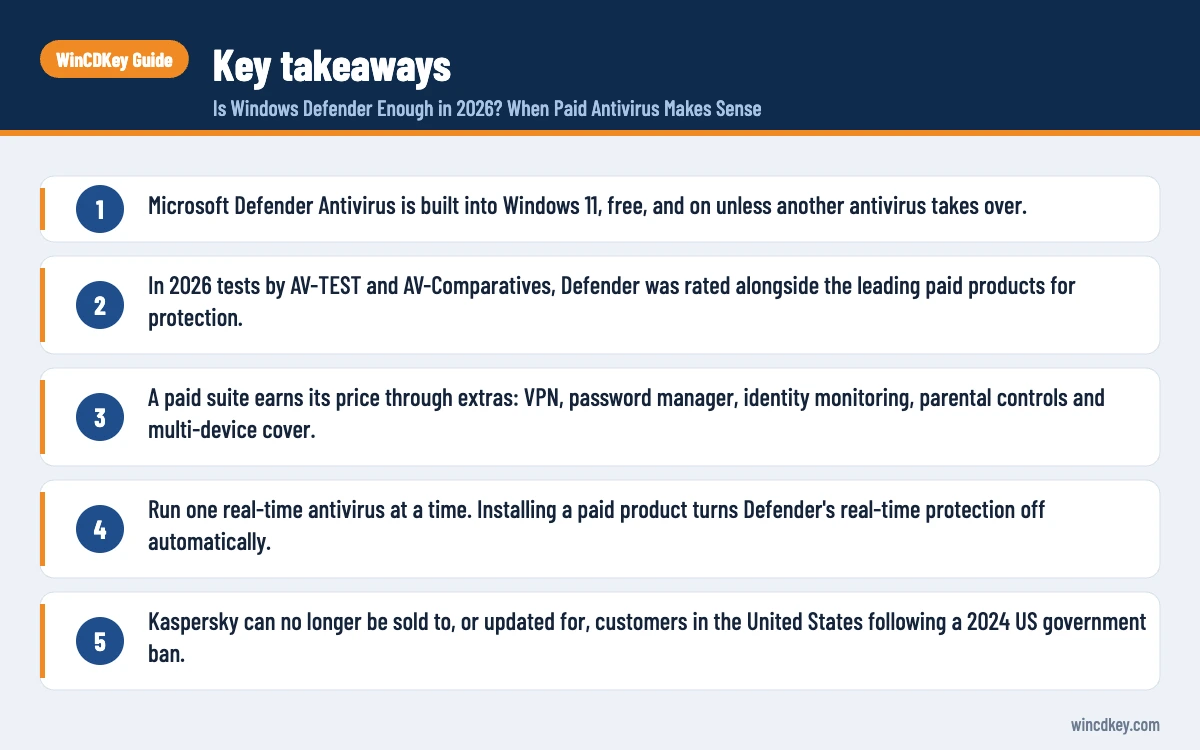
Key takeaways
- Microsoft Defender Antivirus is built into Windows 11, free, and on unless another antivirus takes over.
- In 2026 tests by AV-TEST and AV-Comparatives, Defender was rated alongside the leading paid products for protection.
- A paid suite earns its price through extras: VPN, password manager, identity monitoring, parental controls and multi-device cover.
- Run one real-time antivirus at a time. Installing a paid product turns Defender’s real-time protection off automatically.
- Kaspersky can no longer be sold to, or updated for, customers in the United States following a 2024 US government ban.
In this guide
- Is Windows Defender enough for Windows 11?
- What does Microsoft Defender actually protect against?
- Defender vs paid antivirus: what is the difference?
- When does paid antivirus make sense?
- How do you choose the best antivirus for Windows 11?
- How can you make Windows Defender stronger for free?
- Frequently asked questions
- The bottom line
- Useful links
Is Windows Defender enough for Windows 11?
For a typical home user who keeps Windows updated, uses a modern browser and avoids pirated downloads, Windows Defender is enough on its own for malware protection. Independent labs now place it among the leading products, which was not true ten years ago, so the old advice to install a third-party antivirus straight away no longer applies by default.
The evidence is consistent across labs. In AV-TEST’s March/April 2026 test of Windows 11 security products, Microsoft Defender Antivirus earned the maximum 18 points and a TOP PRODUCT award, the same total as several well-known paid suites.
AV-Comparatives found a similar picture in its February–May 2026 Real-World Protection Test. Defender sat in the top protection group and produced no false positives in that round. One test period is a snapshot, not a promise, but the trend over several years has been steady.
“Enough” still depends on you. Defender protects the PC well; it does not manage passwords, hide your traffic on public Wi-Fi or watch for your email address in data breaches. That is where the paid question really sits.
What does Microsoft Defender actually protect against?
Microsoft Defender Antivirus provides real-time scanning, cloud-delivered protection and automatic signature updates through Windows Update. Around it, the Windows Security app adds a firewall, SmartScreen download and website checks, ransomware protection for chosen folders, and hardware-based security features on supported PCs.
Here is what you get in Windows 11 without paying anything extra:
- Virus & threat protection: real-time and on-demand scanning, cloud-delivered protection and tamper protection, which stops malware switching Defender off.
- Microsoft Defender Offline scan: restarts the PC and scans before Windows loads, useful for stubborn infections.
- Firewall & network protection: the built-in Windows firewall, on by default for every network profile.
- App & browser control: reputation-based protection, SmartScreen for Microsoft Edge and downloads, potentially unwanted app blocking, and Smart App Control on eligible PCs.
- Ransomware protection: Controlled folder access, which blocks untrusted apps from changing files in protected folders. It is off by default.
- Device security: core isolation and memory integrity on compatible hardware, plus TPM-backed features.
Windows 11 Pro also adds BitLocker drive encryption, which protects your data if a laptop is lost or stolen. It is not antivirus, but it is one of the clearest security reasons people weigh up Windows 11 Home vs Pro.
Defender vs paid antivirus: what is the difference?
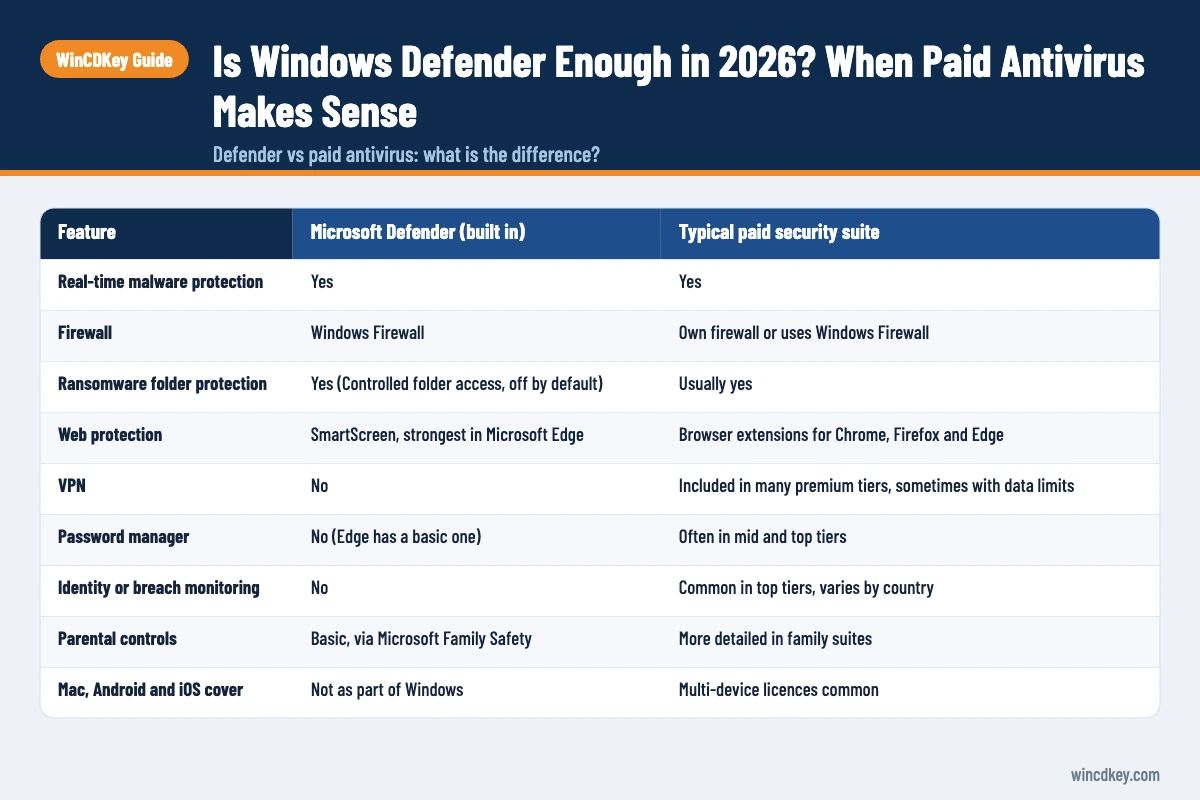
The core malware engine is no longer the main difference. Defender and the leading paid products all detect the overwhelming majority of threats in lab testing. Paid suites differ mainly in their extras, their management across several devices, and the support you can contact when something goes wrong.
| Feature | Microsoft Defender (built in) | Typical paid security suite |
|---|---|---|
| Real-time malware protection | Yes | Yes |
| Firewall | Windows Firewall | Own firewall or uses Windows Firewall |
| Ransomware folder protection | Yes (Controlled folder access, off by default) | Usually yes |
| Web protection | SmartScreen, strongest in Microsoft Edge | Browser extensions for Chrome, Firefox and Edge |
| VPN | No | Included in many premium tiers, sometimes with data limits |
| Password manager | No (Edge has a basic one) | Often in mid and top tiers |
| Identity or breach monitoring | No | Common in top tiers, varies by country |
| Parental controls | Basic, via Microsoft Family Safety | More detailed in family suites |
| Mac, Android and iOS cover | Not as part of Windows | Multi-device licences common |
| Cost | Included with Windows | Annual subscription |
Exact features vary by product and edition, so always check the specific tier before you buy. A “Premium” label from one vendor is not the same bundle as another vendor’s “Premium”.
When does paid antivirus make sense?
Paid antivirus makes sense when you would otherwise buy the extras separately, when you need one licence to cover a mix of Windows, Mac and phones, or when you want a single dashboard and a support line for a household or small office. It rarely makes sense purely for “better detection”.
Good reasons to pay
- You want a bundle. If you were going to pay for a VPN and a password manager anyway, a suite that includes both can cost less than separate subscriptions.
- You protect a family. Parental controls, family dashboards and cover for children’s phones are where consumer suites put most of their effort.
- You run a small business without IT staff. Central licence management and vendor support can save time. Larger organisations should look at business endpoint products instead.
- You have mixed devices. One multi-device licence across Windows, macOS and Android is simpler than a different tool on each.
Weak reasons to pay
- A pop-up says your PC is “at risk”. Scareware adverts and fake browser warnings are a common trick, and genuine Windows Security alerts appear in the Windows Security app, not in a web page.
- The shop bundled a trial with your new laptop. Trials often expire into an unprotected state if you ignore renewal emails. Either pay for it properly or remove it so Defender takes over again.
- You think free means weak. With Defender, that is not what the test data shows.
A common support ticket we see is a PC running an expired third-party trial. Windows usually re-enables Defender when the other product stops providing protection, but uninstalling the expired product cleanly is the safer route.
Decided you want the extras?
Compare suites in our antivirus software range, from McAfee+ Premium for Windows to ESET Internet Security. Check the device count and term on each listing before you buy.
How do you choose the best antivirus for Windows 11?
Choose the best antivirus for Windows 11 by matching features to your real needs, then checking recent independent lab results, the number of devices covered and the renewal price. Detection is close at the top, so extras, ease of use and cost over two or three years usually decide it.
- List the extras you would actually use. VPN, password manager, parental controls, identity monitoring. Ignore anything you would never open.
- Check current lab results. Look at the latest AV-TEST and AV-Comparatives rounds rather than a vendor’s own award badge.
- Count your devices. Licences are usually sold by device number and term, such as one device for one year.
- Compare renewal costs. First-year discounts can be steep, so read what the second year will cost.
- Check where you live. Some products and features vary by country, and in one case the product is barred in a whole market (see below).
Kaspersky vs McAfee: is Kaspersky available in the US?
No. In June 2024 the US Commerce Department’s Bureau of Industry and Security barred Kaspersky from selling software to US customers from 20 July 2024, and from providing updates after 29 September 2024, as TechCrunch reported at the time. Antivirus without updates loses protection quickly, so US readers should choose another vendor.
Outside the US, Kaspersky remains on sale and performed strongly in the same 2026 lab rounds as Defender. UK and European buyers can compare Kaspersky Premium (UK) with the McAfee range on features and device count. If you are in the US, McAfee, ESET, Avast or simply Defender are the practical routes.
How can you make Windows Defender stronger for free?
You can make Windows Defender noticeably stronger in about ten minutes by keeping Windows updated, switching on Controlled folder access and reputation-based protection, keeping tamper protection on, and backing up your files. These steps close most of the gap people expect a paid product to fill.
- Open Settings > Privacy & security > Windows Security and select Open Windows Security.
- Under Virus & threat protection > Manage settings, confirm that Real-time protection, Cloud-delivered protection and Tamper protection are on.
- Under Virus & threat protection > Ransomware protection, turn on Controlled folder access. If a trusted app is blocked, allow it through the same page.
- Under App & browser control > Reputation-based protection settings, turn on potentially unwanted app blocking.
- Run Windows Update and install pending updates. Defender’s intelligence updates arrive this way.
- To check Defender’s status from PowerShell, run
Get-MpComputerStatusand look atAMRunningMode. “Normal” means Defender is your active antivirus.
Then cover the risk no antivirus fully removes: losing files. Keep a backup with File History, OneDrive or a disk image. If something is deleted or encrypted, our guide on how to recover deleted files on Windows 11 walks through the free options first.
Finally, avoid “activated” copies of Windows or Office from unofficial sources. Unofficial activators are a common route for malware, they breach licence terms, and they often require you to switch antivirus off. A genuine Windows 11 Pro licence keeps you on normal Windows Update channels.
Frequently asked questions
Is Windows Defender good enough in 2026?
For most home users, yes. Microsoft Defender Antivirus earned AV-TEST’s maximum score in its March/April 2026 Windows 11 test and was in the top protection group in AV-Comparatives’ February–May 2026 Real-World Protection Test. Keep Windows updated and use safe browsing habits, and Defender handles everyday malware threats well.
Do I need antivirus if I have Windows 11?
You need antivirus protection, but Windows 11 already includes it. Microsoft Defender Antivirus is on by default, so you do not need to install anything else for basic malware protection. Buy a third-party product only if you want extras such as a VPN, password manager, parental controls or cover for other devices.
Can I run Windows Defender and another antivirus together?
Not both in real time. On a home PC, installing a third-party antivirus normally disables Defender’s real-time protection automatically, and Windows can turn Defender back on if that product expires or is removed. Running two real-time scanners at once is unsupported by Microsoft and can slow the PC or cause conflicts.
Is Kaspersky better than Windows Defender?
In 2026 lab rounds, both scored at the top for protection, so detection alone is not a clear win either way. Kaspersky’s paid tiers add extras Defender lacks, such as a password manager and VPN. However, Kaspersky cannot be sold to, or updated for, US customers following the 2024 US ban, so it suits non-US buyers only.
Does Windows Defender protect against ransomware?
Partly. Defender detects and blocks many ransomware strains, and Controlled folder access can stop untrusted apps changing files in protected folders, but that feature is off by default. No antivirus is perfect, so pair it with a regular backup on a separate drive or cloud service that ransomware cannot easily reach.
Is free antivirus safe to use?
Reputable free antivirus, including Defender, is safe and well tested. Be wary of unknown “free” tools promoted through pop-ups or fake scan results, as some are scareware or bundle unwanted software. Download security software only from the vendor or a reputable retailer, and check recent independent lab results before you trust it.
The bottom line
Windows Defender is enough for most people who keep Windows updated, browse carefully and back up their files. Pay for antivirus when you genuinely want the VPN, password manager, family tools or multi-device cover, and choose by features and renewal price rather than fear. If that is you, start with our antivirus range.
Useful links
| Resource | Why it helps |
|---|---|
| AV-TEST: best security solutions for Windows 11 | Independent lab scores for Defender and paid suites |
| AV-Comparatives Real-World Protection Test | Protection rates and false positives in real-world attacks |
| TechCrunch: US bans Kaspersky software | Dates and details of the 2024 US Kaspersky ban |
| WinCDKey antivirus software | Compare paid security suites by device count and term |
| McAfee+ Premium for Windows | A full suite option for US and international buyers |
| ESET Internet Security | A lighter-weight paid antivirus alternative |
| Kaspersky Premium (UK) | For UK buyers comparing Kaspersky with McAfee |
| Windows 11 Home vs Pro | Explains BitLocker and other Pro security features |
| Recover deleted files on Windows 11 | Free and paid recovery methods if files are lost |


