🎃 HALLOWEEN SALE: 50% OFF best-selling Windows, Office, Autodesk & Server keys — use code GHOST50 Shop the sale →


Does Office 2024 Have Copilot? What You Get Without a Subscription

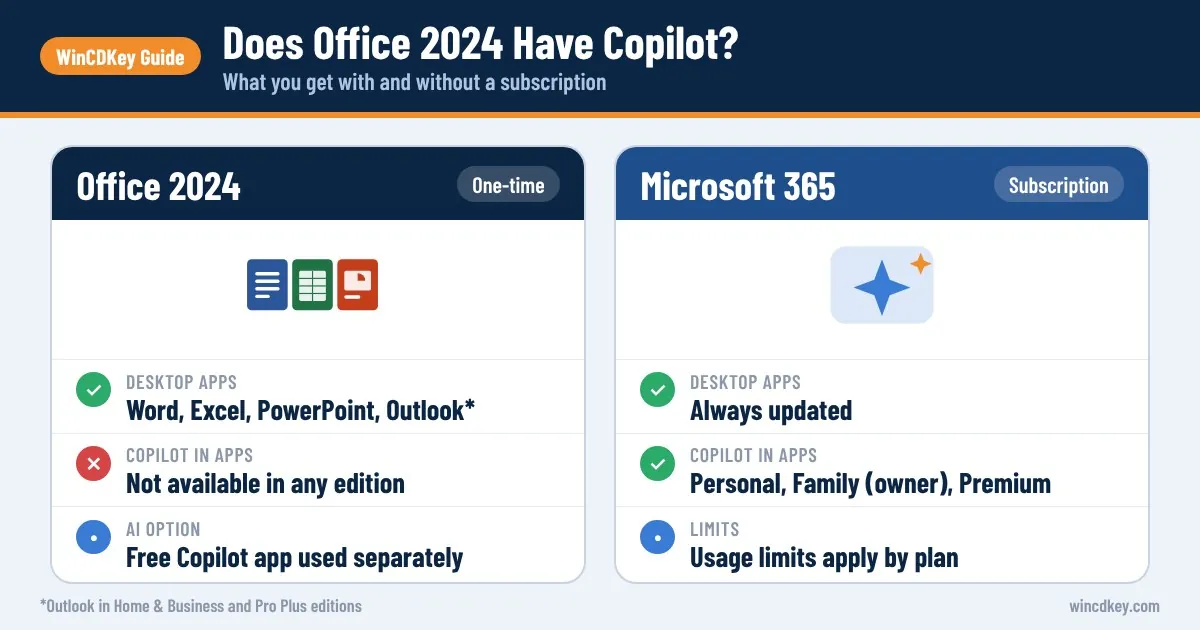
No, Office 2024 does not have Copilot. There is no Office 2024 Copilot button inside Word, Excel, PowerPoint or Outlook, and Microsoft does not sell Copilot as an add-on for the one-time-purchase version. Copilot in the apps needs a Microsoft 365 subscription. With Office 2024 you can still use the free Copilot app alongside your documents.
That leaves a practical question: how much AI do you really need, and is it worth switching to a subscription for it? This guide sets out what each plan includes, what you can do with Office 2024 and free tools, and how to decide.
Key takeaways
- Office 2024 (Home, Home & Business and Professional Plus) and Office LTSC 2024 do not include Copilot in the apps.
- Copilot inside Word, Excel, PowerPoint and Outlook comes with Microsoft 365 Personal, Family and Premium, or a business plan with a Microsoft 365 Copilot licence.
- On Microsoft 365 Family, Copilot is for the subscription owner only.
- Office 2024 users can use the free Copilot app separately, but it cannot edit your open documents.
- If AI is occasional, Office 2024 plus the free app is often enough; if it is daily, a subscription makes sense.
In this guide
- Does Office 2024 have Copilot?
- Which Microsoft plans include Copilot in Office apps?
- What AI can you use with Office 2024 without a subscription?
- Is there an Office 2024 Copilot add-on?
- Do you actually need Copilot in Office?
- Office 2024 or a Copilot plan: how to choose
- Frequently asked questions
- The bottom line
- Useful links
Does Office 2024 have Copilot?
Office 2024 does not have Copilot. The perpetual apps are a fixed 2024 build that receives security updates but no new features, while Copilot is a cloud service that Microsoft ties to an active subscription. Microsoft’s own UK comparison lists Office Home 2024 with only the free version of Copilot chat, not Copilot in the apps.
The reason is structural rather than technical. Copilot runs on Microsoft’s servers and costs money every time you use it, so Microsoft links it to recurring plans. A one-off licence paid in 2024 cannot fund an AI service used in 2029.
The same applies to every perpetual edition: Office Home 2024, Office Home & Business 2024, Office Professional Plus 2024 and Office LTSC 2024. Microsoft’s Office LTSC 2024 overview notes that cloud-backed features, including AI-driven automation, are not available in that release. Office 2021 and Office 2019 do not have Copilot either.
Which Microsoft plans include Copilot in Office apps?
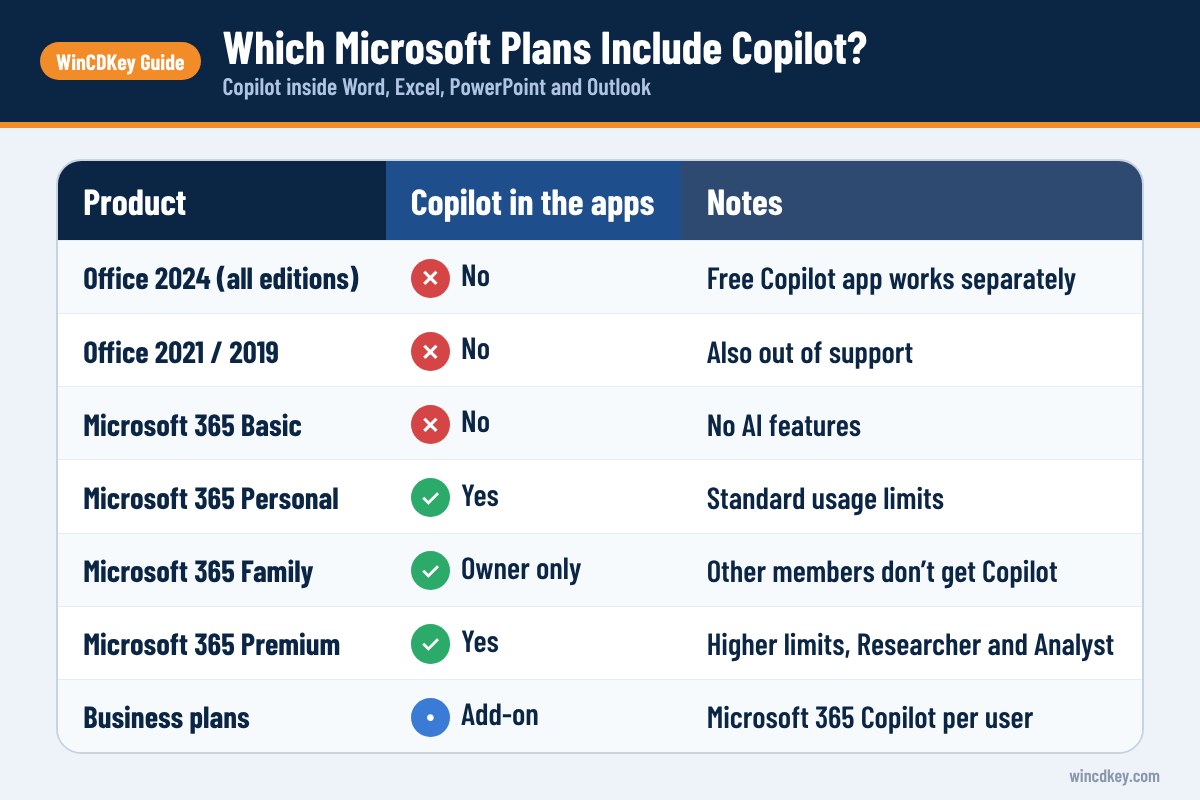
Copilot inside the Office apps is included with Microsoft 365 Personal, Family and Premium for home users, and with a separate Microsoft 365 Copilot licence for business plans. Microsoft 365 Basic, Office 2024 and older perpetual versions do not include it. Usage limits vary by plan, with Premium offering the highest.
| Product | Copilot in Word, Excel, PowerPoint, Outlook | Notes |
|---|---|---|
| Office 2024 (all editions) | No | Free Copilot app can be used separately |
| Office 2021 / 2019 | No | Also out of support |
| Microsoft 365 Basic | No | Microsoft states AI features are not available |
| Microsoft 365 Personal (£84.99/year) | Yes | Standard usage limits |
| Microsoft 365 Family (£104.99/year) | Yes, owner only | Other members do not get Copilot |
| Microsoft 365 Premium (£189.99/year) | Yes | Higher limits, plus Researcher and Analyst agents |
| Microsoft 365 business plans | With an add-on | Microsoft 365 Copilot is licensed per user on top of the plan |
Prices are Microsoft’s UK list prices from its plan comparison page and can change. Premium replaced the older Copilot Pro subscription in October 2025, and Microsoft describes its extra features on the Microsoft 365 Premium page.
What AI can you use with Office 2024 without a subscription?
With Office 2024 you can use the free Copilot app on the web, in Windows or on your phone, signed in with a free Microsoft account. It can draft text, summarise pasted content and explain formulas. What it cannot do is work inside your open document, so you copy and paste between the two.
For many everyday tasks that workflow is perfectly usable:
- Drafting. Ask Copilot for a first draft of a letter or report section, then paste it into Word and edit.
- Excel help. Describe what you want (“sum sales by region where the date is this year”) and ask for a formula to paste in.
- Summaries. Paste a long email or meeting notes and ask for key points.
- Slide outlines. Request an outline, then build the slides yourself in PowerPoint.
Be careful with what you paste. Avoid customer data, payroll figures or anything confidential in any free AI tool unless you have checked its data terms.
The non-AI tools in Office 2024 that save time
Office 2024 also adds features that do some of the work people expect from AI. Excel 2024 brings 14 new text and array functions, dynamic charts that resize with your data, and the IMAGE function. PowerPoint adds Recording Studio for narrated presentations. Our overview of what’s new in Microsoft Office 2024 covers them in more detail.
Is there an Office 2024 Copilot add-on?
No. There is no Copilot add-on, plug-in or upgrade key for Office 2024. To get Copilot inside the apps you need a qualifying Microsoft 365 subscription, which installs the Microsoft 365 versions of Word, Excel and PowerPoint. Microsoft does not generally support running both versions side by side, so on that PC the Microsoft 365 apps normally replace Office 2024.
A common support question we see is whether entering a Microsoft 365 key switches on Copilot in an existing Office 2024 installation. It does not. The subscription comes with its own installer, and Copilot appears once you sign in to the Microsoft 365 apps with the account that holds the subscription.
Be wary of any listing that claims to add Copilot to a perpetual Office key or sells “lifetime Copilot”. As we explain in our guide to the Office 365 lifetime licence myth, Microsoft sells these services on a term basis only.
Do you actually need Copilot in Office?
Most home users and many small businesses do not need Copilot built into Office. It is most valuable for people who write, summarise or analyse large amounts of material every day. If you mainly type letters, keep budgets and make occasional slides, Office 2024 with the free Copilot app covers you.
Copilot in the apps is worth paying for if you:
- Summarise long documents or email threads most days.
- Build presentations from existing Word documents regularly.
- Analyse Excel data and want natural-language questions answered against your own sheets.
- Already need 1 TB of storage or several devices, so the AI comes with a plan you would buy anyway.
It is probably not worth it if you:
- Work on one PC with a modest number of documents.
- Handle sensitive data you would rather not process with AI.
- Would subscribe to Family only for Copilot, since other family members will not get it.
Office 2024 or a Copilot plan: how to choose
Choose Office 2024 if you want to pay once and use AI occasionally through the free app. Choose Microsoft 365 Personal if you want Copilot in the apps at a modest yearly cost. Choose Premium only if you are a heavy AI user who needs its higher limits and research agents.
- Count your devices. One PC points to Office 2024; several points to Microsoft 365.
- Estimate weekly AI use. A few prompts a week fits the free app; daily drafting and summarising fits a subscription.
- Check who needs AI. On Family, only the owner gets Copilot.
- Compare three-year cost. Office 2024 is supported until 9 October 2029; set that against three years of subscription fees.
For the full cost and feature breakdown, see Microsoft 365 vs Office 2024.
Pick the version that fits how you work
If you want Office without a subscription, Office 2024 Home & Business for PC or Mac and Office Home 2024 are one-time purchases. If you want Copilot in the apps, Microsoft 365 Personal (1 year) includes it for one person.
Frequently asked questions
Is Copilot included in Office 2024?
No. Copilot is not included in Office Home 2024, Office Home & Business 2024, Office Professional Plus 2024 or Office LTSC 2024. Microsoft only provides Copilot inside the Office apps with Microsoft 365 subscriptions. Office 2024 users can still use the free Copilot app separately with a Microsoft account.
Do I need Microsoft 365 to use Copilot in Word?
Yes. Copilot in Word requires Microsoft 365 Personal, Family or Premium for home users, or a Microsoft 365 Copilot licence for business users. On Family, only the subscription owner gets Copilot. Without one of these, you can use the free Copilot app and paste the results into Word.
Is the free Copilot app enough for Office 2024 users?
For occasional drafting, summarising and formula help, often yes. The free app works in a browser, in Windows and on phones. Its limit is that it cannot see or edit your open documents, so you copy text in and out, and usage limits are lower than in paid plans.
Does Office 2021 have Copilot?
No. Office 2021 has no Copilot features, and it reached end of support on 13 October 2026, so it no longer receives security updates. Office 2019 and Office 2016 also lack Copilot and are out of support. Copilot in the apps is limited to Microsoft 365 subscriptions.
What happened to Copilot Pro?
Microsoft replaced Copilot Pro with Microsoft 365 Premium in October 2025, and Copilot Pro subscribers were offered the move at no extra cost. Premium combines the Office apps, cloud storage for up to six people and higher Copilot usage limits, plus agents such as Researcher and Analyst.
Will Microsoft add Copilot to Office 2024 later?
That is unlikely. Office 2024 receives security and quality updates but no new features after release, according to Microsoft. Copilot is tied to subscription plans because it is a paid cloud service. If AI in the apps matters to you, plan on a Microsoft 365 subscription rather than waiting for an update.
The bottom line
Office 2024 does not include Copilot, and it will not gain it later. If AI is an occasional helper, Office 2024 with the free Copilot app is a sensible, paid-once setup; if you would use it daily, a Microsoft 365 plan earns its fee. Compare all options in our Microsoft 365 range and Office 2024 range.
Useful links
| Resource | Why it helps |
|---|---|
| Microsoft 365 Personal (1 year) | Copilot in the apps for one person |
| Office 2024 Home & Business (PC/Mac) | One-time purchase without Copilot |
| Office Home 2024 for Windows | Lowest-cost one-time option |
| What’s new in Office 2024 | Non-AI features that save time |
| Microsoft 365 vs Office 2024 | Full cost and feature comparison |
| Office 365 lifetime licence explained | Why there is no lifetime subscription |
| Microsoft UK plan comparison | Official AI features by plan |
| Microsoft 365 Premium | Higher Copilot limits and agents |
| Office LTSC 2024 overview | Confirms cloud AI features are excluded |


