

Windows Server 2025 Standard vs Datacenter: Which Edition Do You Actually Need?

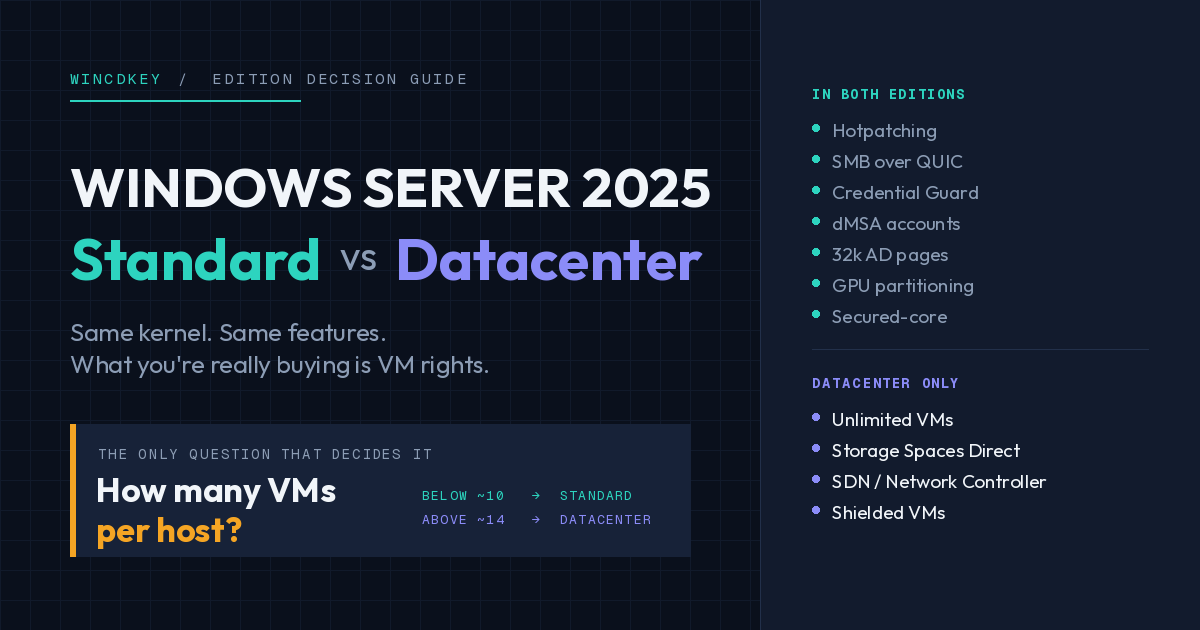
Choose Windows Server 2025 Standard if you run roughly ten or fewer virtual machines per host and do not need Storage Spaces Direct, software-defined networking or Shielded VMs. Choose Datacenter above that VM count, or if you need any of those features. The two editions are technically near-identical — what you are buying is virtualisation rights, not a better operating system.
That last point is the one most buyers get wrong. Datacenter is not a faster or more secure version of Standard. Hotpatching, SMB over QUIC, Credential Guard, dMSA and the Active Directory improvements covered in our guide to the top Windows Server 2025 Standard features are all present in both editions.
Four capabilities and an unlimited VM entitlement are what separate them. This guide covers where the cost lines cross, what those four features do, and the licensing traps that quietly add to the bill.
What this guide covers
- What is the difference between Standard and Datacenter?
- Feature comparison table
- How many VMs can Windows Server 2025 Standard run?
- Where does Datacenter become cheaper than Standard?
- The four Datacenter-only features, explained
- Five licensing traps that cost buyers money
- A three-question decision framework
- FAQs
What is the difference between Windows Server 2025 Standard and Datacenter?
Both editions share the same kernel, the same feature set for identity, file services, security and remote access, and the same per-core licensing model. Datacenter adds unlimited virtualisation rights plus four capabilities aimed at clustered, high-density infrastructure: Storage Spaces Direct, the software-defined networking stack, Shielded VMs, and unrestricted Storage Replica.
Standard grants two operating system environments per fully licensed server. Datacenter grants an unlimited number. Everything else in the comparison follows from that single difference.
If you have been testing on an evaluation build, note that the edition you convert to matters and is not freely reversible — our note on the Standard vs Datacenter evaluation conversion issue covers the trap people hit there.
Windows Server 2025 Standard vs Datacenter comparison table
| Capability | Standard | Datacenter |
|---|---|---|
| Virtual OS environments per licensed host | 2 (stackable) | Unlimited |
| Windows Server containers | Unlimited | Unlimited |
| Hyper-V isolated containers | 2 | Unlimited |
| Licensing model | Per physical core — 16 core minimum per server, 8 per processor, plus CALs | |
| Hotpatching via Azure Arc | Yes | Yes |
| SMB over QUIC | Yes | Yes |
| Credential Guard, dMSA, 32k AD pages | Yes | Yes |
| Secured-core server | Yes | Yes |
| Hyper-V GPU partitioning | Yes | Yes |
| Storage Spaces (standard) | Yes | Yes |
| Storage Spaces Direct (S2D) | No | Yes |
| Software-defined networking (Network Controller) | No | Yes |
| Shielded virtual machines | No | Yes |
| Storage Replica | One partnership, one volume, up to 2 TB | Unlimited |
| Client Access Licences required | Yes | Yes — identical CALs |
Microsoft maintains the authoritative matrix on its comparison of Windows Server editions page. Check it before finalising a large purchase — edition boundaries have shifted between releases, and SMB over QUIC moving into Standard for 2025 is a recent example.
A fourth edition, Datacenter: Azure Edition, exists only as a virtual machine on Azure or Azure Local. It is not sold as an on-premises licence, so it sits outside this comparison.
How many VMs can Windows Server 2025 Standard run?
Two. When you license every physical core in the server, Standard grants two virtual operating system environments. You may also run the physical host operating system, provided that host is used only to run and manage those virtual machines — the moment the host starts doing other work, it consumes one of the two entitlements.
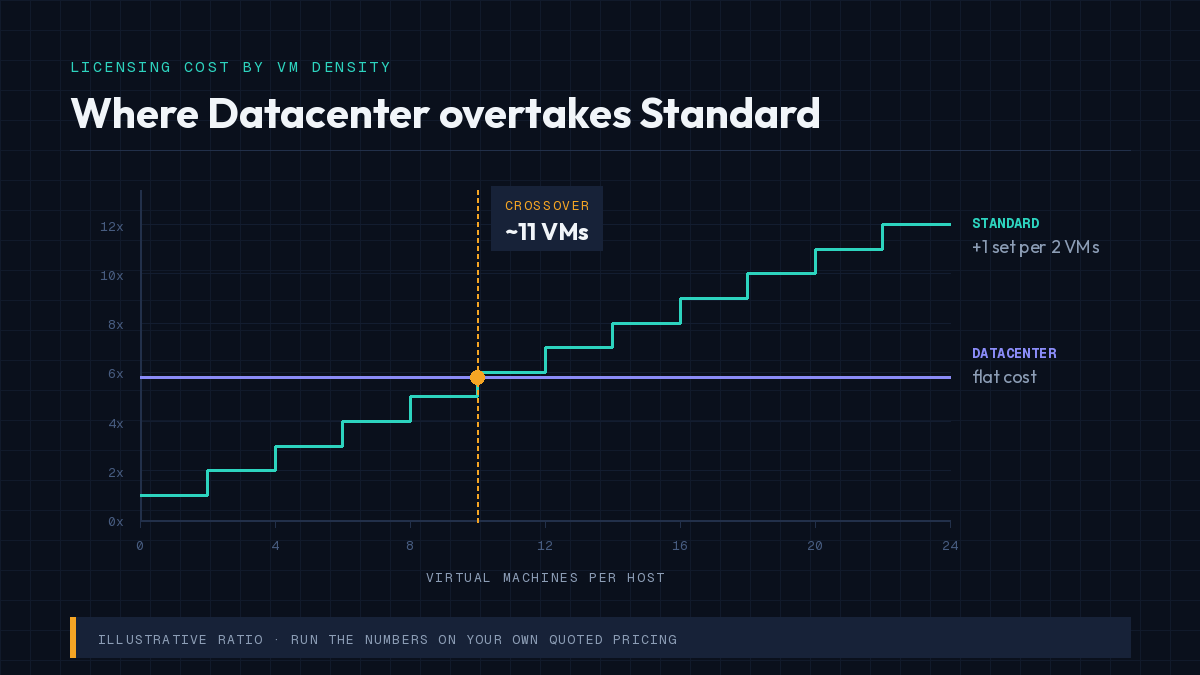
Chart showing Windows Server 2025 Standard licensing cost overtaking Datacenter at around 11 virtual machines per host
The part that changes the maths is stacking. You can apply additional full sets of Standard core licences to the same physical server, and each complete set grants two more virtual machines. Four sets on a 16-core host means eight VMs, legitimately licensed.
This is why “Standard is limited to 2 VMs” is only half true. Standard is limited to two VMs per licence set, and the real ceiling is economic, not technical.
At how many VMs does Datacenter become cheaper than Standard?
The break-even point is wherever the cost of stacked Standard licences overtakes one Datacenter licence for the same core count. At Microsoft list pricing, Datacenter has historically cost roughly five to six times a Standard licence of the same core count, which puts the crossover somewhere around ten to fourteen VMs per host.
Rather than trust a number from an article, run the calculation on your own quoted prices. It takes one line:
Standard licence sets needed = VMs ÷ 2, rounded up. Multiply by your Standard price for that core count. If the result exceeds your Datacenter price, buy Datacenter.
Three worked shapes, using a ratio of roughly 5.8× for illustration only:
| VMs on the host | Standard licence sets | Relative cost vs one Datacenter licence | Better buy |
|---|---|---|---|
| 2 | 1 | ~0.17× | Standard, comfortably |
| 6 | 3 | ~0.52× | Standard |
| 10 | 5 | ~0.86× | Standard, but close |
| 14 | 7 | ~1.21× | Datacenter |
| 20 | 10 | ~1.72× | Datacenter, decisively |
Two adjustments are worth making before you commit to the answer that table gives you.
First, plan for the VM count you will have in three years, not today. Buying Standard at eight VMs and stacking twice more as you grow usually costs more than buying Datacenter once — and unlike the initial purchase, those later licence sets arrive as unbudgeted spend.
Second, if any of the four Datacenter-only features is on your roadmap, the VM arithmetic stops mattering. You cannot stack your way to Storage Spaces Direct.
What do the four Datacenter-only features actually do?
Storage Spaces Direct (S2D)
S2D pools the local drives across a cluster of ordinary servers into a single software-defined, highly available storage layer. It is the technology behind hyperconverged infrastructure on Windows — compute and storage on the same nodes, no SAN.
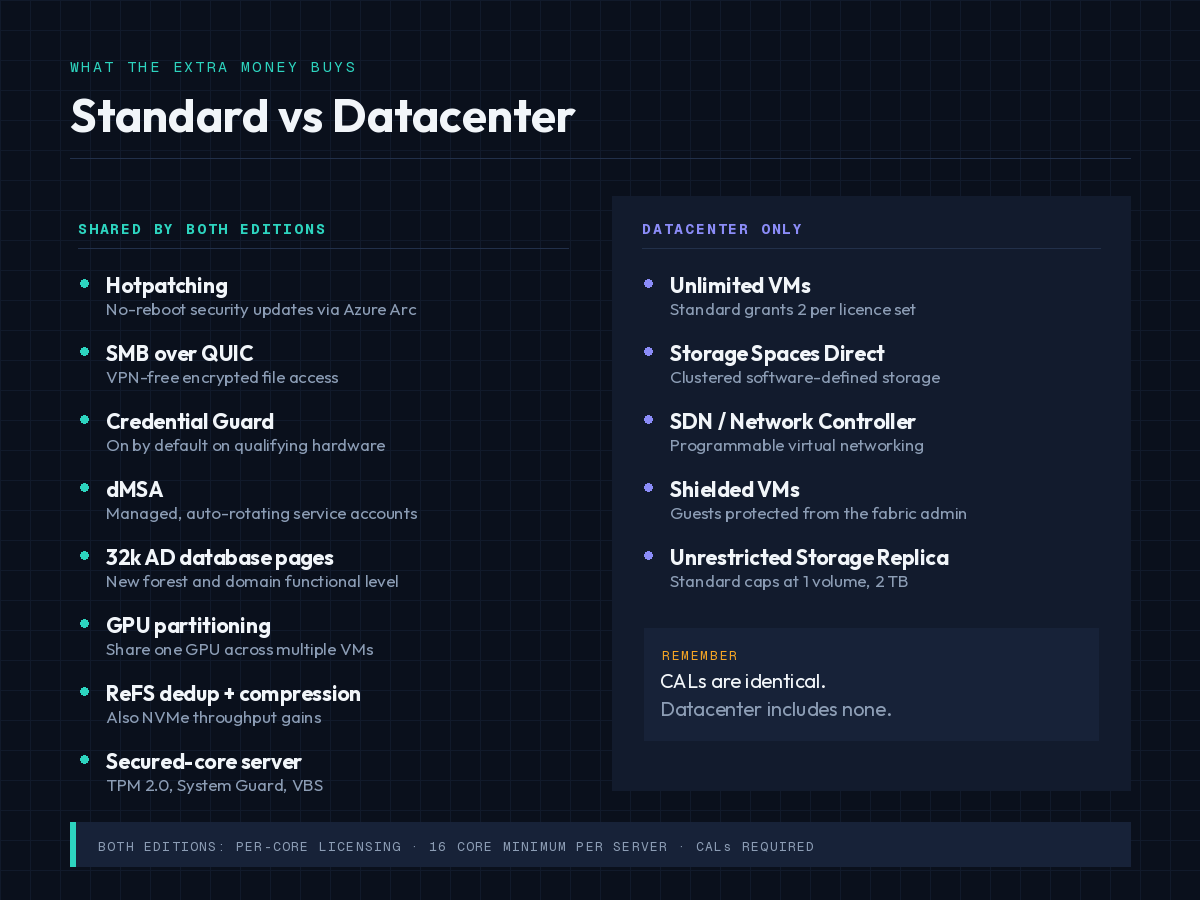
Windows Server 2025 features shared by both editions compared with Datacenter-only capabilities
Standard includes conventional Storage Spaces, which pools drives within a single server. The difference is the cluster: S2D survives a whole node failing, ordinary Storage Spaces does not.
Software-defined networking
SDN lets you define virtual networks, policies, gateways and load balancing programmatically, the way a public cloud does. Its central orchestration component, the Network Controller role, is Datacenter-only.
Worth knowing before you upgrade an edition for this reason: some SDN-adjacent pieces do appear in Standard, but the orchestrated stack built around Network Controller does not. If your design document says “Network Controller”, you need Datacenter.
Shielded virtual machines
Shielded VMs encrypt and lock down guest virtual machines so that even a compromised host administrator cannot read the guest’s disk or memory. This matters in exactly one scenario: multi-tenant hosting, or any environment where the person administering the fabric is not trusted with the data inside the workloads.
For a single-business server room where the same team owns the host and the guests, this feature solves a problem you do not have.
Unrestricted Storage Replica
Standard includes Storage Replica, but licence-limited to a single partnership and a single volume of up to 2 TB. Datacenter removes both limits.
The cause and effect worth planning around: the 2 TB cap is per volume, so a disaster-recovery design that replicates one modest file volume fits inside Standard, while one that replicates a database volume or several volumes does not. Check the volume sizes in your DR plan before assuming Standard covers it.
Five licensing traps that cost buyers money
- Assuming Datacenter includes CALs. It does not. Client Access Licences are required for both editions and are identical between them — the edition changes nothing about your User CAL or Device CAL count.
- Licensing cores you did not know you had. The 16-core minimum per server and 8-core minimum per processor apply regardless of actual core count, and you must license every physical core in the machine — not the cores you have assigned to VMs.
- Using the Hyper-V host for other work. Standard’s two-VM entitlement assumes the host runs only virtualisation management. Add a file share or a management agent that does real work, and the host itself consumes an entitlement, leaving you one VM.
- Forgetting RDS CALs are separate. Remote desktop access needs RDS User CALs or the device equivalent on top of standard CALs, in both editions.
- Buying Datacenter for the feature list. If you are not clustering, not doing multi-tenant hosting and not exceeding the Storage Replica limits, you are paying a large premium for capabilities that will never be enabled.
Licence terms vary by region and agreement type, so treat the above as general guidance and confirm the specifics against your own agreement. For volume purchases the B2B quote request and enterprise licensing page are the right starting points.
A three-question decision framework
Work through these in order and stop at the first yes.
- Do you need S2D, Network Controller SDN, Shielded VMs, or Storage Replica beyond one 2 TB volume? If yes, buy Datacenter. The cost comparison is irrelevant — Standard cannot do these at any quantity.
- Will this host run more VMs than your calculated break-even within three years? If yes, buy Datacenter now rather than stacking Standard licences later.
- Neither? Buy Standard. It is the right answer for most single-host deployments, domain controllers, file servers and small virtualisation estates.
One reassurance if you are torn: Microsoft supports an in-place edition upgrade from Standard to Datacenter using a Datacenter key, with no reinstall. The reverse is not supported — going from Datacenter down to Standard requires a clean installation. That asymmetry makes Standard the safer starting point when the future VM count is genuinely uncertain.
Buying Windows Server 2025
WinCDKey supplies both editions with digital delivery — Windows Server 2025 Standard and Windows Server 2025 Datacenter — alongside the matching CAL packs. The full range sits in the Windows Server 2025 category.
Once you have your key, our Server 2025 download, install and activate guide covers setup. If activation does not go cleanly, the Help & Support Centre and the phone activation Confirmation ID tool are the fastest routes to a fix, and the refunds and returns policy sets out replacement terms.
Frequently asked questions
Is Windows Server 2025 Datacenter faster than Standard?
No. The two editions share the same kernel and performance characteristics. Datacenter’s advantages are unlimited virtualisation rights and four clustering and multi-tenancy features — Storage Spaces Direct, software-defined networking, Shielded VMs and unrestricted Storage Replica. Nothing about raw performance differs.
How many virtual machines can Windows Server 2025 Standard run?
Two per fully licensed server, plus the physical host operating system if that host is used only to run and manage the VMs. Additional complete sets of Standard core licences can be applied to the same server, each granting two more virtual machines.
Can I upgrade from Standard to Datacenter without reinstalling?
Yes. Microsoft supports an in-place edition upgrade from Standard to Datacenter using a Datacenter product key, with no operating system reinstall. Downgrading from Datacenter to Standard is not supported and requires a clean installation.
Do I need different CALs for Datacenter?
No. Client Access Licences are identical across Standard and Datacenter. You need one User or Device CAL for every user or device accessing the server in either edition, plus separate RDS CALs for remote desktop access.
Does Windows Server 2025 Standard include Storage Replica?
Yes, but limited by licence to a single partnership and a single volume of up to 2 TB. Datacenter removes both limits. Check the volume sizes in your disaster recovery plan before assuming Standard is sufficient.
Is Storage Spaces Direct available in Windows Server 2025 Standard?
No. Storage Spaces Direct is Datacenter-only. Standard includes conventional Storage Spaces, which pools drives within a single server but does not provide the clustered, node-failure-tolerant storage layer that S2D does.
Which edition do I need for a Hyper-V host?
It depends on VM density. Below roughly ten VMs per host, stacked Standard licences usually cost less. Above that, Datacenter is generally cheaper and simpler to administer. Calculate it against your own quoted prices rather than a published break-even figure.
Is Datacenter: Azure Edition an option for on-premises servers?
No. Datacenter: Azure Edition runs only as a virtual machine on Azure or Azure Local and is not sold as a standalone on-premises licence.


