🎃 HALLOWEEN SALE: 50% OFF best-selling Windows, Office, Autodesk & Server keys — use code GHOST50 Shop the sale →


KB5129195: Microsoft’s Emergency Windows 11 Update — What It Fixes, What’s Still Broken, and Whether to Install It

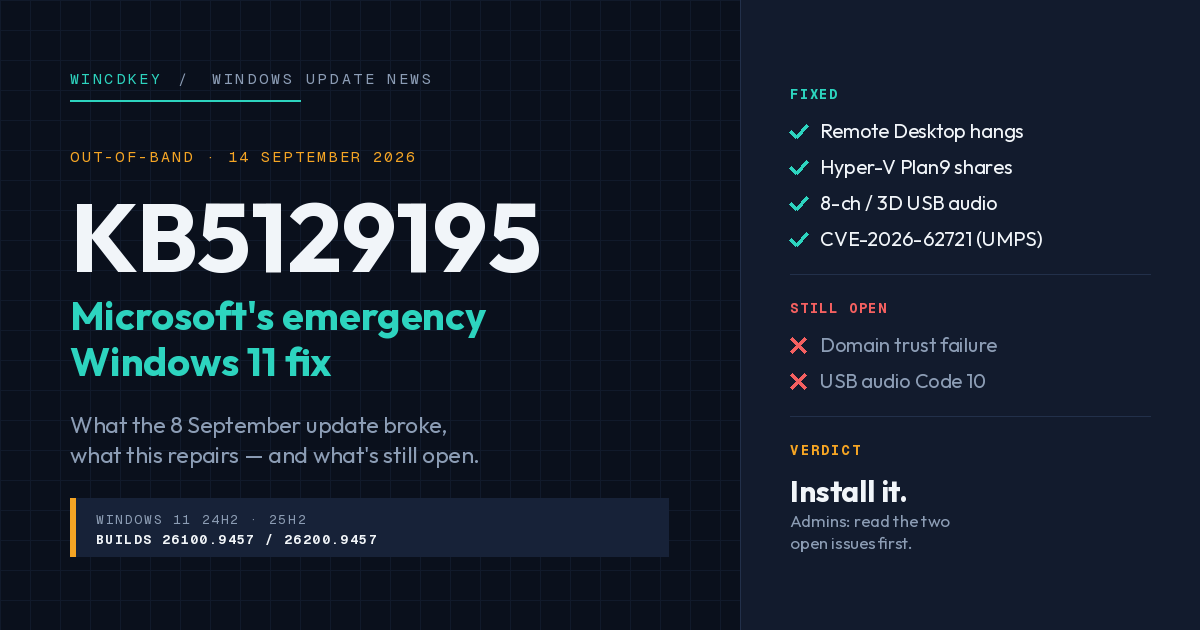
KB5129195 is an out-of-band update Microsoft released on 14 September 2026 for Windows 11 24H2 and 25H2. It fixes three problems introduced by the 8 September Patch Tuesday update (KB5124008): Remote Desktop Services hanging or refusing connections, Hyper-V shared folders vanishing from Linux VMs, and multichannel USB audio failing. It also patches a newly disclosed privilege-escalation vulnerability. Two known issues from KB5124008 remain open — a domain trust failure on some Credential Guard-protected devices, and USB Audio Class 1.0 devices showing Code 10.
What this article covers
- What went wrong with the September Patch Tuesday update?
- What does KB5129195 fix?
- What is still broken after KB5129195?
- Should you install KB5129195, and how?
- What about Windows Server?
- Other Windows 11 issues resolved this month
- FAQs
What went wrong with the September 2026 Patch Tuesday update?
The 8 September security update, KB5124008 (OS builds 26200.9445 and 26100.9445), shipped with at least four regressions that Microsoft acknowledged within days on its Windows release health dashboard.
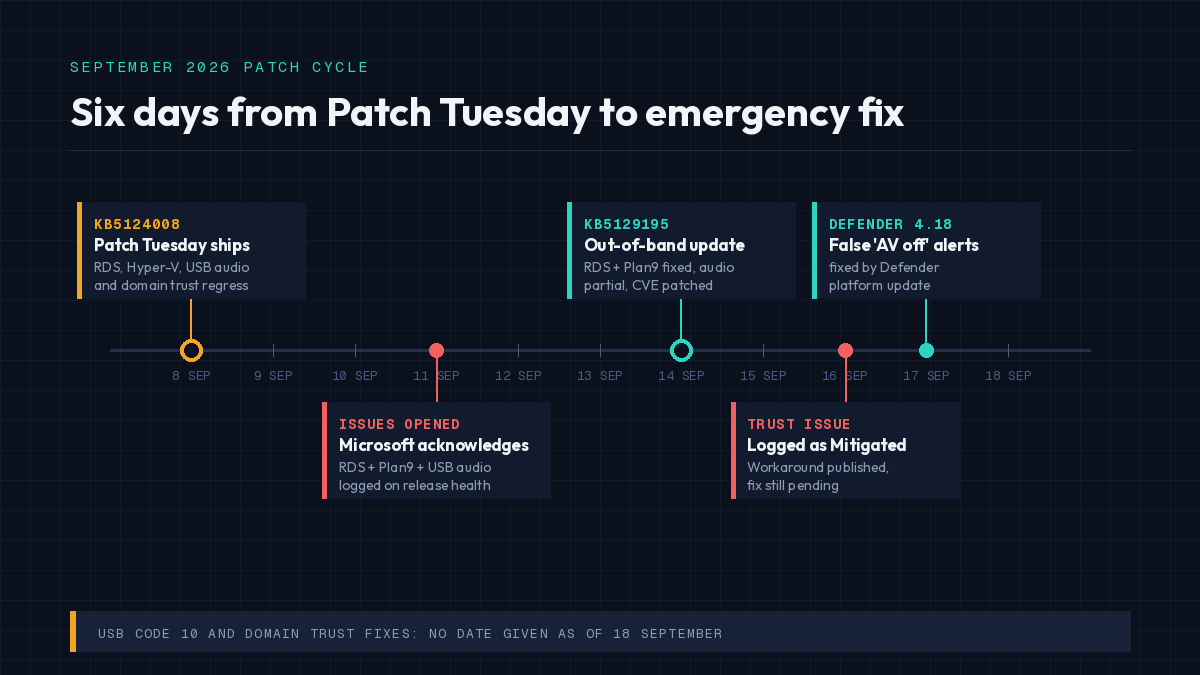
Timeline of the September 2026 Windows 11 patch cycle from KB5124008 to KB5129195
The most serious for businesses was Remote Desktop. On affected machines, RDP sessions dropped after a few minutes, sign-ins failed, and servers hung at “Please wait for the Remote Desktop Configuration”. The problem spread beyond RDP itself — Microsoft Management Console, the RDS Licensing Diagnoser, File Explorer and even the Windows Update settings page could become unresponsive on the same machine. Microsoft opened the issue on 11 September and had a fix out three days later, which tells you how many support calls it generated.
The other three: Hyper-V host folders shared into Linux VMs via Plan9 stopped appearing in the guest (breaking WSL and sandbox tools that rely on shared folders); USB Audio Class 1.0 devices failed to start or went silent; and some domain-joined devices lost their trust relationship with Active Directory.
Six days after Patch Tuesday, Microsoft released KB5129195 to address the first two fully and the third partially. The fourth is still open.
What does KB5129195 fix?
KB5129195 takes Windows 11 to OS builds 26200.9457 (25H2) and 26100.9457 (24H2), and bundles servicing stack update KB5124007. According to Microsoft’s release notes, it contains four changes:
| Area | What changed | Status |
|---|---|---|
| Security | Protections for CVE-2026-62721, an elevation-of-privilege vulnerability in the Windows User-Mode Power Service (UMPS) | New fix |
| Remote Desktop Services | RDS instability, RDP connection and sign-in failures, and hangs during Remote Desktop configuration | Resolved |
| Hyper-V / Plan9 | Host folders shared with Linux VMs via Plan9 not appearing in the guest | Resolved |
| USB audio | USB Audio Class 1.0 devices failing in 8-channel or 3D audio modes | Partially resolved — see below |
Two administrative notes buried in the release health entries are worth pulling out. If you deployed Microsoft’s temporary Group Policy mitigation for the RDS issue, you can install KB5129195 without reverting it first. But if you applied the Group Policy workaround for the Plan9 issue, you must re-enable that policy, install the update, and restart — otherwise the shares stay broken.
What is still broken after KB5129195?
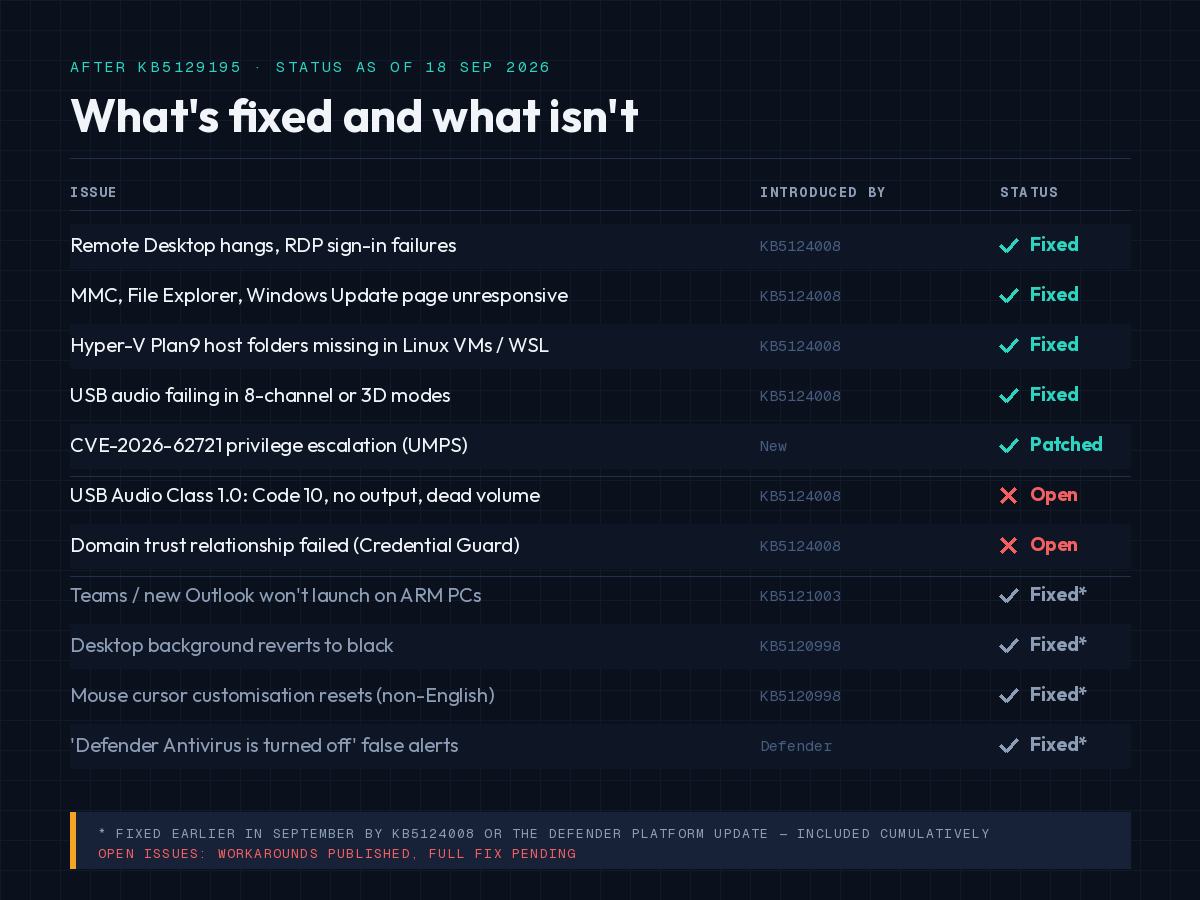
Status of Windows 11 known issues after KB5129195 showing fixed and unresolved problems
Domain-joined devices losing their trust relationship
This is the issue most likely to generate an urgent ticket, and KB5129195 does not fix it. Some devices using Credential Guard-protected machine accounts lose their secure channel with the on-premises domain after installing KB5124008 or any later update, including this one. Users see “the trust relationship between this workstation and the primary domain failed” and cannot sign in with valid domain credentials. Cached credentials may still work offline.
The cause is instructive. KB5124008 made Windows start honouring an existing Machine Identity Isolation setting that some environments had provisioned earlier through Intune, Group Policy or the registry. That feature is only supported when the domain controllers run at the Windows Server 2025 domain functional level. Anywhere else, it needs to be disabled — and on devices where it was already switched on, the update turned a dormant setting into an active one.
Microsoft’s workaround is to disable Machine Identity Isolation through whichever method enabled it, restart, and reset the secure channel with Test-ComputerSecureChannel -Repair. The registry keys to check are HKLM\SYSTEM\CurrentControlSet\Control\Lsa\MachineIdentityIsolation and HKLM\SOFTWARE\Policies\Microsoft\Windows\DeviceGuard\MachineIdentityIsolation; a value of 2 needs to become 0. Microsoft says a future update will temporarily block enforcement while the feature is reworked.
If you are planning to use Machine Identity Isolation properly, the prerequisite is Server 2025 domain controllers — our Windows Server 2025 features guide covers the new domain functional level and what upgrading DCs involves.
USB Audio Class 1.0 devices showing Code 10
KB5129195 fixes the multichannel symptom only. Devices that show “This device cannot start (Code 10)” in Device Manager, produce no output, or have unresponsive volume controls are still affected. Microsoft is working on it and has not given a date. If you have a USB audio interface or DAC that stopped working after 8 September, this update will probably not bring it back — a temporary switch to a different audio device, or rolling back KB5124008 on a non-critical machine, are the realistic options until the follow-up lands.
Should you install KB5129195, and how?
For home users and small businesses: yes. Out-of-band updates are sometimes optional; this one is delivered automatically through Windows Update and Microsoft Update, which signals Microsoft considers it a required fix, and the UMPS vulnerability patch is not something to defer. Go to Settings → Windows Update → Check for updates, install, and restart.
For IT administrators: KB5129195 is cumulative, so it supersedes KB5124008 — there is no need to install both. It is also available through the Microsoft Update Catalog and WSUS. Approve it for Remote Desktop hosts first, since that population has the worst symptoms from KB5124008. Before broad deployment, audit whether any devices have Machine Identity Isolation provisioned; if they do and your DCs are not at Server 2025 functional level, disable it before the update reaches those machines rather than after.
If you are on Windows 11 23H2, the equivalent out-of-band update is KB5129242 (build 22631.7584). Windows 11 26H1 devices get KB5129194 (build 28000.2956).
Installing on a fresh machine? The build you land on after KB5129195 is what a clean Windows 11 Pro installation should be updated to before you activate and join a domain — updating first avoids re-triggering the trust issue on a device you have just configured.
What about Windows Server?
The Remote Desktop and USB audio issues affect Windows Server 2012 through Server 2025 as well as Windows 11 and Windows 10. Microsoft’s release health entry confirms the RDS resolution applies across those platforms via the corresponding out-of-band updates released on 14 September. [VERIFY: confirm the Server 2022 and Server 2025 OOB KB numbers from the Windows Server release health pages before publishing.]
The domain trust issue, by contrast, is client-only — Server platforms are not listed as affected. Domain controllers keep replicating normally; it is the workstations that lose their channel.
If you run RDS on Windows Server 2022 or Server 2025 Standard, treat the September OOB as mandatory for those hosts. Windows 365 and Azure Virtual Desktop are not affected.
Other Windows 11 issues resolved this month
September’s patch cycle also closed several issues that had been open since August. If you had any of these, KB5124008 or the Defender update fixed them:
- Teams and new Outlook failing to launch on ARM devices (Surface Pro 11, Surface Laptop 7) after the August update — fixed in KB5124008.
- Desktop backgrounds turning solid black and refusing to be changed after the 27 August preview update — fixed in KB5124008.
- Custom mouse cursors resetting on non-English Windows installations — fixed in KB5124008.
- “Microsoft Defender Antivirus is turned off” notifications appearing while Defender was running normally — fixed by Defender platform update 4.18.26080.4 on 17 September, independent of the OS update.
- Games crashing with EXCEPTION_ACCESS_VIOLATION when RGB peripheral drivers (inpoutx64) are present — Microsoft confirmed this is a driver problem, not a Windows bug, and now blocks the driver on affected systems.
If you hit an activation error after a cumulative update, our guides on error 0xC004F050 and error 0xC004C008 cover the common causes, and the Help & Support Centre is the fastest route if a licence you bought from us stops validating.
Frequently asked questions
What is KB5129195?
KB5129195 is an out-of-band cumulative update for Windows 11 versions 24H2 and 25H2, released by Microsoft on 14 September 2026. It brings devices to OS build 26200.9457 or 26100.9457 and fixes Remote Desktop, Hyper-V Plan9 sharing and multichannel USB audio problems introduced by the 8 September update KB5124008, plus a security fix for CVE-2026-62721.
Is KB5129195 a security update?
Yes. Alongside the bug fixes it includes protections for CVE-2026-62721, an elevation-of-privilege vulnerability in the Windows User-Mode Power Service. That is why Microsoft delivers it automatically through Windows Update rather than as an optional download.
Do I need to install KB5124008 before KB5129195?
No. KB5129195 is cumulative and includes everything in KB5124008 and earlier updates. Installing KB5129195 directly is sufficient.
Why does my domain-joined PC say the trust relationship failed after the September update?
KB5124008 and later updates began honouring a Machine Identity Isolation setting that may have been provisioned earlier on your device. The feature only works with domain controllers at the Windows Server 2025 domain functional level. Disable Machine Identity Isolation via the method used to enable it, restart, and run Test-ComputerSecureChannel -Repair. Microsoft plans a future update to block enforcement temporarily.
Does KB5129195 fix USB audio devices showing Code 10?
Not fully. It resolves USB Audio Class 1.0 devices failing in 8-channel or 3D audio modes. Devices that fail to start entirely, show Code 10, or produce no output remain affected. Microsoft is still working on that resolution.
Does the Remote Desktop issue affect Windows Server?
Yes. The RDS instability from the September 2026 security update affects Windows Server 2012 through Server 2025 as well as Windows 10 and 11 clients. Corresponding out-of-band updates were released for Server on 14 September. Windows 365 and Azure Virtual Desktop are not affected.
Which builds does KB5129195 apply to?
Windows 11 version 25H2 (build 26200.x) and version 24H2 (build 26100.x), all editions. Windows 11 23H2 receives KB5129242 and Windows 11 26H1 receives KB5129194 for the same fixes.
Can I uninstall KB5129195 if it causes problems?
Yes, via Settings → Windows Update → Update history → Uninstall updates, within the standard rollback window. Be aware that uninstalling removes the security fix and reintroduces the Remote Desktop and Hyper-V issues from KB5124008.


