🎃 HALLOWEEN SALE: 50% OFF best-selling Windows, Office, Autodesk & Server keys — use code GHOST50 Shop the sale →


AutoCAD 2026 System Requirements: Minimum and Recommended Specs

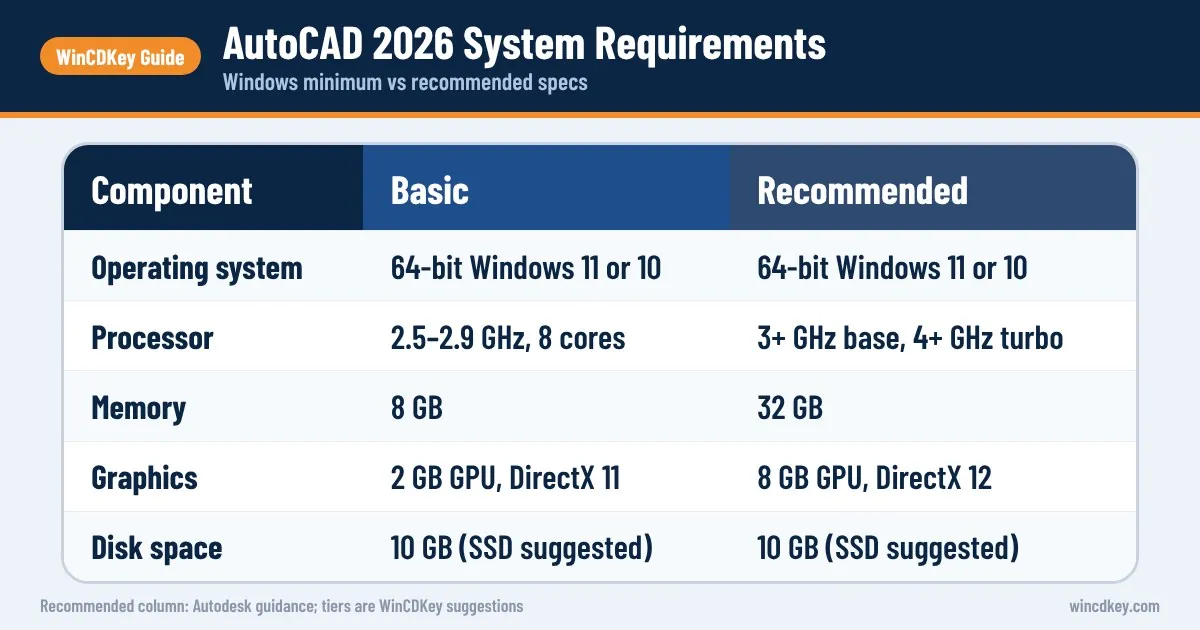
The AutoCAD 2026 system requirements for Windows are 64-bit Windows 11 or Windows 10, a 2.5–2.9 GHz processor with 8 logical cores, 8 GB of RAM (32 GB recommended), a 2 GB DirectX 11 graphics card (8 GB DirectX 12 recommended) and 10 GB of disk space, ideally on an SSD. ARM processors are not supported on Windows.
Key takeaways
- Minimum is 8 GB RAM and a 2 GB GPU, but Autodesk recommends 32 GB RAM and an 8 GB DirectX 12 GPU.
- Single-core clock speed matters more than core count for everyday AutoCAD work.
- Toolsets such as Architecture, MEP and Electrical need 16 GB RAM minimum and 12–21 GB extra disk space each.
- AutoCAD 2026 for Mac supports macOS Ventura, Sonoma and Sequoia on Intel or Apple silicon.
- AutoCAD 2026 still lists Windows 10, but Microsoft ended Windows 10 support on 14 October 2025, so plan on Windows 11.
In this guide
- What are the AutoCAD 2026 system requirements for Windows?
- What processor does AutoCAD 2026 need?
- How much RAM and what GPU do you need for AutoCAD?
- What extra hardware do the toolsets need?
- What are the AutoCAD 2026 requirements for Mac?
- What is the best laptop for AutoCAD 2026?
- How do you check if your PC can run AutoCAD 2026?
- Frequently asked questions
- The bottom line
- Useful links
What are the AutoCAD 2026 system requirements for Windows?
Autodesk publishes two levels for AutoCAD 2026 on Windows: Basic, which will run the software, and Recommended, which keeps larger drawings responsive. The table below reproduces Autodesk’s published figures for AutoCAD 2026 including specialised toolsets. Basic is fine for light 2D work; Recommended is what we would buy for daily professional use.
| Component | Basic | Recommended |
|---|---|---|
| Operating system | 64-bit Windows 11 or Windows 10 (see Autodesk’s Product Support Lifecycle) | |
| Processor | 2.5–2.9 GHz, 8 logical cores (base); ARM not supported | 3+ GHz base, 4+ GHz turbo |
| Memory | 8 GB | 32 GB |
| Display resolution | 1920 x 1080 with True Color | Up to 3840 x 2160 (4K) with a Recommended display card |
| Display card | 2 GB GPU, 29 GB/s bandwidth, DirectX 11 compliant | 8 GB GPU, 106 GB/s bandwidth, DirectX 12 compliant |
| Disk space | 10 GB (SSD suggested) | |
| .NET | .NET 8 | |
| Pointing device | MS-Mouse compliant | |
For large datasets, point clouds and 3D modelling, Autodesk adds a further tier: 32 GB RAM or more, 6 GB of free disk beyond the installation, and a 4K-capable workstation-class card with 12 GB VRAM or more. Always confirm against Autodesk’s live AutoCAD 2026 system requirements article, because Autodesk updates it after release.
A note on Windows 10
Autodesk still lists Windows 10 for AutoCAD 2026, but Microsoft ended Windows 10 support on 14 October 2025 (apart from Extended Security Updates), and Autodesk ties OS support to its own lifecycle policy. AutoCAD 2027 has moved to Windows 11 only. If you are buying or rebuilding a CAD PC now, install Windows 11; our Windows 11 system requirements guide explains the TPM and Secure Boot checks.
What processor does AutoCAD 2026 need?
AutoCAD 2026 needs a 64-bit x86 processor running at 2.5–2.9 GHz with 8 logical cores as a minimum, and Autodesk recommends 3 GHz or more base with 4 GHz or more turbo. ARM-based Windows processors are not supported. For most drafting, a fast clock speed matters more than a very high core count.
Much of AutoCAD’s everyday work, such as opening drawings, regenerating, editing and selecting objects, runs largely on one thread. A desktop chip with a high boost clock usually feels quicker than a server-class processor with many slower cores.
Extra cores still help in places: background plotting and publishing, rendering in full AutoCAD, and running other applications alongside. A current mid-range Intel Core or AMD Ryzen desktop processor with strong single-thread performance is the sweet spot for most users.
How much RAM and what GPU do you need for AutoCAD?
AutoCAD 2026 runs with 8 GB of RAM, but Autodesk recommends 32 GB, and 16 GB is the realistic floor for professional 2D work with xrefs and images. For graphics, the minimum is a 2 GB DirectX 11 card; Autodesk recommends an 8 GB DirectX 12 card with dedicated VRAM. DirectX 12 feature level 12_0 is needed for the “Fast” visual styles.
RAM
- 8 GB: simple 2D drawings, one drawing at a time, little else open.
- 16 GB: typical 2D professional work with xrefs, PDFs and a browser alongside.
- 32 GB: large drawings, toolsets, 3D models and several drawings open at once.
- 64 GB: point clouds, large 3D models or AutoCAD alongside Revit or Navisworks.
Graphics card
AutoCAD uses the GPU for view manipulation, line smoothing and text and linetype generation, not only for 3D. Autodesk recommends a card with dedicated VRAM, and integrated graphics can struggle with dense drawings at high resolutions.
Gaming GeForce or Radeon cards generally run AutoCAD well. Workstation cards (NVIDIA RTX professional or AMD Radeon PRO) cost more and come with certified drivers, which matters most for 3D and point clouds. Whichever you choose, install the latest driver from the manufacturer’s site, which fixes a large share of the display glitches users report.
What extra hardware do the toolsets need?
The specialised toolsets included with full AutoCAD on Windows add their own requirements on top of the base product. Most need 16 GB of RAM as a basic minimum with 32 GB recommended, plus between 1 GB and 21 GB of extra disk space each. Plan for the toolsets you will actually install, not just base AutoCAD.
| Toolset (Windows only) | Extra disk space | Memory |
|---|---|---|
| AutoCAD Architecture | 20 GB | 16 GB basic, 32 GB recommended |
| AutoCAD MEP | 21 GB | 16 GB basic, 32 GB recommended |
| AutoCAD Electrical | 20 GB | 16 GB basic, 32 GB recommended |
| AutoCAD Map 3D | 20 GB | 16 GB basic, 32 GB recommended |
| AutoCAD Mechanical | 12 GB | 16 GB basic, 32 GB recommended |
| AutoCAD Plant 3D | 12 GB | 32 GB recommended for 3D modelling |
| AutoCAD Raster Design | 1 GB | As base AutoCAD |
AutoCAD Electrical also needs the 64-bit Microsoft Access runtime unless 64-bit Office 2016 or later is installed, and it does not support machines with 32-bit Office. Map 3D has its own database and FDO provider requirements. AutoCAD LT has no toolsets and is lighter overall; see our AutoCAD vs AutoCAD LT comparison if you are deciding between them.
What are the AutoCAD 2026 requirements for Mac?
AutoCAD 2026 for Mac runs on macOS Sequoia 15, Sonoma 14 and Ventura 13, on Intel or Apple M-series Macs that support Metal graphics. Autodesk lists 8 GB of RAM as basic and 16 GB or more as recommended, with 8 GB of free disk space for download and installation. Toolsets are not available on Mac.
| Component | AutoCAD 2026 for Mac |
|---|---|
| Operating system | macOS Sequoia 15, Sonoma 14, Ventura 13 |
| Model | Macs compatible with macOS Ventura or later that support Metal |
| CPU | 64-bit Intel or Apple M-series |
| Memory | 8 GB basic, 16 GB or more recommended |
| Display | 1280 x 800 basic; 2880 x 1800 Retina for high resolution |
| Disk space | 8 GB free |
| Disk format | APFS or Mac OS Extended (Journaled), encrypted or not |
Newer macOS releases may be added after launch, so check Autodesk’s article before upgrading macOS on a production machine.
What is the best laptop for AutoCAD 2026?
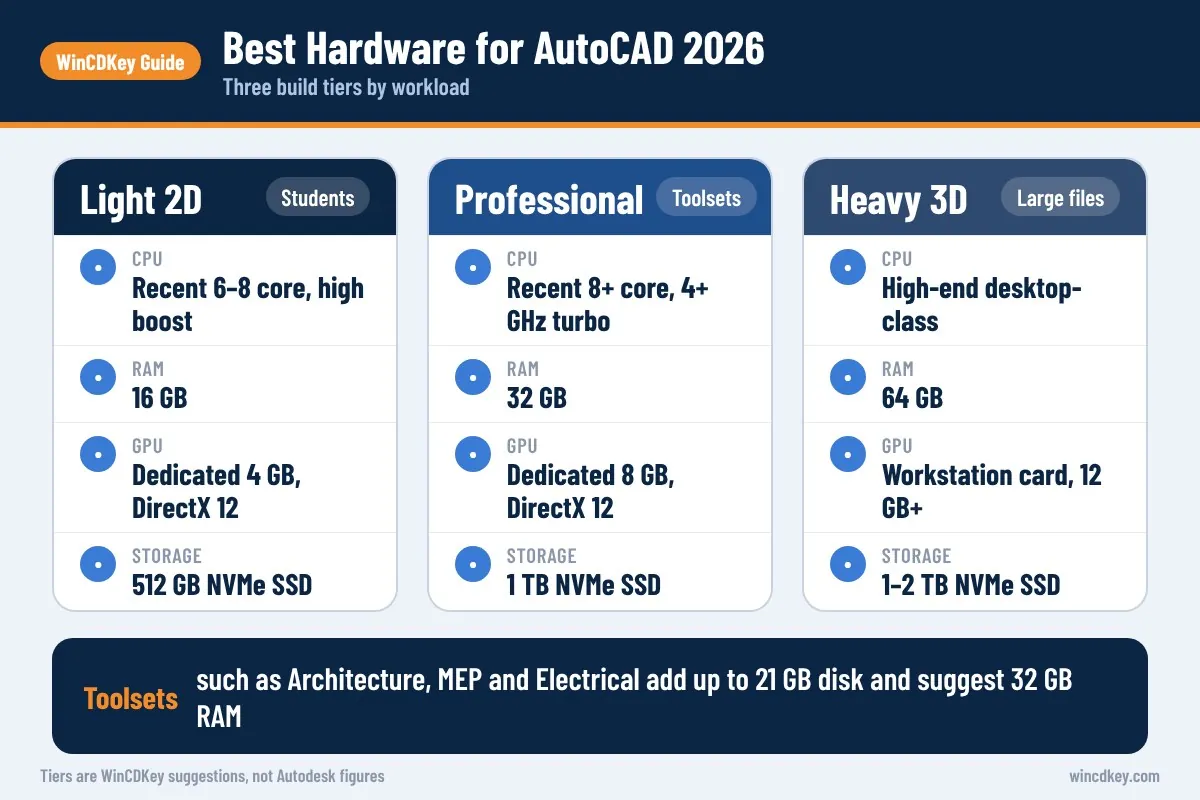
The best laptop for AutoCAD 2026 is one that meets Autodesk’s Recommended tier: a high-clock Intel Core or AMD Ryzen processor, 32 GB of RAM, a dedicated GPU with 8 GB of VRAM, a fast NVMe SSD and a good-quality 1920 x 1080 or higher screen. For light 2D work, 16 GB RAM and a 4–6 GB GPU is a workable compromise.
| Use case | CPU | RAM | GPU | Storage |
|---|---|---|---|---|
| Students and light 2D | Recent 6–8 core, high boost clock | 16 GB | Dedicated 4 GB, DirectX 12 | 512 GB NVMe SSD |
| Professional 2D and toolsets | Recent 8+ core, 4+ GHz turbo | 32 GB | Dedicated 8 GB, DirectX 12 | 1 TB NVMe SSD |
| 3D, point clouds, large files | High-end desktop-class CPU | 64 GB | Workstation card, 12 GB+ VRAM | 1–2 TB NVMe SSD |
Two practical tips: buy a laptop whose RAM can be upgraded later, and avoid ARM-based Windows laptops for AutoCAD, as Autodesk does not support them. For Windows on a CAD workstation with more than one CPU socket or very large memory, look at Windows 11 Pro for Workstations; for everyone else, Windows 11 Pro is plenty.
Hardware ready? Get your AutoCAD licence
WinCDKey offers AutoCAD 2026 for Windows and the newer AutoCAD 2027 for Windows as 1-year or 3-year subscription licences. Remember that AutoCAD 2027 requires Windows 11.
How do you check if your PC can run AutoCAD 2026?
You can check your PC in a few minutes using tools built into Windows. Settings shows your Windows version, processor and RAM; Task Manager shows your GPU and its memory; and the DirectX Diagnostic Tool confirms DirectX support. Compare the results with the requirements table above before you install.
- Press
Win + I, open System > About and note the processor, installed RAM, system type (must be 64-bit, x64-based) and Windows edition. - Press
Ctrl + Shift + Escto open Task Manager, select Performance > GPU and note the card name and dedicated GPU memory. - Press
Win + R, typedxdiagand press Enter. On the Display tab, check the DirectX feature levels; 12_0 or higher enables AutoCAD’s Fast visual styles. - Open This PC and confirm at least 10 GB free on an SSD, plus space for any toolsets.
- Update your graphics driver from NVIDIA, AMD or Intel before installing AutoCAD.
When everything checks out, follow our AutoCAD 2026 download, install and activation guide.
Frequently asked questions
Can AutoCAD 2026 run on 8 GB RAM?
Yes. Autodesk lists 8 GB as the Basic memory requirement for AutoCAD 2026 on Windows and Mac. It is workable for simple 2D drawings with few other programs open. Large drawings, xrefs, images, toolsets or 3D will quickly feel slow, so 16 GB is a sensible minimum for daily work and 32 GB is Autodesk’s recommendation.
Does AutoCAD 2026 need a graphics card?
AutoCAD 2026 needs a DirectX 11 compliant GPU with at least 2 GB of memory, and Autodesk recommends a card with dedicated VRAM. Modern integrated graphics can run simple 2D drawings, but a dedicated 8 GB DirectX 12 card is recommended for smooth panning, zooming and 3D. The GPU handles line smoothing and text generation too.
Does AutoCAD 2026 run on Windows 10?
Autodesk’s AutoCAD 2026 requirements list 64-bit Windows 10 and Windows 11, subject to Autodesk’s product support lifecycle. However, Microsoft ended Windows 10 support on 14 October 2025 and AutoCAD 2027 supports Windows 11 only. For a machine you will use for several years, Windows 11 is the safer choice.
Can I run AutoCAD 2026 on an ARM laptop?
Not on Windows. Autodesk states that ARM processors are not supported for AutoCAD 2026 on Windows, so Snapdragon-based Windows laptops are not a supported option. On Mac, AutoCAD 2026 for Mac runs natively on Apple M-series chips, which are ARM-based. If you need the Windows toolsets, choose an Intel or AMD laptop.
How much disk space does AutoCAD 2026 need?
Base AutoCAD 2026 for Windows needs 10 GB of disk space, and Autodesk suggests an SSD. Each specialised toolset adds more: about 20 GB for Architecture, Electrical or Map 3D, 21 GB for MEP, and 12 GB for Mechanical or Plant 3D. Leave additional free space for temporary files, updates and your project drawings.
Are AutoCAD LT 2026 requirements lower?
Generally, yes. AutoCAD LT 2026 is 2D only and has no toolsets, so it needs less disk space and copes better with modest memory and graphics. It is still a 64-bit Windows or macOS application with similar processor guidance. Autodesk publishes a separate AutoCAD LT 2026 requirements article you should check before buying.
The bottom line
AutoCAD 2026 will start on modest hardware, but a fast-clocked CPU, 32 GB of RAM, an 8 GB DirectX 12 GPU and an SSD are what make it pleasant to use every day. Budget extra memory and disk for any toolsets, and choose Windows 11 for longevity. When your hardware is ready, browse our Autodesk licences.
Useful links
| Resource | Why it helps |
|---|---|
| Autodesk: AutoCAD 2026 system requirements | The official, maintained requirements article |
| Autodesk: AutoCAD LT 2026 system requirements | Official figures for the 2D-only LT edition |
| AutoCAD 2026 for Windows | 1-year and 3-year AutoCAD 2026 licences |
| AutoCAD 2027 for Windows | The current release (Windows 11 only) |
| AutoCAD 2026 install guide | Download, install and activate step by step |
| AutoCAD vs AutoCAD LT | Decide whether you need toolsets and 3D |
| Windows 11 system requirements | TPM 2.0 and Secure Boot checks for a new CAD PC |
| Windows 11 Pro | A suitable OS for most CAD workstations |
| Windows 11 Pro for Workstations | For high-end multi-CPU or large-memory machines |
| Autodesk category | All Autodesk licences in one place |


