🎃 HALLOWEEN SALE: 50% OFF best-selling Windows, Office, Autodesk & Server keys — use code GHOST50 Shop the sale →


Office 2024 vs Office 2021: What’s New and Is It Worth Upgrading?

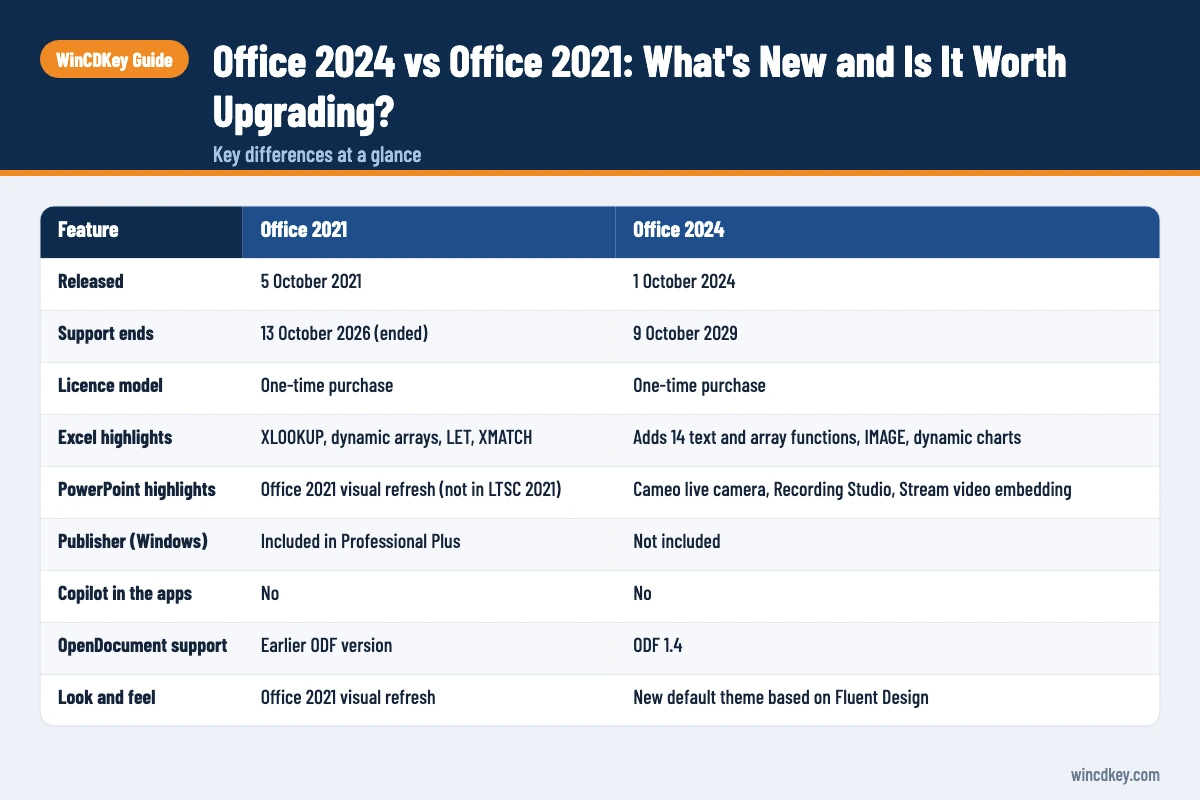
In the Office 2024 vs Office 2021 decision, Office 2024 is now the clear choice. Office 2021 reached end of support on 13 October 2026, so it no longer receives security updates, while Office 2024 is supported until 9 October 2029. Office 2024 also adds new Excel functions, a refreshed design and better Outlook search, though it drops Publisher and, like Office 2021, does not include Copilot.
If you already run Office 2021, the question is less “which is better” and more “how soon should I move”. This guide covers the feature differences app by app, what Office LTSC 2024 changes for organisations, what was removed, and when upgrading is worth it.
Key takeaways
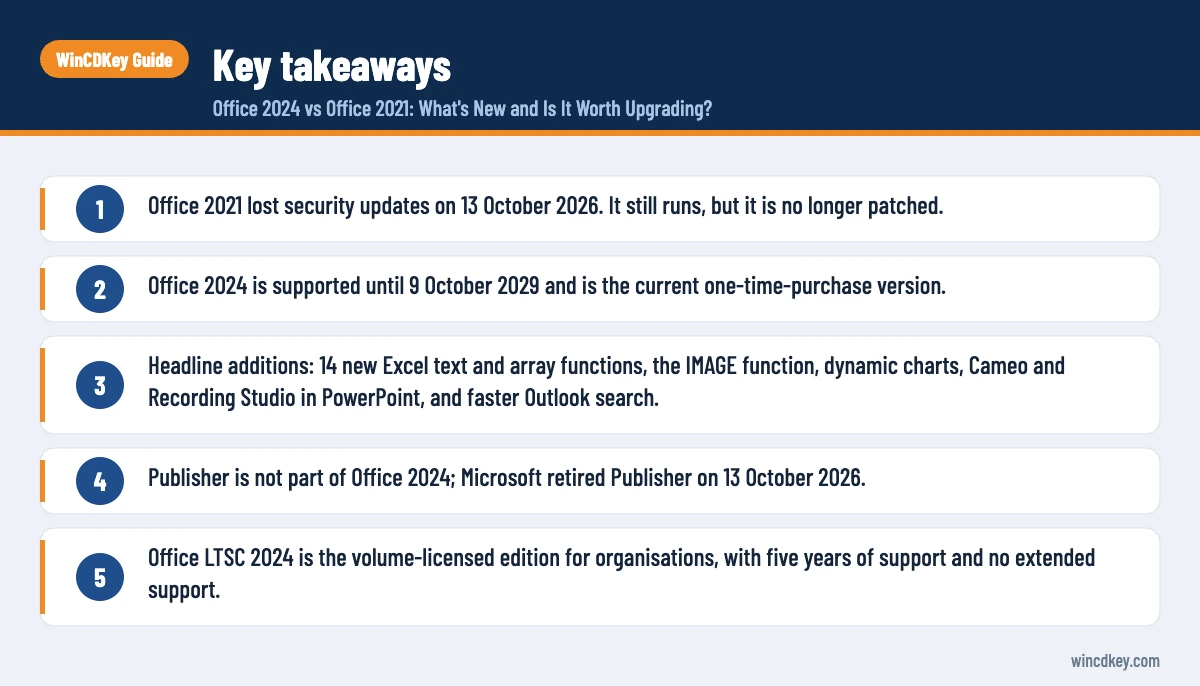
- Office 2021 lost security updates on 13 October 2026. It still runs, but it is no longer patched.
- Office 2024 is supported until 9 October 2029 and is the current one-time-purchase version.
- Headline additions: 14 new Excel text and array functions, the IMAGE function, dynamic charts, Cameo and Recording Studio in PowerPoint, and faster Outlook search.
- Publisher is not part of Office 2024; Microsoft retired Publisher on 13 October 2026.
- Office LTSC 2024 is the volume-licensed edition for organisations, with five years of support and no extended support.
| Office 2021 | Office 2024 | |
|---|---|---|
| Released | 5 October 2021 | 1 October 2024 |
| Support ends | 13 October 2026 (ended) | 9 October 2029 |
| Licence model | One-time purchase | One-time purchase |
| Excel highlights | XLOOKUP, dynamic arrays, LET, XMATCH | Adds 14 text and array functions, IMAGE, dynamic charts |
| PowerPoint highlights | Office 2021 visual refresh (not in LTSC 2021) | Cameo live camera, Recording Studio, Stream video embedding |
| Publisher (Windows) | Included in Professional Plus | Not included |
| Copilot in the apps | No | No |
| OpenDocument support | Earlier ODF version | ODF 1.4 |
| Look and feel | Office 2021 visual refresh | New default theme based on Fluent Design |
In this guide
- What are the main differences between Office 2024 and Office 2021?
- What’s new in Office 2024, app by app?
- What does Office 2021 end of support mean for you?
- What is Office LTSC 2024 and how is it different?
- What did Office 2024 remove or change?
- Office 2024 vs Office 2021: is upgrading worth it?
- Frequently asked questions
- The bottom line
- Useful links
What are the main differences between Office 2024 and Office 2021?
The biggest difference is support: Office 2021 is now unsupported, while Office 2024 receives security updates until October 2029. Beyond that, Office 2024 adds a set of Excel, PowerPoint and Outlook improvements, a new visual theme and ODF 1.4 support, and removes Publisher. Both are perpetual, single-device licences without Copilot.
Day to day, someone moving from Office 2021 will find Office 2024 familiar. The ribbon, file formats and core workflows are the same, so there is no retraining. The gains are incremental features plus three more years of patches.
Both versions run on Windows 10 and Windows 11, according to Microsoft. In practice, a new Office 2024 install belongs on Windows 11, since Windows 10 itself is out of support.
What’s new in Office 2024, app by app?
Office 2024’s main new features are new Excel functions and dynamic charts, Cameo and Recording Studio in PowerPoint, better search in Outlook, session recovery in Word, and a Dataverse connector in Access. Microsoft lists them in its What’s new in Office 2024 article.
Excel 2024
- 14 new text and array functions for splitting, combining and reshaping data.
- The
IMAGEfunction, which places a picture from a web address inside a cell. - Dynamic charts that update automatically when a dynamic array formula recalculates.
- Better performance when several workbooks with independent calculations are open.
Word 2024
- Session recovery reopens your documents after an unexpected shutdown.
- “Like” reactions on comments, and ODF 1.4 support for better compatibility with LibreOffice users.
PowerPoint 2024
- Cameo inserts a live camera feed directly on a slide.
- Recording Studio records narration, ink and video for a self-running presentation.
- Videos stored in Microsoft Stream on SharePoint can be embedded.
Outlook, Access and Visio
- Outlook 2024: faster, more accurate search across mail, attachments, contacts and calendar.
- Access 2024: a Dataverse connector that links databases with the Power Platform.
- Visio 2024: new shapes and stencils, including Azure and Kubernetes shapes in Professional.
We give a fuller tour in what’s new in Microsoft Office 2024.
What does Office 2021 end of support mean for you?
Office 2021 end of support means Microsoft stopped releasing security updates, bug fixes and technical help for it on 13 October 2026. Your installed copy still opens and saves files, and your licence remains valid. The risk is that any new vulnerability, especially in documents or email attachments, will not be fixed.
The date applies to every Office 2021 edition, plus Project 2021, Visio 2021 and Office LTSC 2021, according to Microsoft’s 2026 end-of-support list. Office LTSC 2021 for Mac moved to extended support instead.
We cover what still works, what to watch for and how to stay safe in the meantime in our dedicated Office 2021 end of support guide, so we will not repeat it all here.
What is Office LTSC 2024 and how is it different?
Office LTSC 2024 is the volume-licensed, “Long Term Servicing Channel” version of Office 2024 for businesses and public bodies that need a fixed feature set. It is available through volume licensing agreements, receives five years of mainstream support until 9 October 2029, and has no extended support phase.
Microsoft’s Office LTSC 2024 overview lists the main differences from consumer Office 2024:
- Editions: Office LTSC Professional Plus 2024 and Office LTSC Standard 2024 for Windows, with Project and Visio LTSC 2024 alongside. A Standard for Mac edition is available to volume customers, without Access.
- Extra features: some items, such as the Accessibility ribbon in Excel, automatic meeting shortening in Outlook, and captions and subtitles in PowerPoint, are listed by Microsoft for LTSC only.
- Not preinstalled: Microsoft Teams, which can be added separately.
- Security defaults: ActiveX controls are disabled by default.
- Removed: the Publish to Power BI option in Excel.
If you are choosing between a retail and an LTSC-based edition, our comparison of Office Home & Business 2024 vs Professional Plus 2024 LTSC covers licensing and app differences, and the Office 2024 LTSC install guide walks through deployment.
What did Office 2024 remove or change?
Office 2024 does not include Publisher, which Microsoft retired on 13 October 2026. Office LTSC 2024 also drops Excel’s Publish to Power BI option, ships without Teams preinstalled and disables ActiveX by default. Office Home 2024 replaces the older Home & Student name.
The Publisher change catches people out most often. If you rely on .pub files, convert them to PDF or Word format while you still have a working copy of Publisher, because Office 2024 cannot open them. Word handles most simple flyer and newsletter layouts well enough.
Neither version includes Copilot inside the apps. AI in Word, Excel and PowerPoint requires a Microsoft 365 subscription, a trade-off we weigh up in Microsoft 365 vs Office 2024.
Office 2024 vs Office 2021: is upgrading worth it?
Yes, for anyone who opens email attachments or shares documents, because Office 2021 no longer gets security fixes. The new features are a bonus rather than the main reason. The only users who can reasonably wait are those running Office 2021 on an offline machine for a narrow, fixed task.
Which Office 2024 edition replaces yours?
- Home & Student 2021 → Office Home 2024 for Windows.
- Home & Business 2021 → Office 2024 Home & Business for PC or Mac.
- Professional Plus 2021 → Office 2024 Professional Plus for Windows, minus Publisher.
Not sure whether you need Outlook or commercial use? See Office Home 2024 vs Home & Business 2024.
How to move from Office 2021 to Office 2024
- Export any Publisher files you still need to PDF or .docx.
- Back up Outlook data files and custom templates.
- Uninstall Office 2021 from Settings > Apps > Installed apps, or use our guide to completely uninstall Office.
- Restart, then install Office 2024 and activate it under File > Account with your new key.
Moving off Office 2021?
Our Office 2024 range covers Home, Home & Business and Professional Plus as one-time purchases with digital delivery. If you are unsure which edition replaces yours, our support team can check before you buy.
Frequently asked questions
Can I still use Office 2021 after end of support?
Yes. Office 2021 keeps working after 13 October 2026 and your licence stays valid. You can open, edit and save files as usual. Microsoft simply stops releasing security updates, bug fixes and support, so the software becomes more exposed to new threats, particularly through email attachments and downloaded documents.
Is Office 2024 better than Office 2021?
Yes, for most people. Office 2024 is supported until October 2029, while Office 2021 is no longer supported. It also adds new Excel functions, dynamic charts, PowerPoint Cameo and Recording Studio, and faster Outlook search. The trade-off is that Publisher is no longer included.
Does Office 2024 include Publisher?
No. Publisher is not included in any Office 2024 or Office LTSC 2024 edition. Microsoft retired Publisher on 13 October 2026, including from Microsoft 365 plans. If you have .pub files, export them to PDF or Word format before you remove your old version of Office.
Is Office 2024 a free upgrade from Office 2021?
No. Office 2024 is a separate one-time purchase, and Microsoft does not offer a discounted or free upgrade path from Office 2021. Your files carry over without conversion, but you need a new Office 2024 licence or a Microsoft 365 subscription to use the newer version.
What is the difference between Office 2024 and Office LTSC 2024?
Office 2024 is sold to consumers and small businesses as Home and Home & Business editions. Office LTSC 2024 is the volume-licensed edition for organisations, including Professional Plus and Standard. Both share the same core features and the same 9 October 2029 end date, with a few extras listed for LTSC only.
Does Office 2024 have Copilot?
No. Office 2024 and Office 2021 do not include Copilot inside Word, Excel, PowerPoint or Outlook. Copilot in the apps requires a Microsoft 365 subscription such as Personal, Family or Premium, or a business plan with a Copilot licence. You can still use the free Copilot app separately.
The bottom line
Office 2021 has reached the end of the road for security updates, and Office 2024 is its supported successor until 2029. If you open attachments or share files, upgrading is worth it now, and the new Excel and PowerPoint features come along for free. Browse our Office 2024 keys to find your edition.
Useful links
| Resource | Why it helps |
|---|---|
| Office 2021 end of support | What changes for existing Office 2021 users |
| What’s new in Office 2024 | A fuller tour of the new features |
| Home & Business 2024 vs Pro Plus 2024 LTSC | Retail vs LTSC-based editions |
| Office 2024 LTSC install guide | Installing and activating LTSC 2024 |
| Office 2024 Professional Plus | Replacement for Office 2021 Pro Plus |
| Office 2024 range | All one-time-purchase editions |
| What’s new in Office 2024 (Microsoft) | Official feature list |
| Office LTSC 2024 overview | Editions, removals and requirements |
| Microsoft end of support 2026 | Confirms Office 2021 and Publisher dates |


