🎃 HALLOWEEN SALE: 50% OFF best-selling Windows, Office, Autodesk & Server keys — use code GHOST50 Shop the sale →


SQL Server Standard vs Enterprise vs Express: Which Do You Need?

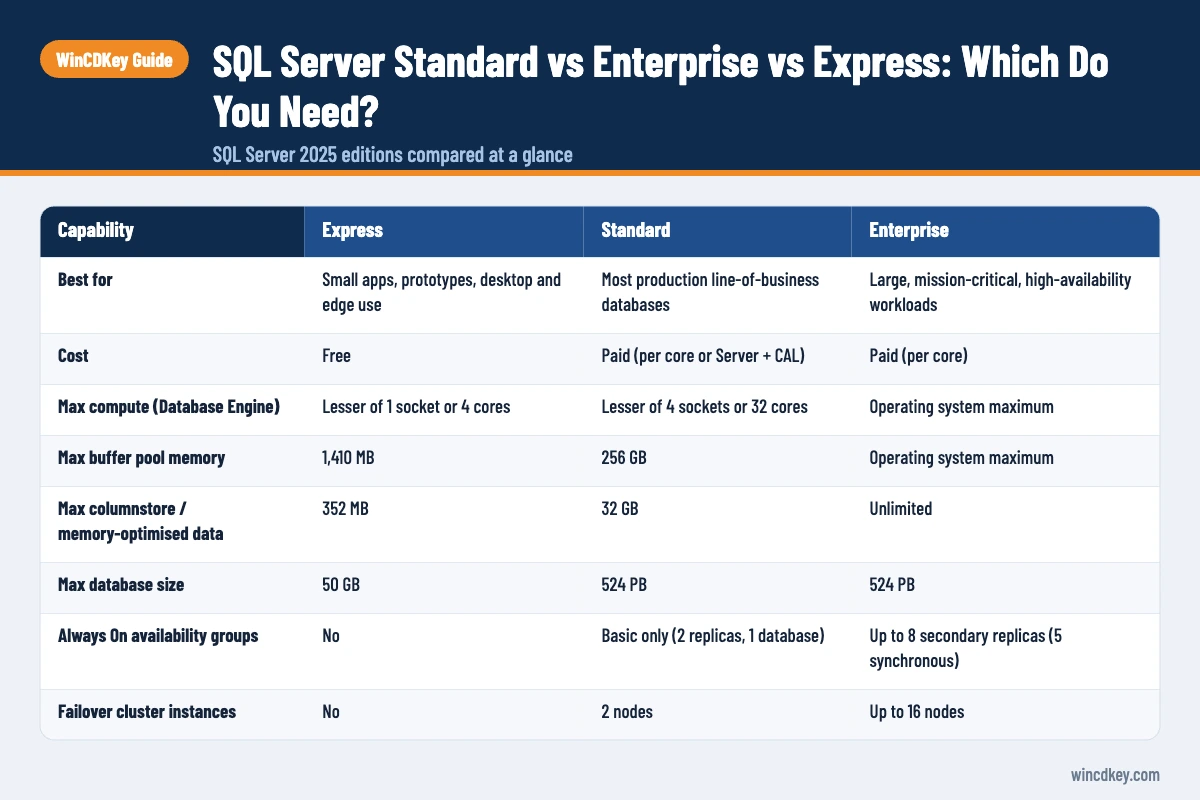
In SQL Server Standard vs Enterprise, SQL Server 2025 Standard runs most business databases well within its limits of 32 cores and 256 GB of buffer pool memory per instance. Enterprise removes those limits and adds online index operations and full Always On availability groups. Express is free but capped at 4 cores and 50 GB per database.
SQL Server 2025 also changed the edition line-up: Web edition is gone, Express has absorbed Advanced Services, and there is a new free Standard Developer edition. Below are the limits that actually decide your choice, checked against Microsoft Learn in October 2026.
Key takeaways
- SQL Server 2025 Standard: up to 4 sockets or 32 cores, 256 GB buffer pool, basic availability groups, and Resource Governor (new in 2025).
- Enterprise: operating-system maximum compute and memory, online index rebuilds, availability groups with up to 8 secondary replicas.
- Express: free, 1 socket or 4 cores, about 1.4 GB buffer pool, 50 GB maximum database size.
- Developer editions (Enterprise and Standard) are free for development and testing only, never production.
- Most small and mid-sized businesses outgrow Express long before they need Enterprise.
In this guide
- SQL Server 2025 editions compared at a glance
- What editions does SQL Server 2025 come in?
- What are the SQL Server Express limits?
- SQL Server Standard vs Enterprise: what’s the real difference?
- How is SQL Server licensed: per core or Server + CAL?
- Which SQL Server edition do you need?
- Frequently asked questions
- The bottom line
- Useful links
SQL Server 2025 editions compared at a glance
Verdict: use Express for small apps under 50 GB, Standard for most production business systems, and Enterprise only when you need more than 32 cores or 256 GB of buffer pool memory, multi-replica availability groups, or online maintenance with no downtime. All figures are per instance and come from Microsoft’s SQL Server 2025 editions and supported features page.
| Capability | Express | Standard | Enterprise |
|---|---|---|---|
| Best for | Small apps, prototypes, desktop and edge use | Most production line-of-business databases | Large, mission-critical, high-availability workloads |
| Cost | Free | Paid (per core or Server + CAL) | Paid (per core) |
| Max compute (Database Engine) | Lesser of 1 socket or 4 cores | Lesser of 4 sockets or 32 cores | Operating system maximum |
| Max buffer pool memory | 1,410 MB | 256 GB | Operating system maximum |
| Max columnstore / memory-optimised data | 352 MB | 32 GB | Unlimited |
| Max database size | 50 GB | 524 PB | 524 PB |
| Always On availability groups | No | Basic only (2 replicas, 1 database) | Up to 8 secondary replicas (5 synchronous) |
| Failover cluster instances | No | 2 nodes | Up to 16 nodes |
| Online index create and rebuild | No | No | Yes |
| Resource Governor | No | Yes (new in 2025) | Yes |
| Transparent data encryption and backup encryption | No | Yes | Yes |
| Backup compression | No | Yes | Yes |
| SQL Server Agent jobs | No | Yes | Yes |
What editions does SQL Server 2025 come in?
SQL Server 2025 comes in three production editions, Enterprise, Standard and Express, plus two free development editions, Enterprise Developer and Standard Developer, and a time-limited Evaluation edition. Web edition has been discontinued, and Express with Advanced Services no longer exists as a separate download because Express now includes those features.
SQL Server 2025 became generally available on 18 November 2025. According to Microsoft’s lifecycle page, mainstream support runs to January 2031 and extended support to January 2036.
Why the Standard Developer edition matters
Previously, the only free developer edition behaved like Enterprise. Teams built and tested on Enterprise features, then hit errors in production on Standard. Standard Developer has Standard’s features and limits, so what works in testing works in production. Neither Developer edition may be used for live workloads.
What changed for Standard in 2025
Standard’s ceiling rose from the lesser of 4 sockets or 24 cores to 4 sockets or 32 cores, and buffer pool memory from 128 GB to 256 GB. Resource Governor, previously Enterprise-only, now works in Standard. The What’s new in SQL Server 2025 page lists these alongside the new vector data type, native JSON and regular expression support.
What are the SQL Server Express limits?
SQL Server 2025 Express is limited to the lesser of 1 socket or 4 cores, 1,410 MB of buffer pool memory, 352 MB for columnstore and memory-optimised data, and a 50 GB maximum relational database size per database. It is free for production use, but it has no SQL Server Agent, no backup compression and no high-availability features.
The 50 GB cap is a big rise from 10 GB in earlier versions, which keeps many small accounting, point-of-sale and line-of-business apps on Express for longer. Memory is usually the limit people hit first. With only about 1.4 GB for caching data, a busy database with 15 or 20 users starts reading from disk constantly and slows down.
Signs you have outgrown Express
- Your largest database is approaching 50 GB.
- Reports and queries slow down as more users connect, even on a fast server.
- You are scripting backups with Windows Task Scheduler because Express has no SQL Server Agent.
- You need a standby copy of the database for failover.
SQL Server Standard vs Enterprise: what’s the real difference?
The real difference between SQL Server Standard and Enterprise is scale and uptime. Standard caps one instance at 32 cores and 256 GB of buffer pool memory and offers basic two-replica availability groups. Enterprise has no edition limits on compute or memory, rebuilds indexes online, and supports multi-database availability groups with readable secondaries.
Performance and scale
For most databases under a few hundred gigabytes, 32 cores and 256 GB is plenty. The limit applies per instance, not per server, so Standard simply doesn’t use extra cores or memory above the cap. If you would need more, Enterprise is the edition that uses all the hardware you license.
Availability and maintenance
Basic availability groups in Standard protect one database with one secondary replica, which you can’t read from. Enterprise availability groups can include several databases that fail over together, up to eight secondaries, and readable replicas for reporting. Enterprise’s online index rebuilds also let you maintain large tables during working hours without locking users out.
Security
Security is closer than many people assume. Standard in SQL Server 2025 includes Transparent Data Encryption, backup encryption, Always Encrypted, row-level security and Extensible Key Management. Security is rarely a reason to buy Enterprise on its own.
How is SQL Server licensed: per core or Server + CAL?
SQL Server Standard can be licensed per core or with Server + CAL, while Enterprise is licensed per core for new purchases. Per-core licences are sold in 2-core packs, with a minimum of 4 core licences per physical processor or per virtual machine. Server + CAL suits small user counts; per core suits web-facing or large user bases.
With Server + CAL, you license the server, then each user or device that accesses it. With per-core licensing, user numbers don’t matter, which is why it is the only sensible model for public websites or apps with many external users. Express and the Developer editions need no licence purchase.
Don’t forget the operating system
SQL Server licensing covers the database engine only. The Windows Server underneath needs its own licence and CALs. If you are planning both, our guide to Windows Server 2025 licensing, cores and CALs explains that side, and Windows Server 2025 Standard is the usual host for a single SQL Server.
Moving up from Express?
SQL Server 2025 Standard lifts the 50 GB and 4-core limits and adds SQL Server Agent, backup compression and basic availability groups. If your application vendor certifies only the previous release, SQL Server 2022 Standard is also available.
Which SQL Server edition do you need?
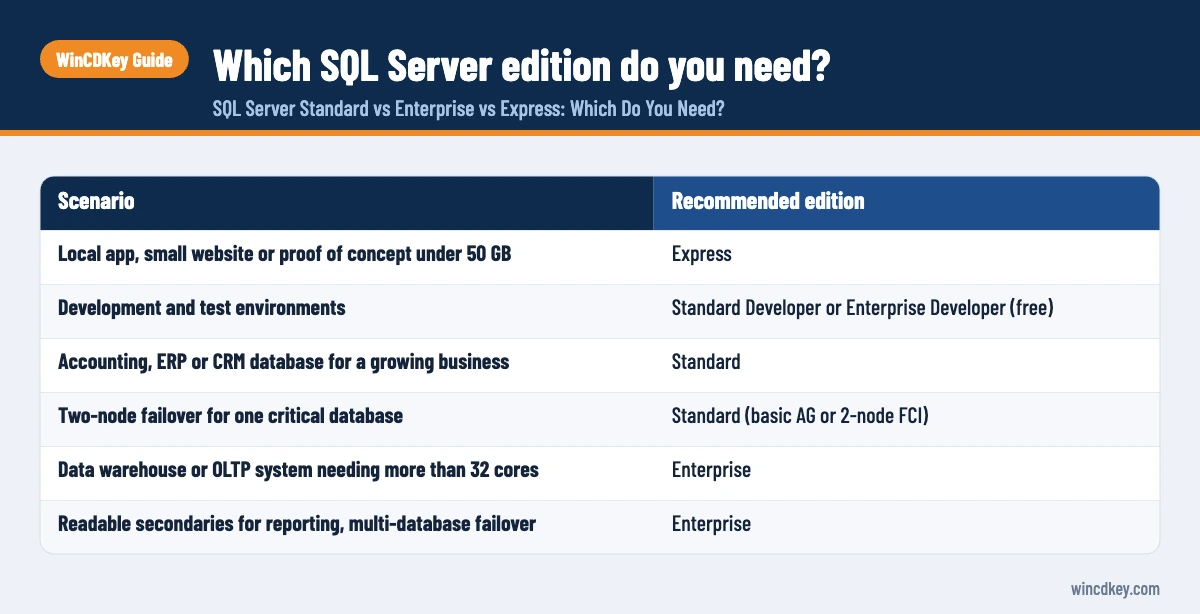
Choose Express if your databases stay under 50 GB with light concurrent use. Choose Standard for nearly every production business system that has outgrown Express. Choose Enterprise when one instance needs more than 32 cores or 256 GB of buffer pool, when several databases must fail over together, or when maintenance windows are unacceptable.
| Scenario | Recommended edition |
|---|---|
| Local app, small website or proof of concept under 50 GB | Express |
| Development and test environments | Standard Developer or Enterprise Developer (free) |
| Accounting, ERP or CRM database for a growing business | Standard |
| Two-node failover for one critical database | Standard (basic AG or 2-node FCI) |
| Data warehouse or OLTP system needing more than 32 cores | Enterprise |
| Readable secondaries for reporting, multi-database failover | Enterprise |
Before upgrading, check the edition your application vendor supports. Our SQL Server 2025 Standard download and install guide covers setup, including entering the product key to move from Evaluation or Developer to Standard. You can compare all versions in our SQL Server category.
Frequently asked questions
Is SQL Server Express free for commercial use?
Yes. SQL Server 2025 Express is free to download and can be used in production, including commercial applications. Its limits are technical rather than licensing ones: the lesser of 1 socket or 4 cores, about 1.4 GB of buffer pool memory, and 50 GB per database. It also lacks SQL Server Agent and high-availability features.
What is the maximum database size in SQL Server Express 2025?
The maximum relational database size in SQL Server 2025 Express is 50 GB per database, up from 10 GB in SQL Server 2022 and earlier. The limit applies to each database’s data files, not the whole instance, so an instance can hold several databases, each up to 50 GB.
How many cores can SQL Server 2025 Standard use?
SQL Server 2025 Standard uses the lesser of 4 sockets or 32 cores per instance, up from 24 cores in SQL Server 2022. Buffer pool memory is capped at 256 GB per instance. If the server has more cores or memory than that, Standard simply doesn’t use the extra capacity.
Can I use SQL Server Developer edition in production?
No. Both SQL Server 2025 Enterprise Developer and Standard Developer editions are licensed for development, testing and demonstration only. Running a live workload on them breaches the licence terms. For production, buy Standard or Enterprise, or use Express if its limits fit your workload.
Is there a SQL Server 2025 Web edition?
No. Microsoft discontinued Web edition with SQL Server 2025. Hosting providers and web workloads now move to Standard or Enterprise under per-core licensing. SQL Server 2022 Web edition remains supported under that version’s lifecycle, but it isn’t carried forward into 2025.
Can I upgrade from SQL Server Express to Standard without reinstalling?
Yes. SQL Server Setup includes an Edition Upgrade option under Maintenance. You run setup from the Standard media, choose Edition Upgrade, enter the Standard product key and select the instance. Databases stay in place, though you should take a full backup first and plan a short restart.
The bottom line
Express is a good start, Standard is the right edition for most businesses, and Enterprise is for workloads that need more hardware or uptime than Standard allows. Developers choosing tools for SQL work may also want our comparison of Visual Studio Professional vs Enterprise.
Useful links
| Resource | Why it helps |
|---|---|
| SQL Server category | All SQL Server versions and editions |
| SQL Server 2025 Standard | Current Standard edition licence |
| SQL Server 2022 Standard | For apps certified on the previous release |
| SQL Server 2025 Standard install guide | Download, setup and key entry |
| Windows Server 2025 licensing explained | Licensing the operating system under SQL Server |
| Windows Server 2025 Standard | Typical host OS for SQL Server |
| Visual Studio Professional vs Enterprise | Choosing development tools |
| Microsoft: SQL Server 2025 editions and features | Official limits and feature matrix |
| Microsoft: what’s new in SQL Server 2025 | Edition changes and new features |
| Microsoft: SQL Server 2025 lifecycle | Support end dates |


