🎃 HALLOWEEN SALE: 50% OFF best-selling Windows, Office, Autodesk & Server keys — use code GHOST50 Shop the sale →


Visio Standard vs Professional: Which Edition Fits Your Diagrams?

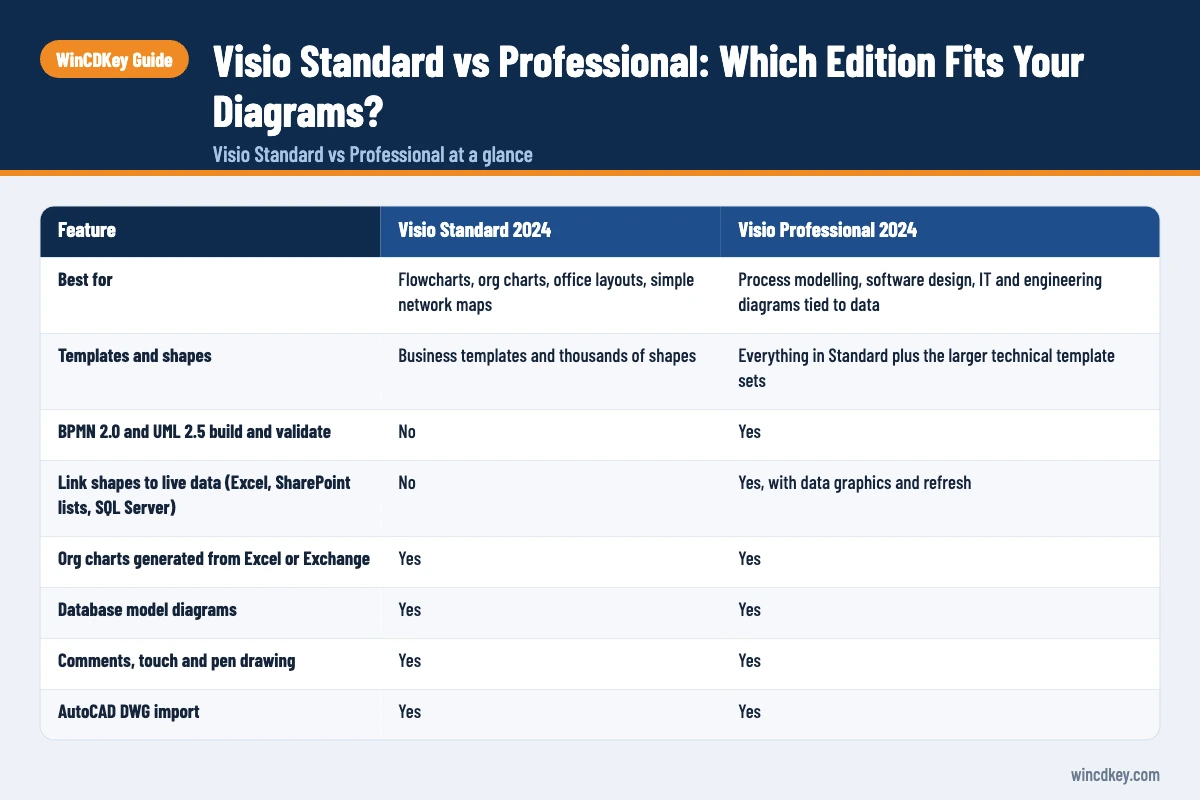
In the Visio Standard vs Professional choice, Standard 2024 handles everyday diagrams such as flowcharts, org charts, floor plans and basic network drawings. Professional 2024 adds two things: diagrams that are validated against BPMN 2.0 and UML 2.5, and shapes linked to live data from Excel, SharePoint lists or SQL Server. If you only need to draw and share, Standard is enough.
Both are one-time purchases for a single Windows PC. Neither includes real-time co-authoring, which Microsoft keeps for the Visio Plan 2 subscription. The rest of this guide shows where each edition fits and where people commonly overspend.
Key takeaways
- Visio Professional 2024 = everything in Standard 2024 + BPMN 2.0/UML 2.5 validation + live data linking with data graphics.
- Both editions include the same templates interface, comments, touch drawing, database model diagrams and org charts generated from Excel.
- Co-authoring and Data Visualizer need Visio Plan 2. Neither perpetual edition has them.
- Both 2024 editions are supported until October 2029 and run on Windows only.
- Choose Professional if your diagrams must follow a notation or show changing data. Otherwise Standard does the job for less.
In this guide
- Visio Standard vs Professional at a glance
- What is Visio used for?
- What does Visio Professional add over Standard?
- Which Visio edition should you buy?
- How do Visio Plan 1 and Plan 2 fit in?
- Will Visio 2024 work alongside your Office installation?
- Frequently asked questions
- The bottom line
- Useful links
Visio Standard vs Professional at a glance
Verdict: buy Visio Standard 2024 for general business diagrams, and Visio Professional 2024 if you model processes in BPMN, design software in UML, or want diagrams that refresh from a data source. The table below sets out the verified differences, based on Microsoft’s own product pages for the two 2024 editions.
| Feature | Visio Standard 2024 | Visio Professional 2024 |
|---|---|---|
| Best for | Flowcharts, org charts, office layouts, simple network maps | Process modelling, software design, IT and engineering diagrams tied to data |
| Templates and shapes | Business templates and thousands of shapes | Everything in Standard plus the larger technical template sets |
| BPMN 2.0 and UML 2.5 build and validate | No | Yes |
| Link shapes to live data (Excel, SharePoint lists, SQL Server) | No | Yes, with data graphics and refresh |
| Org charts generated from Excel or Exchange | Yes | Yes |
| Database model diagrams | Yes | Yes |
| Comments, touch and pen drawing | Yes | Yes |
| AutoCAD DWG import | Yes | Yes |
| Real-time co-authoring | No (Visio Plan 2 only) | No (Visio Plan 2 only) |
| Licence | One-time purchase, one Windows PC | One-time purchase, one Windows PC |
| Microsoft list price (UK) | £339.99 | £639.99 |
| Support ends | October 2029 | October 2029 |
Microsoft’s prices were checked in October 2026 and can change. Retailers, including WinCDKey, usually sell below list, so compare the edition before you compare the price.
What is Visio used for?
Visio is Microsoft’s diagramming application for turning processes, structures and systems into clear drawings. Typical uses include flowcharts, organisation charts, office floor plans, IT network maps, timelines, database models and software diagrams. Shapes stay connected when you move them, so diagrams can be rearranged without redrawing every line.
That last point is why people pick Visio over drawing tools in PowerPoint. Connectors are “glued” to shapes, and each shape can carry its own data fields, such as an owner, a cost or an IP address.
Who uses each edition in practice
Office managers, HR teams and team leads mostly draw org charts, process flows and seating plans. That work sits comfortably in Standard. Business analysts, IT administrators, solution architects and engineers lean on notation rules and data, which is where Professional earns its higher price.
What does Visio Professional add over Standard?
Visio Professional adds standards-based diagram validation and live data connections. You can build BPMN 2.0 process maps and UML 2.5 software diagrams and have Visio check them against the rules, and you can link shapes to external data so colours, icons and values update when the source changes. Everything else is shared with Standard.
BPMN and UML validation
Validation is more useful than it sounds. When a BPMN gateway has no outgoing flow, or a UML class diagram has a broken relationship, Visio flags it in an issues window. Analysts handing process maps to developers or auditors get fewer “this diagram doesn’t make sense” round trips.
If nobody downstream expects BPMN or UML notation, you will rarely touch this feature. A plain flowchart in Standard does the same job.
Live data linking and data graphics
According to Microsoft’s guide to importing data into Visio shapes, external data import is available “with Visio Professional and subscription versions”. You link rows from a spreadsheet or database to shapes, then apply data graphics such as traffic lights, progress bars or text callouts.
Here is the cause and effect that matters: because the link is live, a refresh changes the diagram when the source changes. A server rack diagram can turn a shape red when a status column says “offline”, without anyone editing the drawing. In Standard you would update every shape by hand.
Opening Professional files in Standard
Both editions use the same .vsdx file format, so a Standard user can open a diagram made in Professional. What they lose is the tooling around it: no data refresh and no notation validation. Mixed teams work, but the people who maintain data-driven diagrams need Professional.
Which Visio edition should you buy?
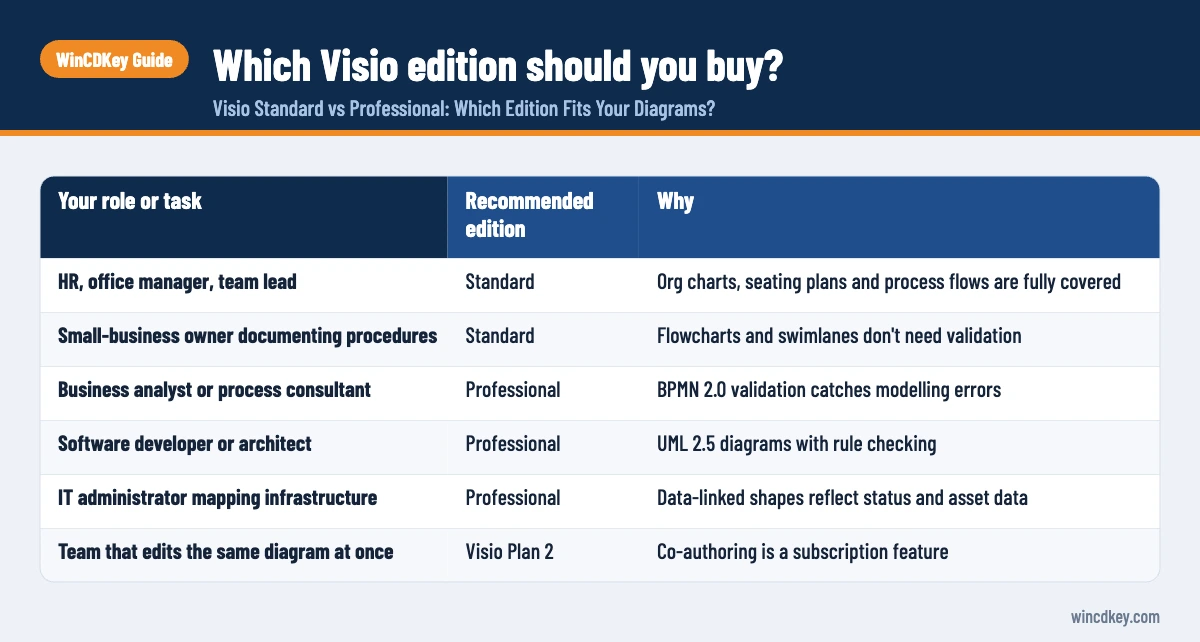
Buy Visio Standard 2024 if your diagrams are drawings you create and share, such as process flows, org charts and layouts. Buy Visio Professional 2024 if you work in BPMN or UML, maintain network or infrastructure diagrams fed by a data source, or need diagrams that stay accurate without manual edits.
| Your role or task | Recommended edition | Why |
|---|---|---|
| HR, office manager, team lead | Standard | Org charts, seating plans and process flows are fully covered |
| Small-business owner documenting procedures | Standard | Flowcharts and swimlanes don’t need validation |
| Business analyst or process consultant | Professional | BPMN 2.0 validation catches modelling errors |
| Software developer or architect | Professional | UML 2.5 diagrams with rule checking |
| IT administrator mapping infrastructure | Professional | Data-linked shapes reflect status and asset data |
| Team that edits the same diagram at once | Visio Plan 2 | Co-authoring is a subscription feature |
A pattern we see in support tickets is a buyer choosing Professional “to be safe” and never using validation or data linking. If you can’t name a diagram that needs either, Standard is the sensible buy. Browse both editions in our Visio software range.
Pick the Visio 2024 edition that matches your diagrams
For everyday flowcharts and org charts, Visio 2024 Standard is the practical choice. If you need BPMN, UML or data-linked diagrams, go for Visio 2024 Professional. Keys are delivered digitally, and our help and support centre can assist if activation needs a hand.
How do Visio Plan 1 and Plan 2 fit in?
Visio Plan 1 and Plan 2 are per-user subscriptions, not one-time licences. Plan 1 (£3.80 per user a month, paid yearly, excluding VAT) gives you the Visio web app only. Plan 2 (£11.50) adds the desktop app on up to five PCs per user, plus features neither perpetual edition has, including co-authoring and Data Visualizer.
Microsoft’s guide to working together on Visio drawings states that all Windows authors “need Visio Plan 2 and to be using the Visio desktop app” to edit at the same time. Comments work in all editions, so you can still review diagrams with colleagues using Standard or Professional.
When a subscription makes more sense
Plan 2 suits teams that co-author daily or want Data Visualizer to build diagrams straight from Excel tables. For a single person who diagrams a few times a month, a perpetual licence usually costs less over the four to five years it is supported. Many Microsoft 365 business plans also include a basic web version of Visio for viewing and light editing, which can be enough for occasional readers.
LTSC editions
You will also see Visio LTSC 2024 Standard and Professional. These are the volume-licensed builds of the same editions, intended for organisations. Feature-wise the Standard vs Professional split is the same; the difference is how they are licensed and deployed. If you are unsure which licence type suits you, our guide to OEM, retail and volume licence keys explains the trade-offs.
Will Visio 2024 work alongside your Office installation?
Yes, Visio 2024 runs alongside Office 2024 or Microsoft 365 Apps on the same PC, provided both use the same 32-bit or 64-bit architecture and the same update channel. Microsoft says plainly that you can’t install 32-bit Visio next to 64-bit Office. Mismatched bitness is one of the most common installation errors we help with.
Microsoft’s article on installing different Office, Visio and Project versions on one computer also notes that Microsoft 365 Apps needs to be on Version 2408 or later to sit alongside Visio 2024. Check that before you install.
System requirements
- Windows 11, Windows 10 or Windows Server 2019
- 1.6 GHz or faster, 2-core processor
- 4 GB RAM and 4 GB of free disk space
- 1280 × 768 display and a DirectX 10 graphics card
- Internet access and a Microsoft account for activation
Visio has no macOS version; Mac users are limited to the web app through a subscription. Our Visio 2024 Professional download, install and activation guide walks through setup step by step, and the same process applies to Standard.
Frequently asked questions
Is Visio Standard enough for flowcharts?
Yes. Visio Standard 2024 includes flowchart, cross-functional (swimlane) and basic process templates, connectors that stay attached, and comments. You only need Professional when flowcharts must follow BPMN 2.0 rules and be validated, or when shapes should pull values from a data source such as Excel or SQL Server.
Can I upgrade Visio Standard to Professional later?
Not by entering a new key over the old one. Moving from Standard to Professional means buying a Visio Professional licence, uninstalling Standard and installing Professional. Your existing .vsdx diagrams open without conversion, because both editions share the same file format and the same core templates.
Does Visio Professional 2024 include co-authoring?
No. Microsoft limits real-time co-authoring to Visio Plan 2, where every Windows author uses the desktop app and the file is stored in OneDrive for work or school or SharePoint. Standard and Professional 2024 users can still add and reply to comments, which covers most review workflows.
Is Visio included in Microsoft 365?
Not the full desktop app. Microsoft 365 Personal and Family don’t include Visio, and many business plans include only a basic web version for viewing and simple edits. The desktop app comes with Visio Plan 2 or with a perpetual Visio Standard or Professional 2024 licence.
How long will Visio 2024 be supported?
Microsoft’s lifecycle page lists a retirement date in October 2029 for both Visio 2024 editions, under the Modern Lifecycle Policy. Until then you receive security updates. Perpetual editions don’t receive new features, which subscription versions get through regular updates.
What is the main difference between Visio Standard and Professional?
Professional adds standards-based diagramming and data. It can build and validate BPMN 2.0 and UML 2.5 diagrams and link shapes to live data from Excel, SharePoint lists or SQL Server, with data graphics. Standard shares the interface, templates for everyday business diagrams, comments and org-chart tools, but has neither of those features.
The bottom line
Choose Visio Standard 2024 if you draw diagrams and Visio Professional 2024 if your diagrams model processes, software or data. Choose Plan 2 only if real-time co-authoring matters to you. Teams that also schedule projects may find our comparison of Project Standard vs Professional useful next.
Useful links
| Resource | Why it helps |
|---|---|
| Visio software range | All Visio editions and licence types in one place |
| Visio 2024 Standard | Perpetual licence for everyday business diagrams |
| Visio 2024 Professional | Adds BPMN/UML validation and live data linking |
| Visio 2024 install and activation guide | Step-by-step setup instructions |
| OEM vs retail vs volume keys | Explains licence types, including LTSC volume editions |
| Project Standard vs Professional | The equivalent edition comparison for Microsoft Project |
| Microsoft: import data to Visio shapes | Confirms data import is a Professional and subscription feature |
| Microsoft: work together on Visio drawings | Co-authoring requirements (Visio Plan 2) |
| Microsoft: Office, Visio and Project side by side | Bitness and version rules for installing Visio with Office |


