🎃 HALLOWEEN SALE: 50% OFF best-selling Windows, Office, Autodesk & Server keys — use code GHOST50 Shop the sale →


OEM vs Retail vs Volume Windows Keys: What’s the Difference?

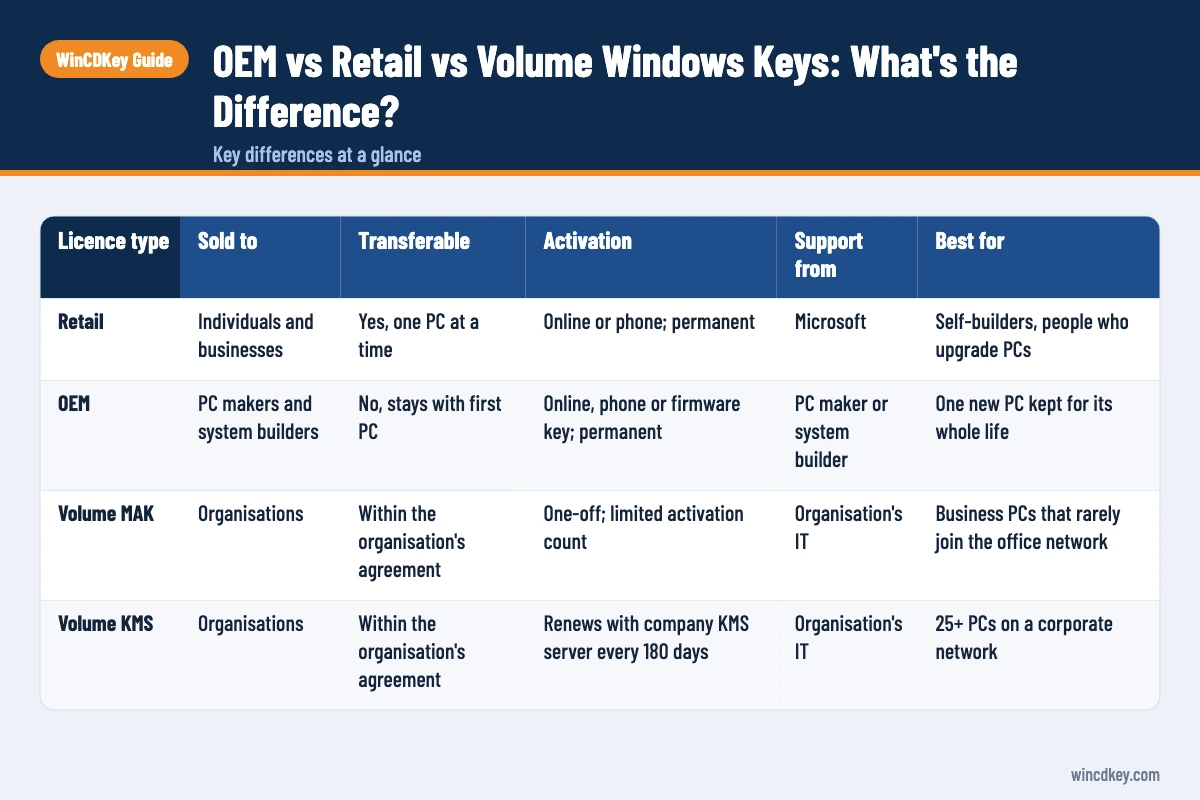
The core difference in OEM vs retail keys is transferability. A retail key is a standalone licence you can move to another PC you own, while an OEM key is tied to the first computer it activates. Volume keys (MAK and KMS) are a third category, sold to organisations under licensing agreements and managed centrally by IT.
Key takeaways
- Retail keys can normally be moved to a new PC once removed from the old one; OEM keys stay with the original machine.
- OEM and retail editions are the same software with the same features and updates. Only the licence rights differ.
- Volume licences use MAK (one-off activation with a set count) or KMS (renewal with an in-house server every 180 days).
- A KMS activation on a personal PC is a warning sign, not a bargain.
slmgr /dlitells you which channel your current licence uses.
| Licence type | Sold to | Transferable | Activation | Support from | Best for |
|---|---|---|---|---|---|
| Retail | Individuals and businesses | Yes, one PC at a time | Online or phone; permanent | Microsoft | Self-builders, people who upgrade PCs |
| OEM | PC makers and system builders | No, stays with first PC | Online, phone or firmware key; permanent | PC maker or system builder | One new PC kept for its whole life |
| Volume MAK | Organisations | Within the organisation’s agreement | One-off; limited activation count | Organisation’s IT | Business PCs that rarely join the office network |
| Volume KMS | Organisations | Within the organisation’s agreement | Renews with company KMS server every 180 days | Organisation’s IT | 25+ PCs on a corporate network |
In this guide
OEM vs retail key: what is the difference?
OEM and retail keys install the same Windows edition with identical features, performance and updates. The difference is in the licence rights: a retail licence can be moved to another device you own, OEM licences are bound to the first PC, and support comes from Microsoft for retail but from the PC maker or builder for OEM.
This is where buyers most often get caught out. Both keys look identical, both activate Windows 11 Pro in exactly the same way, and both say “Windows is activated” afterwards. The difference only shows up months or years later, when you replace a motherboard or buy a new PC and try to bring the licence with you.
Why the price gap exists
OEM licences are intended for pre-installation on new hardware, where the manufacturer, not Microsoft, carries the support burden. Fewer rights and less support mean a lower price. Retail licences cost more because the right to move them gives each one a longer useful life.
What is a retail Windows key?
A retail key is a standalone Windows licence sold directly to the end user, either boxed or as a digital download. It can be installed on one PC at a time and, under Microsoft’s licence terms for standalone software, moved to another device you own after removing it from the first. Microsoft provides support.
Microsoft’s volume activation planning guide describes the retail channel simply: each purchased copy comes with one unique product key. Most retail activations happen online, with telephone activation available as a fallback.
Linking retail licences to your Microsoft account
Once activated, a retail licence becomes a digital licence on that hardware. Signing in with a Microsoft account links it to your account, which makes reactivation after a hardware change far easier. Our guide on transferring a Windows 11 licence to a new PC walks through the full move.
What is an OEM Windows key?
An OEM (Original Equipment Manufacturer) key is a Windows licence meant to be pre-installed on a new computer by a manufacturer or system builder. It activates once, binds to that machine’s hardware and stays with it for life. If the PC is sold, the licence goes with it, but it cannot be moved to a different computer.
On branded laptops and desktops, the key is usually embedded in the motherboard firmware rather than printed on a sticker. Microsoft’s planning guide notes that OEM activation links Windows to the computer’s firmware or BIOS and is available only for computers purchased through OEM channels.
The hardware-change catch
Windows identifies a PC largely by its motherboard. Upgrading RAM, storage or a graphics card rarely causes problems, but replacing the motherboard can make Windows treat the machine as a new device. With a retail licence you can reactivate through the Activation troubleshooter. With an OEM licence, reactivation after a motherboard change is not guaranteed and may need a new licence.
A common support ticket we see is a self-builder who bought an OEM key for a first build, upgraded the motherboard two years later and lost activation. For a PC you expect to rebuild, retail usually costs less over time.
What are volume licence keys (MAK and KMS)?
Volume licence keys are issued to organisations under Microsoft licensing agreements, not sold for individual use. A Multiple Activation Key (MAK) activates many PCs once each, up to a set count. Key Management Service (KMS) activation instead relies on a server inside the organisation that renews each PC’s activation at least every 180 days.
MAK keys
A MAK works like a retail key that can activate multiple computers. Each MAK has a preset number of activations based on the licences the organisation purchased, and activation is permanent once completed, online or by phone. Retailers sometimes sell single Windows 11 Pro MAK keys; check the seller’s terms and activation method before buying.
KMS activation
Microsoft’s KMS activation planning guide explains that KMS activations last 180 days and that clients try to renew every seven days. The KMS host needs at least 25 Windows client PCs (or five servers) before it activates anything, which is why KMS only makes sense for larger networks.
An important nuance most guides skip
Volume licensing for Windows client is an upgrade licence. Microsoft states that each PC needs an underlying retail or OEM licence before volume upgrade rights apply. That is one reason a single KMS-activated home PC is a red flag. If a personal machine shows KMS activation, it was very likely done with an unofficial activator, which is unsafe and breaches Microsoft’s licence terms.
How can you tell which licence type you have?
Open Terminal or Command Prompt and run slmgr /dli. The Description line names the channel: RETAIL for retail keys, OEM_DM or OEM_COA for OEM licences, and VOLUME_MAK or VOLUME_KMSCLIENT for volume licences. The same window shows the last five characters of the installed key and its status.
Two quick interpretations help:
- OEM_DM: a manufacturer key stored in firmware. It belongs to this PC.
- VOLUME_KMSCLIENT on a home PC: run
slmgr /xpr. If it shows an expiry date and you have no employer KMS server, replace the activation with a genuine licence.
Microsoft’s slmgr.vbs reference lists every option if you want to go further.
Which Windows key type should you buy?
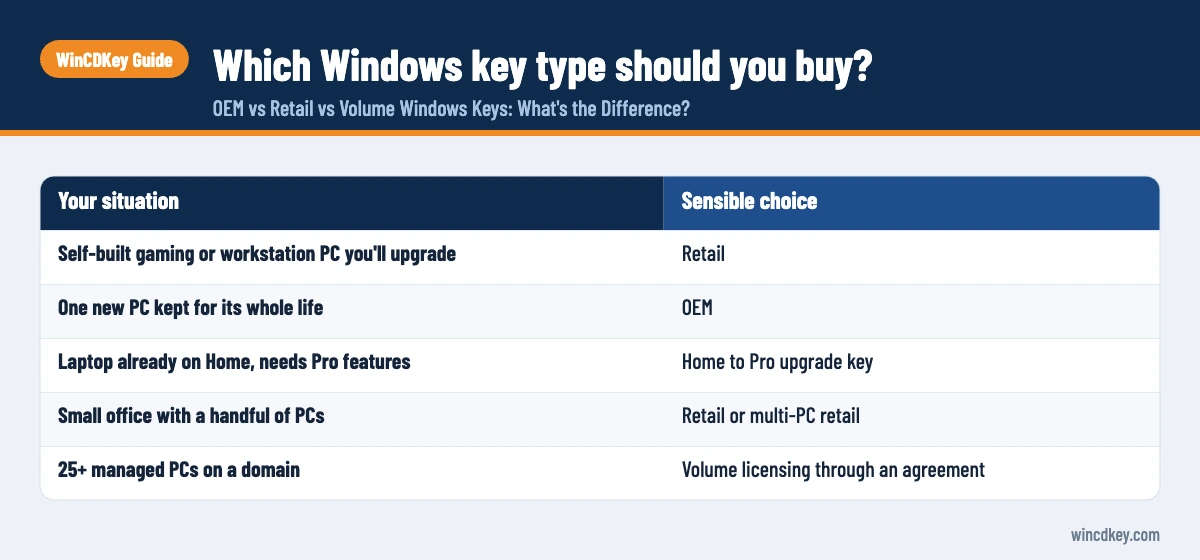
Buy retail if you build or upgrade your own PCs, or want to move the licence later. Buy OEM if you are installing Windows on one new PC you’ll keep until it’s retired. Leave KMS to organisations with their own KMS server, and buy MAK only when the seller explains clearly how activation and replacement work.
| Your situation | Sensible choice |
|---|---|
| Self-built gaming or workstation PC you’ll upgrade | Retail |
| One new PC kept for its whole life | OEM |
| Laptop already on Home, needs Pro features | Home to Pro upgrade key |
| Small office with a handful of PCs | Retail or multi-PC retail |
| 25+ managed PCs on a domain | Volume licensing through an agreement |
In the UK and EU, the resale of genuine, unused software licences is generally recognised under the principle of exhaustion, which is why discounted keys can be legitimate. Our page on EU law and software authentication explains the background, and our guide on whether cheap Windows keys are legit covers how to vet a seller.
Choose the licence that fits how you use your PC
For a build you’ll keep upgrading, a Windows 11 Pro retail key gives you room to move. For a single new machine, a Windows 11 Pro OEM key costs less, and the Windows 11 Pro 5 PC retail pack suits small offices.
Frequently asked questions
Is an OEM key legal for personal use?
OEM licences are intended for system builders installing Windows on a new PC. Many home users build their own PC and use an OEM key, but they then take on the support role themselves and the licence stays with that machine. Buying from a seller who explains the licence type clearly helps avoid surprises later.
Can I transfer an OEM Windows key to a new PC?
Generally no. An OEM licence is tied to the first computer it activates and transfers only with that computer, for example if you sell the whole PC. Moving it to a different machine is not permitted. If you expect to replace or rebuild your PC, a retail licence is the better long-term choice.
Is there any difference in features between OEM and retail Windows?
No. OEM and retail copies of the same edition, such as Windows 11 Pro, are identical software with the same features, performance and security updates. The differences are entirely in the licence: transfer rights, who provides support and how the key is tied to hardware.
What is the difference between MAK and KMS?
A MAK activates each PC once, permanently, by contacting Microsoft online or by phone, and has a limited number of activations. KMS activation is renewed by a server inside the organisation: PCs must contact it at least every 180 days or they lose activation. KMS requires at least 25 client PCs.
Why does my Windows say “volume licence” when I bought it as retail?
If slmgr /dli shows a VOLUME channel on a PC you bought for personal use, either the seller supplied a volume key or the PC was activated with a KMS method. Check slmgr /xpr; an expiry date means KMS. Contact the seller with your order details, and consider replacing it with a retail licence.
Do retail keys work on both Windows 10 and Windows 11?
A Windows 10 Pro retail key will generally activate Windows 11 Pro on eligible hardware, because Microsoft treats Windows 11 as an upgrade of Windows 10 for activation purposes. The edition must match: a Home key activates Home and a Pro key activates Pro.
The bottom line
OEM, retail and volume keys install the same Windows; what differs is where the licence can go and who supports it. Choose retail for flexibility, OEM for a single long-term PC, and leave volume licensing to managed networks. If you’re unsure which licence suits you, our help and support centre can advise before you buy.
Useful links
| Resource | Why it helps |
|---|---|
| Transfer a Windows 11 licence to a new PC | How to move a retail licence |
| Are cheap Windows keys legit? | How to vet a key seller |
| EU law and software authentication | Legal background to software resale |
| Windows 11 Pro retail key | Transferable licence |
| Windows 11 Pro OEM key | Single-PC licence for a new build |
| Microsoft Learn: Plan for volume activation | Official description of retail, OEM and volume channels |
| Microsoft Learn: KMS activation planning | 180-day validity and renewal rules |
| Microsoft Learn: slmgr.vbs options | Commands for checking your licence channel |


