

Top 10 Features of Windows Server 2025 Standard — And Why You Should Upgrade From Server 2022

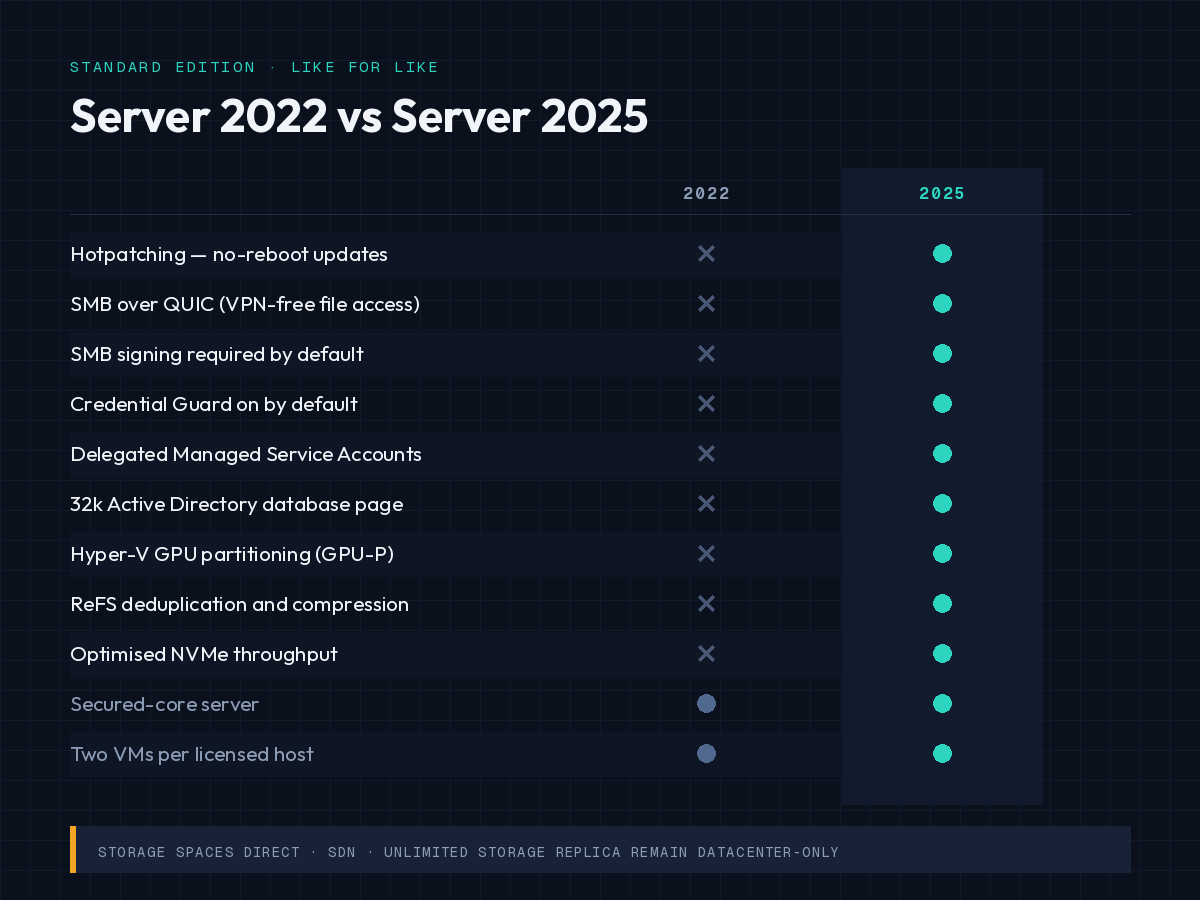
Windows Server 2025 Standard is the current Long-Term Servicing Channel (LTSC) release, and its biggest additions over Server 2022 are reboot-free hotpatching through Azure Arc, SMB over QUIC in the Standard edition, delegated Managed Service Accounts, a 32k-page Active Directory database, and stronger SMB and credential defaults. Server 2022 leaves mainstream support on 13 October 2026.
That date is the reason this article exists. Server 2022 is not about to stop receiving patches — but the support terms change, and the version you are on decides how much runway you have before the next migration. Below are the ten features that actually change day-to-day administration, then the upgrade arithmetic for anyone still on 2022.
If you already know you are moving, our Windows Server 2025 Standard download, install and activate guide covers the mechanics, and you can pick up a licence on the Windows Server 2025 Standard product page.
What this guide covers
- What happens to Windows Server 2022 on 13 October 2026?
- Windows Server 2022 vs 2025 Standard at a glance
- Top 10 features of Windows Server 2025 Standard
- Why upgrade from Server 2022 — the five-year argument
- Check these five things before you upgrade
- Licensing: cores, CALs and downgrade rights
- FAQs
What happens to Windows Server 2022 on 13 October 2026?
On 13 October 2026, Windows Server 2022 leaves mainstream support and moves into extended support. It keeps receiving monthly security updates at no extra cost until 14 October 2031. What stops is the non-security half of support: design changes, new features, non-security hotfixes and warranty-style no-charge incident support.
So this is a planning date, not a security cliff. Treat it the way you would treat a lease renewal — nothing breaks, but the terms get worse and the clock on the next decision starts.
The genuine cliff in the same window is Windows Server 2016, whose extended support ends in January 2027. If you are running 2016 anywhere, that migration outranks this one. Our Microsoft Server category lists the current supported editions if you are auditing what to replace first.
| Version | Mainstream support ends | Extended support ends |
|---|---|---|
| Windows Server 2016 | 11 January 2022 (passed) | 12 January 2027 |
| Windows Server 2019 | 9 January 2024 (passed) | 9 January 2029 |
| Windows Server 2022 | 13 October 2026 | 14 October 2031 |
| Windows Server 2025 | 2029 [VERIFY: Microsoft pages currently show both 9 October 2029 and 13 November 2029 — confirm on the official lifecycle page before publishing] | 2034 [VERIFY: 10 October 2034 vs 14 November 2034] |
Always confirm these against Microsoft’s own Windows Server 2025 lifecycle page before you build a budget around them — Microsoft has adjusted lifecycle dates before.
Windows Server 2022 vs Windows Server 2025 Standard: what actually differs?
The short verdict: if your workload is a plain file, print or line-of-business server, Server 2022 still does the job for five more years. If you run remote file access, virtualisation, Active Directory at scale, or you have a patching window that hurts, Server 2025 Standard is the better landing spot.
| Capability | Server 2022 Standard | Server 2025 Standard |
|---|---|---|
| Hotpatching (no-reboot security updates) | Datacenter: Azure Edition only | Yes, with Azure Arc connection |
| SMB over QUIC | Datacenter: Azure Edition only | Yes, in Standard |
| SMB signing by default | Limited (SYSVOL/NETLOGON) | Required on outbound connections by default |
| Credential Guard | Opt-in | On by default on qualifying hardware |
| Delegated Managed Service Accounts (dMSA) | No | Yes |
| Active Directory database page size | 8k | 32k optional, with new functional level |
| Hyper-V GPU partitioning (GPU-P) | No | Yes, with live migration and clustering support |
| ReFS deduplication and compression | No | Yes |
| Maximum VM scale | Lower ceilings | Up to 240 TB RAM and 2,048 virtual processors per VM |
| Mainstream support remaining | Ends 13 October 2026 | Runs to 2029, security updates to 2034 |
Top 10 features of Windows Server 2025 Standard
1. Hotpatching — security updates without the reboot
Hotpatching installs operating system security updates into running processes in memory, so the server does not restart. It was previously limited to Datacenter: Azure Edition; in Server 2025 it works on Standard and Datacenter machines that are connected to Azure Arc.
The cadence matters more than the headline: a baseline cumulative update roughly every three months does require a restart, followed by two months of restart-free hotpatch releases. Drivers, .NET updates and non-security updates still patch normally.
Microsoft first announced Arc-enabled hotpatching as a paid subscription, then made it available at no additional cost — the current position is documented in Microsoft’s Arc-enabled hotpatch guidance. [VERIFY: confirm pricing status is still “no additional cost” at publish time.]
Prerequisites are real, not nominal: UEFI with Secure Boot, virtualisation-based security, and the Azure Connected Machine agent. An air-gapped server cannot use it.
2. SMB over QUIC, now in the Standard edition
SMB over QUIC gives encrypted file-share access across the internet over UDP/443, without a VPN tunnel. In Server 2022 this was Azure Edition only, which put it out of reach for most on-premises buyers. In Server 2025 it ships in Standard.
That edition move is the single biggest licensing-value change in this release for small and mid-sized deployments. A branch office or remote workforce that previously needed VPN infrastructure for file access can be served from a Standard-licensed file server.
Server 2025 also adds certificate-based client access control, connection auditing and configurable alternative ports for TCP, QUIC and RDMA.
3. SMB hardening — and the one change most likely to break something
Server 2025 requires SMB signing on outbound connections by default, adds brute-force rate limiting on the SMB server, hardened firewall defaults, and AES-256-GCM and AES-256-CCM encryption suites.
Here is the cause and effect worth planning around: signing is negotiated between client and server, so if a NAS appliance, older Linux Samba host or storage controller does not support SMB signing, the mapped drive that worked on Server 2022 will fail after the upgrade — not because the share is gone, but because the session can no longer be established under the new default.
A common pattern we see in support tickets after a server migration is exactly this: “the server is fine, but the shares disappeared.” Test every SMB target against a Server 2025 machine before you cut over.
4. Credential Guard enabled by default
Credential Guard uses virtualisation-based security to isolate credential material so that a compromised process cannot harvest cached domain credentials. On Server 2025 it is on by default on hardware that meets the requirements, rather than being an opt-in configuration.
The practical consequence: authentication protocols that depend on delegating plain credentials — older NTLM scenarios in particular — may stop working silently. This is worth a pilot rather than a weekend cutover.
5. Delegated Managed Service Accounts (dMSA)
A dMSA replaces a legacy service account with an account whose keys Active Directory manages and rotates automatically, while the original account’s password is disabled. No more service accounts with a human-set password that has not changed since 2019.
Beyond password hygiene, dMSAs give per-service delegation and cleaner logging of what a service account actually accessed — which is usually the part auditors ask about.
6. Active Directory’s first structural update in years: the 32k database page
Active Directory has used an 8 KB Extensible Storage Engine page since Windows 2000, which is what caps single-object size and multivalued attributes. Server 2025 introduces an optional 32k page size, along with new forest and domain functional levels (DomainLevel and ForestLevel 10) and schema updates.
Two caveats before anyone gets excited. Moving to 32k pages is forest-wide and requires every domain controller in the forest to run a 32k-capable database. And Microsoft has said it does not plan to retrofit the new functional levels to Server 2019 or 2022 — so this is only available by upgrading domain controllers.
Supporting changes in the same area: LDAP over TLS 1.3, Kerberos AES SHA-256/384 support, channel binding audit events, and an object-repair operation for objects missing core attributes.
7. Hyper-V: GPU partitioning and much higher VM ceilings
GPU partitioning (GPU-P) lets a single physical GPU be shared across multiple virtual machines, with support for live migration and failover clustering. For anyone hosting VDI, rendering or inference workloads on-premises, that removes the all-or-nothing choice of discrete device assignment.
VM scale limits also rise sharply — up to 240 TB of memory and 2,048 virtual processors per VM. Those ceilings sit well beyond current mainstream hardware, so treat them as headroom rather than a buying reason.
8. Storage: NVMe throughput, ReFS dedup and compression
Server 2025 reworks the NVMe storage path to deliver higher IOPS with lower CPU utilisation on the same hardware compared with Server 2022. ReFS gains native deduplication and compression, which were previously NTFS-only, and Storage Replica adds compression to cut the volume of data pushed across the wire during replication.
The CPU side of that NVMe improvement is often the more useful half: the same storage array serving the same load with fewer cycles spent in the storage stack leaves more headroom for the workload itself.
Note that Storage Spaces Direct and unlimited Storage Replica remain Datacenter-only. If your design depends on either, Standard is not the right edition — see Windows Server 2025 Datacenter instead.
9. In-place upgrades that are actually supported
In-place upgrade to Server 2025 is supported from both Server 2019 and Server 2022, and Microsoft also delivers the release as a feature update path rather than media-only. For small estates with one or two physical hosts and no spare hardware, this is the difference between a migration project and an evening’s work.
It is still an upgrade, not a rollback-safe operation: once complete, the only way back is a restore. Take a full backup and verify it before you start. Our guide to converting a Server 2025 evaluation install to Standard covers the related case where you have been testing on the 180-day evaluation build.
10. A modernised server experience
Server 2025 is built on a newer Windows base, so the desktop experience, Settings and shell are modern rather than Server 2016-era. Practical additions include WinGet for package installation, OpenSSH available out of the box, Wi-Fi and Bluetooth support for edge deployments, and Azure Arc onboarding offered during setup.
None of these is a reason to upgrade on its own. Together they cut the small friction that makes server administration slower than it needs to be. Windows Admin Center remains available at no additional cost for hybrid and on-premises management.
Why should you upgrade from Windows Server 2022 to 2025?
The strongest argument is runway, not features. A Server 2022 licence bought today runs on a version that is already out of mainstream support and whose security updates stop in October 2031. Server 2025 gives you mainstream support into 2029 and security updates into 2034 — roughly three extra years of life for the same licensing exercise.
The feature argument stacks on top of that, and it is strongest in three situations:
- You have a painful patching window. Hotpatching removes most reboot nights. If downtime costs you money or goodwill, this is the feature that pays for the upgrade.
- You give remote users file access. SMB over QUIC in Standard replaces VPN plumbing for file shares, at Standard-edition pricing.
- You run Active Directory as the core of your identity estate. dMSA, the 32k page option and the newer crypto defaults are only reachable by upgrading domain controllers.
When should you not rush? If you run a single validated line-of-business application on Server 2022, the vendor has not certified 2025, and your patch window is comfortable — extended support is a legitimate five-year position. Unsupported application stacks are a worse risk than a supported-but-older OS.
If you are still on Server 2016 or 2019, skip the debate and go to 2025 directly. Both are past mainstream support, and Server 2019 only buys you until January 2029.
What should you check before upgrading to Server 2025?
Five checks catch most failed upgrades. Run them on a pilot machine before you touch production.
- CPU instruction set. Server 2025 requires SSE4.2 and POPCNT support. Older processors that ran Server 2022 fine will not boot 2025. [VERIFY: confirm current published hardware requirements.]
- SMB signing compatibility. Test every NAS, Samba host and appliance your servers map drives to, for the reason described in feature 3.
- Storage controller drivers. Some widely-deployed RAID controllers on older generations of server hardware are absent from vendor Server 2025 driver lists. Check your specific controller model on the manufacturer’s support page, not a general compatibility claim.
- Credential Guard side effects. Pilot any application using older NTLM delegation patterns before the estate-wide rollout.
- CAL versions. Client Access Licences must match or exceed the server version. Server 2022 CALs do not cover a Server 2025 host.
Microsoft publishes a free 180-day evaluation through the Evaluation Center, which is the right way to run these checks. If you have already been testing that way, our note on the Standard vs Datacenter evaluation conversion issue covers a trap people hit when converting the trial.
How is Windows Server 2025 Standard licensed?
Windows Server 2025 Standard is licensed per physical core, with a minimum of 16 cores per server and 8 cores per processor, and it grants virtualisation rights for two operating system environments. Every user or device connecting to the server also needs a Client Access Licence, and RDS access needs a separate RDS CAL on top.
Three points that cost buyers money when missed:
- CALs must be the same version or newer than the server. Upgrading the OS means budgeting Server 2025 User CALs or Device CALs alongside it.
- RDS CALs are separate and also version-bound. Remote desktop deployments need Server 2025 RDS User CALs or the device equivalent.
- Standard’s two-VM entitlement is per licensed host. Beyond a few VMs per host, Datacenter usually becomes cheaper than stacking Standard licences.
Buying more than a handful of licences? The B2B quote request and enterprise licensing page handle volume pricing, and licence terms vary by region and agreement type — check yours rather than assuming.
Where to buy Windows Server 2025 Standard
WinCDKey supplies Windows Server 2025 Standard licence keys with digital delivery, alongside Datacenter keys, the matching CAL packs, and SQL Server 2025 Standard if you are refreshing the database tier at the same time.
We have processed over 600,000 orders and hold Microsoft AppSource partner verification; you can read unfiltered customer feedback on our Trustpilot profile. If activation does not go smoothly, the Help & Support Centre and the phone activation Confirmation ID tool are the fastest routes to a fix, and our refunds and returns policy sets out replacement terms.
Frequently asked questions
Is Windows Server 2022 end of life in October 2026?
No. On 13 October 2026, Server 2022 reaches the end of mainstream support and moves to extended support. It continues to receive monthly security updates at no additional cost until 14 October 2031. End of life is the extended date, not the mainstream one.
Can I upgrade directly from Windows Server 2022 to 2025?
Yes. In-place upgrade is supported from Server 2022 and from Server 2019. Verify the CPU meets the SSE4.2 and POPCNT requirement, confirm storage controller driver support, and take a verified full backup first — a completed in-place upgrade cannot be rolled back except by restore.
Does Windows Server 2025 Standard include hotpatching?
Yes, on Standard and Datacenter machines connected to Azure Arc, subject to UEFI Secure Boot and virtualisation-based security prerequisites. Microsoft initially announced it as a paid subscription and subsequently made Arc-enabled hotpatching available at no additional cost. Datacenter: Azure Edition includes it natively.
What is the main difference between Windows Server 2025 Standard and Datacenter?
Standard grants two virtual OS environments per licensed host; Datacenter grants unlimited virtualisation and adds Storage Spaces Direct, software-defined networking and unlimited Storage Replica. Most single-purpose and lightly virtualised servers only need Standard.
Do I need new CALs when I upgrade to Windows Server 2025?
Yes. Client Access Licences must be the same version as the server or newer, so Server 2022 CALs do not cover a Server 2025 host. RDS CALs are separate from standard CALs and follow the same version rule.
Will my mapped network drives still work after upgrading to Server 2025?
Not always. Server 2025 requires SMB signing on outbound connections by default, so shares hosted on NAS devices or older Samba servers that do not support signing will fail to connect. Test every SMB target on a pilot machine before the upgrade.
Is SMB over QUIC available in Windows Server 2025 Standard?
Yes. In Server 2022 it was limited to Datacenter: Azure Edition; Server 2025 brings it to Standard and Datacenter, with certificate-based client access control, connection auditing and configurable alternative ports.
How long is Windows Server 2025 supported?
Windows Server 2025 follows the Fixed Lifecycle Policy with mainstream support running to 2029 and extended support to 2034 — approximately three years more runway than Server 2022. Confirm the exact dates on Microsoft’s official lifecycle page before planning around them.
Should I stay on Server 2022 instead of upgrading?
Staying is defensible if your line-of-business application is only certified on Server 2022, your patch window is comfortable, and you are planning a hardware refresh before 2031 anyway. Extended support still delivers security updates for five more years. Upgrade sooner if you need hotpatching, VPN-free remote file access, or the new Active Directory capabilities.


