🎃 HALLOWEEN SALE: 50% OFF best-selling Windows, Office, Autodesk & Server keys — use code GHOST50 Shop the sale →


Microsoft Project Standard vs Professional: Key Differences in 2026

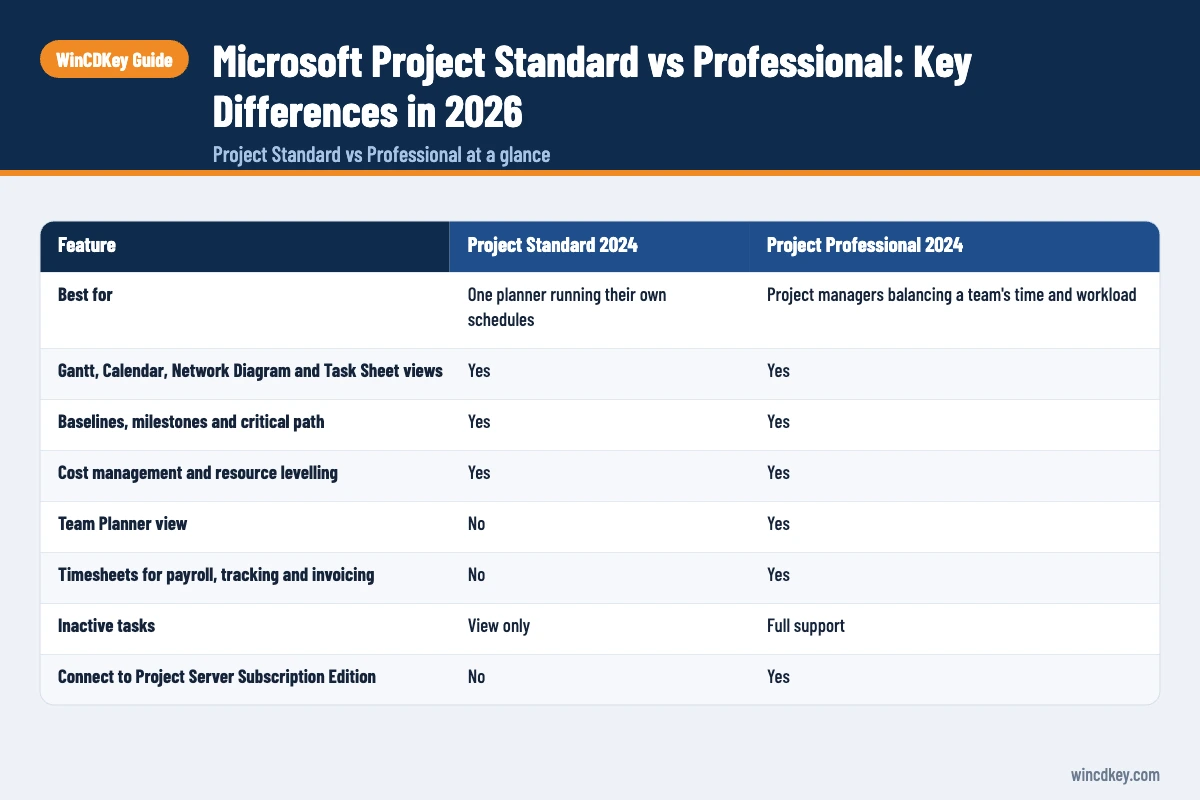
Project Standard vs Professional comes down to who uses the plan. Project Standard 2024 is a complete desktop scheduler for one planner: Gantt charts, critical path, baselines, costs and resource levelling. Project Professional 2024 adds Team Planner, timesheets, fuller resource management and a connection to Project Server. If you plan alone, Standard is usually enough.
The picture changed in 2026. Project Online was retired on 30 September 2026, so the choice is now between desktop editions, Planner subscriptions and Project Server. This guide sorts out which one fits your work.
Key takeaways
- Both 2024 editions are one-time purchases for one user on one Windows PC, supported until October 2029.
- Professional adds Team Planner, timesheets, fuller resource management and a connection to Project Server Subscription Edition.
- Project Online was retired on 30 September 2026. Cloud users now move to Planner plans or Project Server.
- Planner and Project Plan 3 includes the Project desktop app as a subscription. Planner Plan 1 does not.
- Solo planners and small teams rarely need Professional. Teams that manage shared resources often do.
In this guide
- Project Standard vs Professional at a glance
- What can Microsoft Project Standard 2024 do?
- What does Project Professional 2024 add?
- What happened to Project Online and Project for the web?
- Which version of Microsoft Project should you buy?
- What should you check before installing Project 2024?
- Frequently asked questions
- The bottom line
- Useful links
Project Standard vs Professional at a glance
Verdict: Project Standard 2024 suits individual planners who schedule and track work on their own PC. Project Professional 2024 is the right buy when several people’s time has to be balanced, recorded or published to Project Server. The table is based on Microsoft’s own comparison of the two editions.
| Feature | Project Standard 2024 | Project Professional 2024 |
|---|---|---|
| Best for | One planner running their own schedules | Project managers balancing a team’s time and workload |
| Gantt, Calendar, Network Diagram and Task Sheet views | Yes | Yes |
| Baselines, milestones and critical path | Yes | Yes |
| Cost management and resource levelling | Yes | Yes |
| Team Planner view | No | Yes |
| Timesheets for payroll, tracking and invoicing | No | Yes |
| Inactive tasks | View only | Full support |
| Connect to Project Server Subscription Edition | No | Yes |
| Licence | One-time purchase, one user, one PC | One-time purchase, one user, one PC |
| Microsoft list price (UK) | £679.99 | £1,149.99 |
| Support ends | October 2029 | October 2029 |
Prices are from Microsoft’s Project comparison page, checked in October 2026. Both editions also come as LTSC volume-licensed builds with the same feature split.
What can Microsoft Project Standard 2024 do?
Project Standard 2024 does everything most people picture when they think of Microsoft Project. You build task lists with dependencies, see the critical path on a Gantt chart, set baselines to compare plan against actual, track costs and level resources so nobody is booked for twelve hours in a day. It works entirely on your PC.
For a site manager, event organiser or consultant running their own programmes, that is a full toolkit. You can still assign named people to tasks and print or export reports for stakeholders.
Where Standard runs out
Standard’s limit is collaboration, not scheduling. It can’t submit plans to Project Server, it doesn’t have timesheets, and it lacks Team Planner, the drag-and-drop view for spotting who is overloaded. Inactive tasks, which let you keep cancelled work in the plan for reference, are view-only.
What does Project Professional 2024 add?
Project Professional 2024 adds team-level resource management. It brings the Team Planner view, timesheets for recording actual hours, fuller resource tools, full use of inactive tasks, and the ability to connect to Project Server Subscription Edition so plans and resources are shared across an organisation. The scheduling engine itself is identical to Standard.
Team Planner
Team Planner shows each person as a row with their tasks laid along a timeline. You drag work from one person to another and see over-allocation immediately. With several people sharing the same weeks, it is quicker than reading resource usage tables in Standard.
Timesheets and Project Server
Timesheets capture actual hours for payroll, client billing and progress tracking. Combined with Project Server Subscription Edition, an organisation gets a shared resource pool, so one manager can see that a developer is already committed to another project. Without a server, Professional is still a strong single-user tool, but you are paying for capabilities you may not use.
What happened to Project Online and Project for the web?
Microsoft retired Project Online on 30 September 2026, as confirmed on its Project Online retirement announcement. Project for the web has been folded into Microsoft Planner, with premium scheduling features sold through Planner plans. Organisations that relied on Project Online now choose between Planner, Project Server Subscription Edition and desktop Project.
That matters for this comparison. Older guides often say “Professional connects to Project Online”, which is no longer a reason to buy it. The server connection that remains is to Project Server Subscription Edition, an on-premises product.
Planner plans in brief
| Plan | Price (UK, per user a month, paid yearly, excl. VAT) | Includes Project desktop app? |
|---|---|---|
| Planner in Microsoft 365 | Included with eligible Microsoft 365 plans | No |
| Planner Plan 1 | £7.70 | No |
| Planner and Project Plan 3 | £23.10 | Yes |
Prices are from Microsoft’s Planner plans and pricing page. At list price, Plan 3 for one user over the five years Project 2024 is supported comes to about £1,386 before VAT, more than a one-off Project Professional licence. The subscription makes sense mainly when you also need its cloud and Planner features.
Which version of Microsoft Project should you buy?
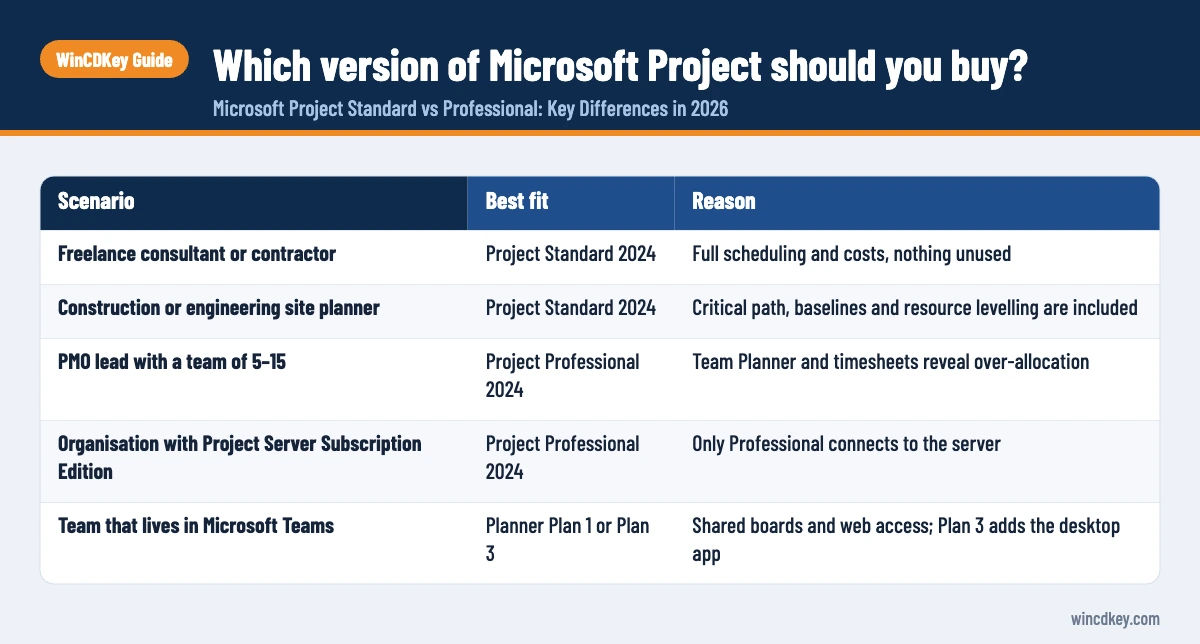
Buy Project Standard 2024 if you plan and track projects yourself and share outputs as reports or PDFs. Buy Project Professional 2024 if you manage several people’s workload, need timesheets, or will connect to Project Server. Choose a Planner plan if your team wants browser-based boards and shared plans more than a desktop scheduler.
| Scenario | Best fit | Reason |
|---|---|---|
| Freelance consultant or contractor | Project Standard 2024 | Full scheduling and costs, nothing unused |
| Construction or engineering site planner | Project Standard 2024 | Critical path, baselines and resource levelling are included |
| PMO lead with a team of 5–15 | Project Professional 2024 | Team Planner and timesheets reveal over-allocation |
| Organisation with Project Server Subscription Edition | Project Professional 2024 | Only Professional connects to the server |
| Team that lives in Microsoft Teams | Planner Plan 1 or Plan 3 | Shared boards and web access; Plan 3 adds the desktop app |
A common support question is whether Standard can open a Professional file. It can open the .mpp, but Professional-only features such as Team Planner aren’t available in Standard. If one person in your team needs Professional, the others can often manage with Standard.
Choose your Project 2024 edition
Planning on your own? Project 2024 Standard covers scheduling, costs and critical path. Managing a team’s workload? Project 2024 Professional adds Team Planner and timesheets. The full range, including LTSC builds, is in our Microsoft Project category.
What should you check before installing Project 2024?
Check three things: you are on Windows 10 or 11 (Project has no Mac version), your existing Office uses the same 32-bit or 64-bit architecture, and any Microsoft 365 Apps installation is on a recent enough version to sit alongside Project 2024. Getting these right avoids most installation errors.
- Confirm your Office bitness in any Office app under File > Account > About.
- Uninstall any older Project version you no longer need, so the installer doesn’t stop on a conflict.
- Download Project 2024 in the same architecture as Office, and install with an internet connection.
- Enter your product key when prompted, or sign in to the Microsoft account the key is linked to.
Our Project 2024 Professional download, install and activation guide covers each step with screenshots. The side-by-side rules for Office, Visio and Project are the same ones covered in our Visio Standard vs Professional comparison, so we won’t repeat them here.
Frequently asked questions
Is Microsoft Project Standard enough for a small business?
Usually, yes. Project Standard 2024 includes Gantt charts, dependencies, critical path, baselines, cost tracking and resource levelling. A small business where one person maintains the plan rarely needs more. Professional becomes worthwhile when several managers share people across projects or you need timesheets for billing.
Can Project Standard 2024 connect to Project Server?
No. Only Project Professional 2024 can connect to Project Server Subscription Edition and create server-based projects. Standard works with local .mpp files. If your organisation runs Project Server, every person who publishes or updates server projects needs Professional or a subscription that includes the Project desktop app.
Is Project Online still available?
No. Microsoft retired Project Online on 30 September 2026. The main alternatives are Planner plans, which now carry the former Project for the web features, Project Server Subscription Edition on-premises, or desktop Project 2024, which is supported until October 2029.
Is Microsoft Project a one-time purchase?
Project Standard 2024 and Project Professional 2024 are one-time purchases for one user on one PC, with security updates until October 2029. Planner plans, including Planner and Project Plan 3 with the desktop app, are per-user subscriptions billed monthly or yearly.
Does Microsoft Project come with Microsoft 365?
No. Microsoft 365 Personal, Family and the standard business plans don’t include the Project desktop app. Basic Planner is included with many business plans, but full Project scheduling needs a separate Project 2024 licence or a Planner and Project Plan 3 or higher subscription.
Can I open a Project Professional file in Project Standard?
Yes, Project Standard 2024 opens .mpp files saved in Professional, so you can view and edit tasks, dates and costs. Professional-only features, such as Team Planner and server connections, won’t be available, and inactive tasks are view-only in Standard.
The bottom line
Most solo planners should buy Project Standard 2024. Buy Professional when you need Team Planner, timesheets or Project Server. With Project Online gone, compare a one-time licence against Planner subscriptions carefully. If your work also involves process diagrams, see our Visio range.
Useful links
| Resource | Why it helps |
|---|---|
| Microsoft Project category | All Project 2024 editions, including LTSC |
| Project 2024 Standard | One-time licence for individual planners |
| Project 2024 Professional | Adds Team Planner, timesheets and Project Server connection |
| Project 2024 install guide | Download, installation and activation steps |
| Visio Standard vs Professional | Companion comparison, including side-by-side install rules |
| Visio range | Diagramming software that pairs with Project |
| Microsoft: compare Project options | Official edition features and prices |
| Microsoft: Project Online retirement | Retirement date and migration guidance |
| Microsoft: Planner plans and pricing | Current subscription prices and inclusions |


