🎃 HALLOWEEN SALE: 50% OFF best-selling Windows, Office, Autodesk & Server keys — use code GHOST50 Shop the sale →


Revit vs AutoCAD: Key Differences, Use Cases and Which to Learn First

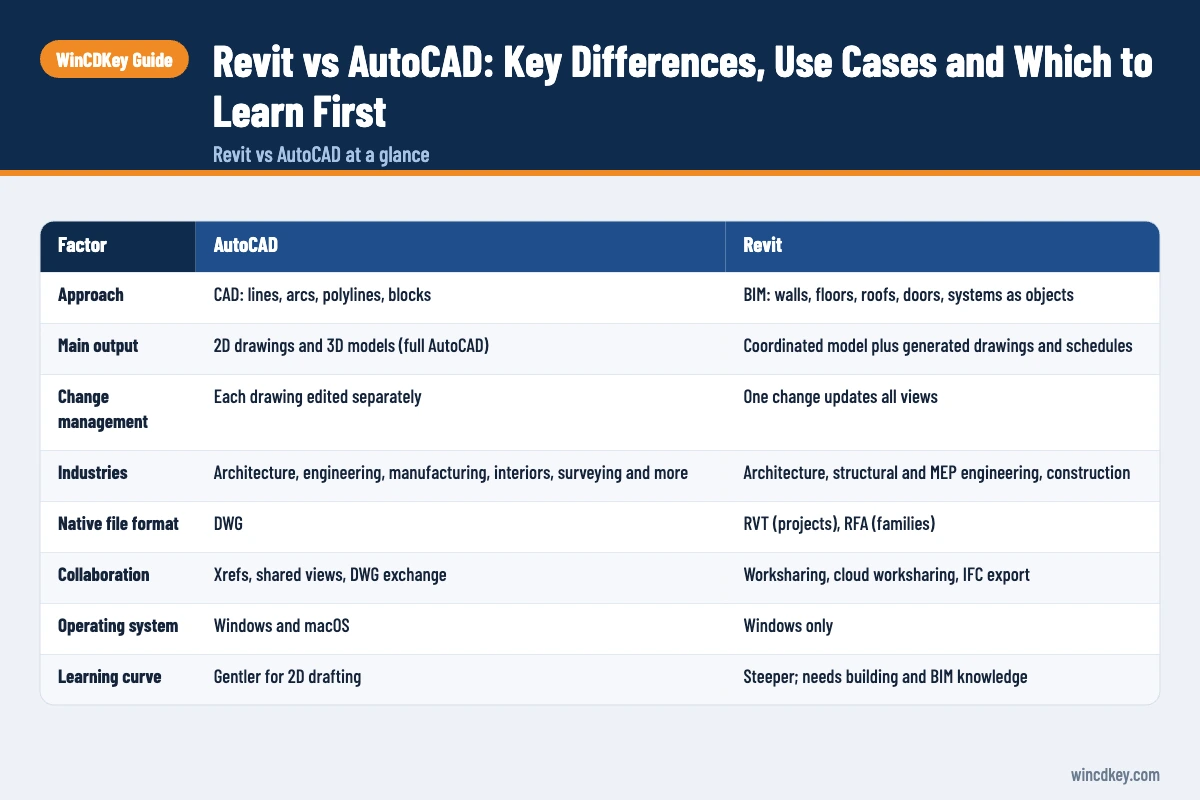
Revit vs AutoCAD comes down to BIM vs CAD. AutoCAD is a general-purpose drafting tool where you draw lines, arcs and blocks that represent a design. Revit is building information modelling (BIM) software where you model walls, floors and systems as intelligent objects, and drawings are generated from that model. Architects increasingly need both.
Key takeaways
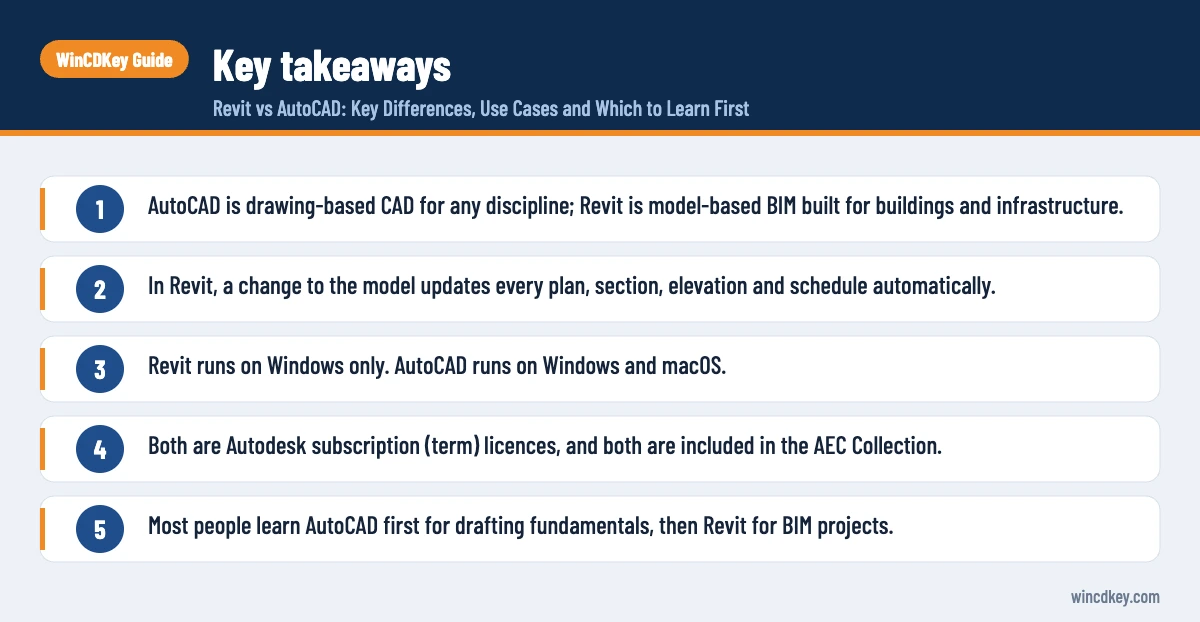
- AutoCAD is drawing-based CAD for any discipline; Revit is model-based BIM built for buildings and infrastructure.
- In Revit, a change to the model updates every plan, section, elevation and schedule automatically.
- Revit runs on Windows only. AutoCAD runs on Windows and macOS.
- Both are Autodesk subscription (term) licences, and both are included in the AEC Collection.
- Most people learn AutoCAD first for drafting fundamentals, then Revit for BIM projects.
In this guide
- Revit vs AutoCAD at a glance
- What is the difference between BIM and CAD?
- Is Revit or AutoCAD better for architecture?
- Where does AutoCAD Architecture fit?
- Can Revit and AutoCAD work together?
- How much do Revit and AutoCAD cost?
- Should you learn Revit or AutoCAD first?
- Frequently asked questions
- The bottom line
- Useful links
Revit vs AutoCAD at a glance
The quickest way to see the difference is side by side. AutoCAD gives you precise geometry and complete drafting control across many industries. Revit gives you a coordinated building model from which drawings, schedules and quantities are derived. The table below sets out the practical differences buyers and learners ask about most.
| Factor | AutoCAD | Revit |
|---|---|---|
| Approach | CAD: lines, arcs, polylines, blocks | BIM: walls, floors, roofs, doors, systems as objects |
| Main output | 2D drawings and 3D models (full AutoCAD) | Coordinated model plus generated drawings and schedules |
| Change management | Each drawing edited separately | One change updates all views |
| Industries | Architecture, engineering, manufacturing, interiors, surveying and more | Architecture, structural and MEP engineering, construction |
| Native file format | DWG | RVT (projects), RFA (families) |
| Collaboration | Xrefs, shared views, DWG exchange | Worksharing, cloud worksharing, IFC export |
| Operating system | Windows and macOS | Windows only |
| Learning curve | Gentler for 2D drafting | Steeper; needs building and BIM knowledge |
| Hardware demand | Moderate for 2D | Higher; RAM scales with model size |
| Licence model | Subscription (term) | Subscription (term) |
What is the difference between BIM and CAD?
CAD (computer-aided design) replaces the drawing board: you draw geometry that represents a building or part, and the meaning lives in your head and your layer names. BIM (building information modelling) builds a digital model of the building itself, where each element knows what it is, how it connects and what data it carries.
In AutoCAD, a wall on a floor plan is usually two parallel lines. If the wall moves, you update the plan, then the elevation, then the section, then any schedule, each by hand. Missed updates are where coordination errors creep in.
In Revit, a wall is a wall object with a type, height, layers and materials. Plans, sections, 3D views and door schedules are all views of the same model, so moving the wall updates every view at once. That is the core productivity case for BIM, and it is why many public-sector and larger projects now ask for BIM deliverables.
Where CAD still wins
- Fast 2D details, sketches and one-off drawings with no model behind them
- Non-building work such as mechanical parts, signage, landscaping details and site plans
- Editing DWG files supplied by consultants, surveyors and manufacturers
Is Revit or AutoCAD better for architecture?
For full building design on medium and large projects, Revit is generally the better tool because its model keeps plans, sections, elevations and schedules coordinated. For small extensions, 2D planning drawings, details and quick revisions, AutoCAD is often faster. Many architectural practices use Revit for the building model and AutoCAD for details and consultant files.
Project size matters. A single-storey rear extension can be drawn in AutoCAD in a day; setting up a Revit template, families and views for the same job may take longer than the drawings themselves. On a multi-storey residential scheme, the balance swings the other way because Revit removes so much manual coordination.
Client requirements matter too. If a contractor or public client asks for an IFC model or a BIM execution plan, you will need BIM software. If they want PDF and DWG drawings only, AutoCAD remains a perfectly professional choice.
Where does AutoCAD Architecture fit?
AutoCAD Architecture is a toolset included with a full AutoCAD subscription on Windows. It adds intelligent walls, doors, windows, spaces and automatic sections and elevations on top of AutoCAD, with thousands of architectural components. It sits between plain drafting and full BIM, but it is not a substitute for Revit on BIM-mandated projects.
The toolset suits practices that want faster architectural drafting without changing their DWG-based workflow. Walls clean up at junctions, doors and windows cut openings automatically and space objects can report areas.
It is not included in AutoCAD LT, which is 2D drafting only. If you are weighing those two, our AutoCAD vs AutoCAD LT comparison covers the toolsets in detail.
Can Revit and AutoCAD work together?
Yes. Revit can link or import DWG files, so survey drawings, site plans and consultant details from AutoCAD can sit inside a Revit project. Revit can also export views and sheets to DWG for consultants who work in AutoCAD. Linking is usually better than importing because the DWG stays a separate, updatable file.
A typical mixed workflow looks like this:
- The surveyor supplies a topographical survey as a DWG.
- The architect links the DWG into Revit and models the building on it.
- Construction details are drafted in AutoCAD or as Revit drafting views.
- Sheets are exported to DWG and PDF for structural and services consultants.
Keep linked DWGs clean. Exploded blocks, stray objects far from the origin and unpurged layers are a frequent cause of slow Revit models, which is a common thread in performance support questions.
How much do Revit and AutoCAD cost?
Both are sold as subscriptions rather than perpetual licences. At the time of writing, Autodesk’s UK suggested annual prices, excluding VAT, are £1,890 for AutoCAD, £2,712 for Revit and £3,318 for the Architecture, Engineering and Construction (AEC) Collection, which includes both Revit and AutoCAD alongside tools such as Civil 3D, Navisworks and 3ds Max.
If you need Revit and AutoCAD together, the AEC Collection usually costs less than buying the two separately. If you only draft in 2D, AutoCAD LT is far cheaper than either. Autodesk subscriptions include access to the current release and three previous versions.
Get the Autodesk licence your projects need
WinCDKey supplies Revit 2026 and AutoCAD 2026 for Windows as 1-year or 3-year term licences, and a lower-cost AutoCAD LT for 2D-only work. See the full Autodesk range.
Should you learn Revit or AutoCAD first?
Most students and career changers should learn AutoCAD first, because drafting conventions, scales, line weights and layouts transfer to every CAD and BIM tool. Then move to Revit once you understand how buildings go together. If you are already in an architectural practice that runs Revit, start with Revit and pick up AutoCAD as needed.
Job adverts tell the real story in your area. Architectural technician and BIM coordinator roles increasingly list Revit as essential, while AutoCAD remains common in engineering, fit-out, manufacturing and contracting roles. Knowing both makes you more employable than knowing either one deeply.
A sensible learning path
- AutoCAD 2D basics: drawing, modifying, layers, dimensions and layouts.
- Core command aliases and keyboard shortcuts, so you draft at speed.
- Revit fundamentals: levels, grids, walls, floors, roofs, doors and windows.
- Revit families, views, sheets and schedules.
- Collaboration: worksharing, linked models and IFC export.
Revit also needs a stronger PC than 2D AutoCAD. Before you start, check your machine against our Revit 2026 system requirements guide.
Frequently asked questions
Is Revit replacing AutoCAD?
Not entirely. Revit has replaced AutoCAD as the main design tool in many architectural and building-services firms, especially on larger BIM projects. AutoCAD remains widely used for 2D detailing, engineering, manufacturing, surveying and consultant drawings, and Autodesk continues to release new versions of both. Most AEC professionals use the two side by side.
Is Revit harder to learn than AutoCAD?
Generally, yes. AutoCAD’s 2D tools can be learned in weeks because you are drawing geometry. Revit requires you to understand how buildings are assembled, plus families, views and project templates. The payoff is faster coordinated output on larger projects once you are proficient, but expect a steeper first few months.
Can I open a Revit file in AutoCAD?
Not directly. AutoCAD cannot open RVT files. The usual route is to export views or sheets from Revit to DWG, which AutoCAD opens normally. You can also export an IFC model from Revit for use in other BIM tools. Exports carry geometry and some data, but not Revit’s full parametric behaviour.
Can Revit run on a Mac?
Not natively. Revit runs on Windows only. Autodesk documents a configuration using Parallels Desktop for Mac running Windows 11, including on Apple silicon, but performance depends on the Mac and model size. AutoCAD, by contrast, has a native macOS version. Mac-based practices should test Revit carefully before committing.
Do I need both Revit and AutoCAD?
Many architectural practices do. Revit handles the coordinated building model and AutoCAD handles details, survey drawings and DWG files from consultants. If you need both, the AEC Collection is usually better value than two separate subscriptions. A sole practitioner doing small 2D jobs may manage with AutoCAD or AutoCAD LT alone.
What is BIM Level 2 and does it require Revit?
The UK’s former BIM Level 2 framework has largely been superseded by the ISO 19650 standards. Neither mandates a specific product. You need software that can produce and exchange coordinated information models, usually via IFC. Revit is a common choice, but other BIM platforms can also meet ISO 19650 project requirements.
The bottom line
AutoCAD is the versatile drafting tool every designer should know, and Revit is the BIM platform that architecture and building-services work is moving towards. Learn AutoCAD for fundamentals, add Revit for coordinated building projects, and pick the licence that matches your real workload. For installation help, see our Revit 2026 download and activation guide or the AutoCAD 2026 installation guide.
Useful links
| Resource | Why it helps |
|---|---|
| Autodesk AEC Collection | What the collection includes and current UK pricing |
| Autodesk UK: Revit overview | Official Revit product information and platform details |
| Revit 2026 | 1-year and 3-year Revit term licences |
| AutoCAD 2026 for Windows | Full AutoCAD including the Architecture toolset |
| AutoCAD LT | Lower-cost 2D-only drafting |
| AutoCAD vs AutoCAD LT | Choosing between full AutoCAD and LT |
| Revit 2026 system requirements | Hardware tiers for smooth BIM work |
| Revit 2026 install guide | Download, install and activation steps |
| AutoCAD 2026 install guide | Setting up AutoCAD 2026 |
| Autodesk category | All Autodesk licences in one place |


